
Participant
July 8, 2021
Answered

Photoshop CS6 no layer effects in the layers panel

  • July 8, 2021
  • 2 replies
  • 1537 views

I'm new to Photoshop, I have the CS6 Master Collection extended version, running on Windows 10, and I was following a pop art video tutorial using filters and such when the person demonstrated collapsing the layer effects to make more room in the layers panel. However, I don't have any way to either collapse or expand layers, there's no toggle and no effects or details show at all (see attached screenshot of my layers panel). I've updated, checked that layer style/show all effects is on, tried resetting the preferences per Adobe's instructions (deleting the PS settings folder from appdata), and uninstalling/reinstalling, but nothing helped.


Please help, thank you.
This topic has been closed for replies.
Correct answer Nancy OShea

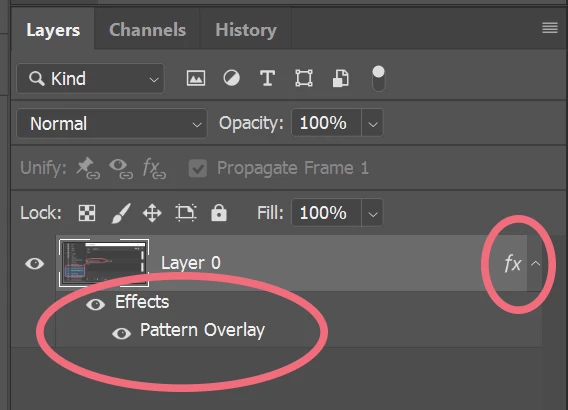
You have no style fx applied to any of your layers.  That's the problem.

Double click a layer to apply a style from the Effects Panel.

See screenshot from Photoshop CC.


2 replies

Nancy OShea
Community Expert
Nancy OSheaCommunity ExpertCorrect answer
Community Expert
July 8, 2021

You have no style fx applied to any of your layers.  That's the problem.

Double click a layer to apply a style from the Effects Panel.

See screenshot from Photoshop CC.


Nancy O'Shea— Product User & Community Expert
glenn5FF2Author
Participant
July 8, 2021

Thank you both SO MUCH! That worked, I must've missed a step in the turorial I guess, and I don't know enough about PS to know what does what. Thanks again, I've been driving myself nuts lol.

jane-e
Community Expert
Community Expert
July 8, 2021

Have you added any Layer Effects? A drop shadow or something else?

~ Jane

glenn5FF2Author
Participant
July 8, 2021

Thank you!

jane-e
Community Expert
Community Expert
July 8, 2021

You're welcome, @glenn5FF2 , I'm glad it's working for you now!


~ Jane