
Inspiring
December 4, 2023
Question

Photoshop custom brushes

  • December 4, 2023
  • 2 replies
  • 250 views

In my dropdown menu of brushes i can never see the preview or the image of the brush while selecting one

i only see a wave like image but not the actual brush and everytime i have to select one at the time to choose one
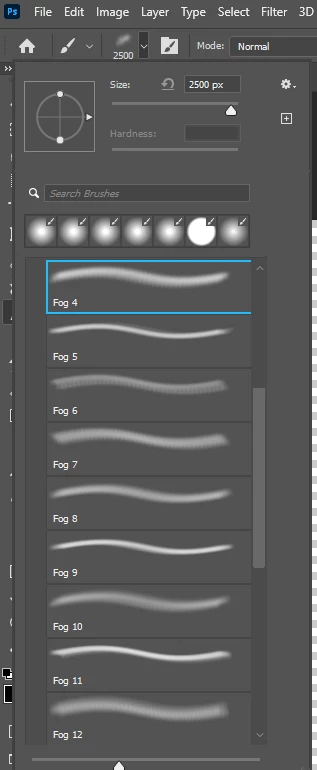


i should see i nthis context fog like brushes but i only see a wave

how can i fix this?

This topic has been closed for replies.

2 replies

c.pfaffenbichler
Community Expert
Community Expert
December 5, 2023

Don’t forget to mark the »Correct Answer«. 

Semaphoric
Community Expert
Community Expert
December 4, 2023

Open the three-line Brushes panel menu. Un-check Brush Stroke, and check Brush Tip.

[EDIT] I see you refer to the drop down in the Option bar. In that case, use the cogwheel Settings menu there, to do the same as in the Panel menu.