
Participant
December 31, 2019
Question

Photoshop Custom Icon Thumbnails

  • December 31, 2019
  • 3 replies
  • 570 views

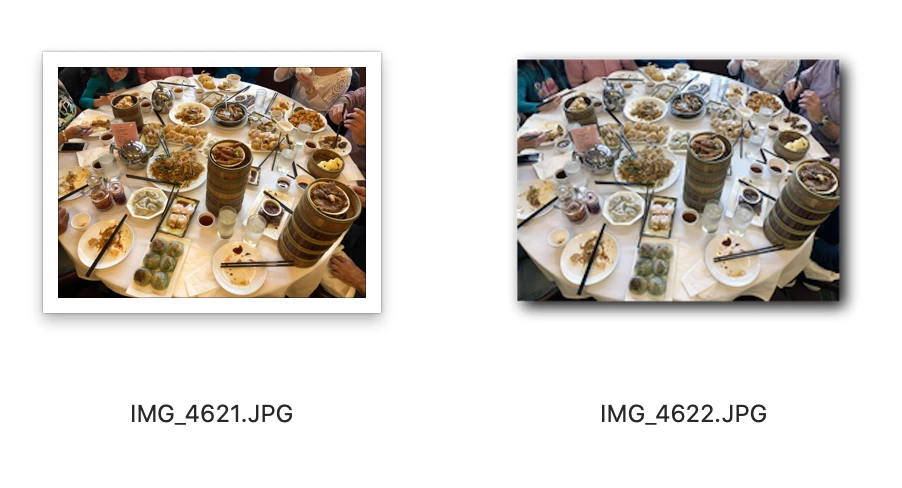
I recently upgraded my Mac OS to Catalina, and was forced to upgrade my Photoshop CS6 to Photoshop CC 2019 because CS6 was no longer compatible. Prior to the upgrade, any edited photos using Photoshop would created custom thumbnail icons - where the thumbnail icons for edited photos do not show the white border.  I really liked this feature since this would allow me to see which photos have been edited or modified (in the thumbnail view). (see attached image)


The thumbnails now for all photos, whether they were edited or not look the same, WITH a white border around all photos, making it impossible to glance and see which pics have been edited.  Is there a fix for this?


This topic has been closed for replies.

3 replies

silk-m
Community Expert
Community Expert
December 31, 2019

Hi,

Photoshop does not store any thumbnail icons after CC.

Thumbnail in Preferences is for Windows and does nothing for Mac.

If you don't use it on Windows, choose "Never Save".

Thumbnail icons with white borders are created by Mac OS.

I don't think it will be fixed in the future.

--Susumu Iwasaki
Legend
December 31, 2019

This is probably a good time to start using Finder tags on your files- that makes it easy to distinguish different types of files once you tag them.

gener7
Community Expert
Community Expert
December 31, 2019

I remember those thumbnails, but the method to generate them and Apple's way of interpreting has changed since CS6. It's a bit dicey for me to follow, but perhaps it will explain why it is that way now.


https://community.adobe.com/t5/photoshop/photoshop-cc-no-icons/td-p/5229857