
JL0428
Inspiring
January 18, 2023
Answered

Photoshop does not save updated icon previews for Finder

  • January 18, 2023
  • 2 replies
  • 1122 views

3 part question.... brand new Mac Studio / Ventura / PS 2023

1) After editing a file, whether save or save as and overwrite, the Finder icon remains the same, does not reflect the edits that were just done.
2) But if I save as a different file, the icon then is up to date.

3) The Finder icons PS makes have a white border around it, I dont want that, I just want the pic with no border. Is this a setting that can be changed?

So annoying.
This topic has been closed for replies.
Correct answer gener7

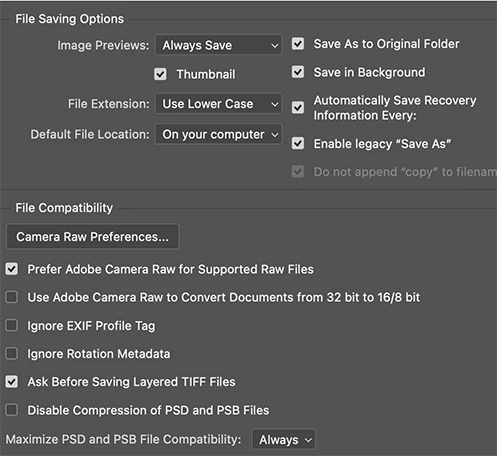
That interesting. I have Monterey. The icons update and have a white border.  So you can go into Photoshop's settings and see if anything in my File Handling Preferences looks like something you can set. This can be reversed if you don't like the results


2 replies

gener7
Community Expert
gener7Community ExpertCorrect answer
Community Expert
January 19, 2023

That interesting. I have Monterey. The icons update and have a white border.  So you can go into Photoshop's settings and see if anything in my File Handling Preferences looks like something you can set. This can be reversed if you don't like the results


JL0428
JL0428Author
Inspiring
January 20, 2023

Yes Sameer & Gener7, thank you! Maximize compatibility did the trick, I had it off before. Now the Finder shows updated thumbnails each time I save.

What about removing the white border around the Finder thumbnails?

gener7
Community Expert
Community Expert
January 20, 2023

The problem is that I have MacOS 12 and that is the expected behavior, except in Gallery view.

https://discussions.apple.com/thread/253572242


So I'll have to turn that over to MacOS 13 users.

Sameer K
Community Manager
Community Manager
January 19, 2023

I'll clarify this for you. The Finder handles thumbnails for files. Finder has to use a new thumbnail if it is saved as a fresh copy.


Try this in Photoshop's preferences > File Handling > Set 'Maximize Compatability of PSDs and PSBs' to Always & restart Photoshop. Try saving again now.

You can try using Adobe Bridge to better handle layered file types like PSD. Let me know how it goes.


Thanks!
Sameer K

gener7
Community Expert
Community Expert
January 19, 2023

A question for you, Sameer. Does Photoshop render thumbnails in the Ventura Finder with a white frame?