
Participating Frequently
May 22, 2018
Question

Photoshop doesn't open...ish

  • May 22, 2018
  • 3 replies
  • 1664 views

I would say Adobe Photoshop isn't really opening, but it's still able to run.

However, I'm not able to access either any files, raw images, or literally anything using Photoshop. Instead of Photoshop running normally whenever I click the shortcut, it just "runs" as a "background processes"
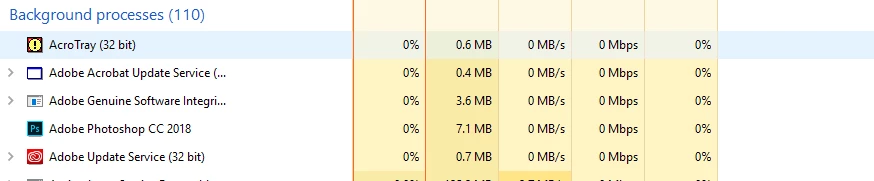
Ya know, a thing that Photoshop is not supposed to do.

This has been going on for the past 3 days, which doesn't make any sense since I was able to use Photoshop 3 days ago, with no added plugins or modifications what so ever. I've run through a ton of "Photoshop isn't opening" posts and so far nothing has worked. If anyone have any suggestions on what to do here, that'll be great.

    This topic has been closed for replies.

    3 replies

    Participant
    September 23, 2024

    cxghsrtg

    May 22, 2018

    Hi

    I assume you can't access the Photoshop interface, if so there's another way to reset the preferences, go to this location

    C:\Users\You User Name\AppData\Roaming\Adobe\Adobe Photoshop CC 2018\Adobe Photoshop CC 2018 Settings

    Then delete the Adobe Photoshop CC 2018 Prefs.psp

    You my need to enable hidden items to view the files

    If that doesn't work try reinstalling Photoshop using the Adobe cleaner tool

    Use the Creative Cloud Cleaner Tool to solve installation problems

    Edit: forgot the mention make sure you end Photoshop.exe task in task manager before deleting the preference file

    FoxNZAuthor
    Participating Frequently
    May 22, 2018

    https://forums.adobe.com/people/Ged+Traynor  wrote

    Hi

    I assume you can't access the Photoshop interface, if so there's another way to reset the preferences, go to this location

    C:\Users\You User Name\AppData\Roaming\Adobe\Adobe Photoshop CC 2018\Adobe Photoshop CC 2018 Settings

    Then delete the Adobe Photoshop CC 2018 Prefs.psp

    You my need to enable hidden items to view the files

    If that doesn't work try reinstalling Photoshop using the Adobe cleaner tool

    Use the Creative Cloud Cleaner Tool to solve installation problems

    So far that didn't work

    Re-installation also doesn't work as well...

    May 22, 2018

    Have you tried logging onto the PC with a different logon account

    What exact version of Windows do you have installed, Windows 10 1803 is causing a lot of people issues

    Derek Cross
    Community Expert
    Community Expert
    May 22, 2018

    Try resetting your Photoshop preferences which you can find under the General tab in Photoshop preferences.

    FoxNZAuthor
    Participating Frequently
    May 22, 2018

    I think you misunderstood my problem

    I cannot open Photoshop as a application, but only as a "background processes"

    So resetting my Photoshop preferences is like opening the door from the inside while you're locked out...

    So is there another way I could fix this problem?

    Derek Cross
    Community Expert
    Community Expert
    May 22, 2018

    Which version of Photoshop, OS and computer spec would help.