


Known Participant
May 18, 2018
Question

Photoshop Drop-Down Menu Options too Small

  • May 18, 2018
  • 2 replies
  • 3360 views

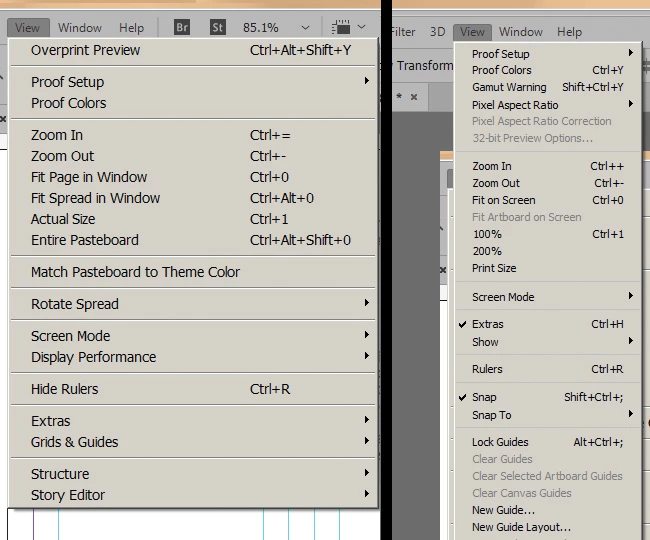
Had this issue previously, and now it's become a larger problem since I've updated to the latest Photoshop. Photoshop's drop-down menu items are so small that they're irritating to read. It's like trying to read fine print in a contract and has slowed productivity because it takes me longer to read and select them..

I've tried suggestions to increase the UI font size or the UI interface. These have not solved the problem. Increasing the font size has not seemed to change anything. Changing the UI interface isn't what I want at all. The rest of the interface is appropriately sized on my screen, so making it larger creates more problems.

InDesign drop-down options (left) versus Photoshop screenshot (right) below. Photoshop on the right is set to "large" UI font size. Notice how the top menu options are the same size, but the drop-down options in Photoshop are too tiny.
    This topic has been closed for replies.

    2 replies

    May 19, 2018
    howlamanAuthor
    Known Participant
    May 21, 2018

    Ged - Thanks for the post, but this is for when the entire UI is too small, which is not my problem.

    JJMack
    Community Expert
    Community Expert
    May 18, 2018

    What OS do you use which Photoshop version do you use? They are also different Adobe Application with different UI.

    JJMack
    howlamanAuthor
    Known Participant
    May 18, 2018

    Photoshop Version 19.1.4 - THis should be the latest, as I just updated through my CC today to ensure it wasn't an issue that would resolve via updating.

    Using Windows 7 OS, 64 bit.

    I do understand applications have their own UI. However, this is the only one of the multiple programs I use that looks anything like this. The others all have larger drop-down option text. I figured the screenshot was the best way to show the disparity and that changing the UI font did not affect them (since that's the most common suggestion I've received). Thanks.

    JJMack
    Community Expert
    Community Expert
    May 19, 2018

    The Problem is that you are using Windows 7.   Adobe and Microsoft worked together to Fix Adobe  Photoshop CC UI scaling.  Microsoft added auditions to Windows 10 Adobe could use. Adobe fixed their Photoshop CC UI scaling problems in version CC 2018 19.1.    Adobe does not add new features to old Photoshop versions and I do not think you will see Microsoft adding Windows 10 features to Windows 7.  Photoshop CC 2018 19.1.+ use Window 10 Display scaling setting and Windows 10 features scaling  Photoshop UI.

    JJMack