
January 11, 2018
Question

Photoshop edge improve brush doesnt work
  • January 11, 2018
  • 1 reply
  • 826 views

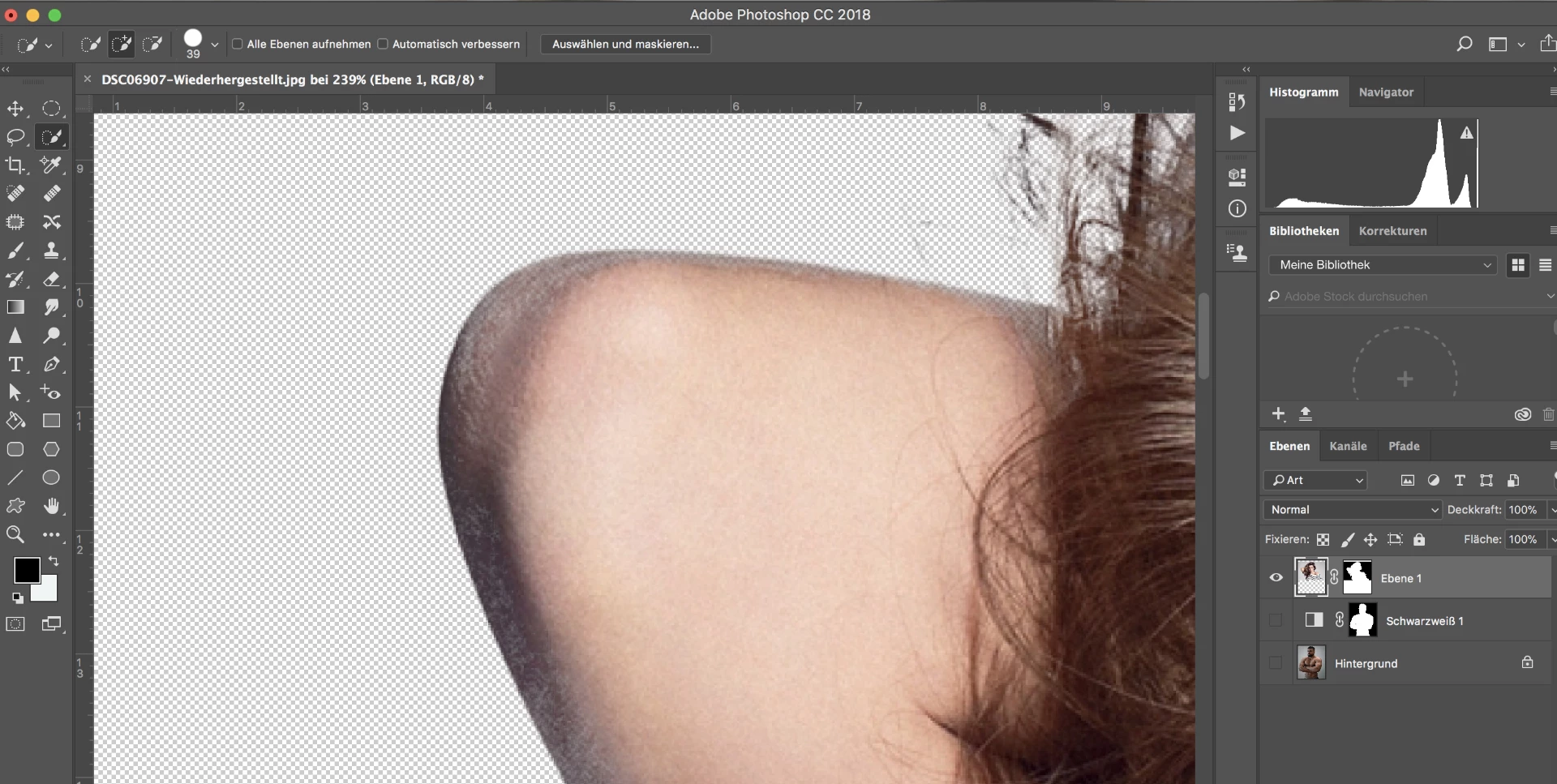
I have a problem with the edge improve brush. While I am in the edge improve brush menu, I select the edge improve brush and drive around the edges. Instead of "cleaning" my edges it deletes my picture( as you can see on the picture). I dont know what I'm doing wrong because I've watched videos and I did the exact same thing, but it didnt work for me. Hope you guys can figure out what is wrong with my photoshop. Thank you in advance!

This topic has been closed for replies.

1 reply

davescm
Community Expert
Community Expert
January 11, 2018

It looks like you are using far too large a brush for refine edge.

It works best when target at just those edges that need cleaning e.g. fur , hair etc.

I tend to use a small brush i.e. 10-20px 100% hardness and 1% spacing. In most cases I leave radius at 0 and smart radius off.  By pressing J you can check where you are asking refine edge to do it's work and can remove areas from the target by holding down ALT (opt on Mac)  whilst brushing

Dave

Trevor.Dennis
Community Expert
Community Expert
January 11, 2018

The more I use Select and Mask, the more I like it, but I am not entirely sure why.  I am definitely making more use of the Quick Selection and Refine Edge brushes, swapping between them with their shortcuts and using the '-' (minus) key with the Quick Selection tool to remove errant  pixels from the selection.  I also use Ctrl z a fair bit to undo errant additions to the selection.

I tend not to use the Brush tool inside Select & Mask, preferring instead, to check Decontaminate Colors to force the output to New Layer with layer mask and then using the brush to fine tune the layer mask.

I've been finding that I am getting better and better at using Select and Mask and getting decent results.  Careful use of the Radius value together with the Refine Edge brush is capturing those flyaway hair type elements, and it seems to be doing a better job of knocking out the holes, like where background shows through narrow gaps that end with very sharp corners.  Of course it doesn't work with everything, and I am not even sure why I am getting better at using it.

davescm
Community Expert
Community Expert
January 11, 2018

Interesting comment on Decontaminate colors Trevor. I never use Decontaminate colours. It is destructive and does not work well, being a one size fits almost nothing "switch".  Instead I leave it unchecked , output to new layer with mask then use a separate layer clipped to the masked layer and set to color blend mode. I then paint the decontamination where required, picking up the wanted brush colour by Alt clicking on the image. I find that works a lot better on most images.

Oh and for clarity (for the the benefit of the OP) - the third tool in Select and Mask (the brush tool) brushes on the mask not the image.

Dave