

Kelli Jae Baeli
Inspiring
March 17, 2018
Answered

Photoshop error/can't open

  • March 17, 2018
  • 1 reply
  • 551 views

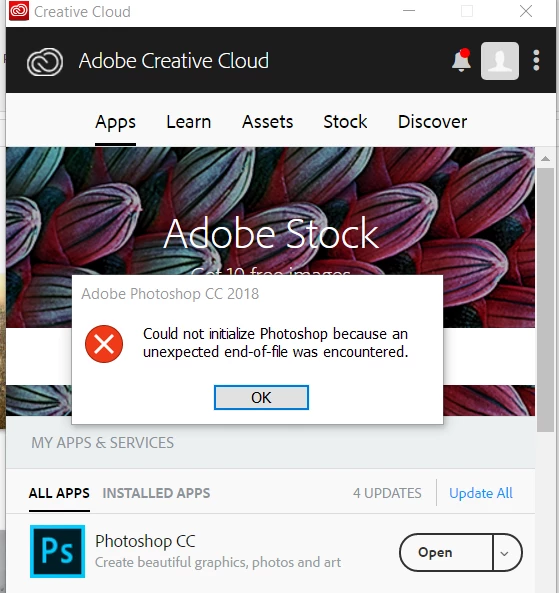
When i tried to open Photoshop CC, i got an error that it could not, because some file HAD BEEN DELETED. Using Cretive Cloud interface, i updated and tried again. Another error. I uninstalled it, and reinstalled it via CC and got the error about an end of file. what's going on?
    This topic has been closed for replies.
    Correct answer Kelli Jae Baeli

    UPDATE: i saw a suggestion on the web to hold down CTRL ALT SHIFT keys while opening the program. It asked if i wanted to delete my settings, i said yes, and photoshop loaded. Then i went to windows/my workspace and it loaded up my previous workspace. (At some point i think i selected to save my preferences when i reinstalled, or maybe that wouldn't be the case). Anyway, This worked.

    1 reply

    Kelli Jae Baeli
    Inspiring
    March 17, 2018

    UPDATE. after i posted this, i tried to open Photoshop forum and my browser page froze. my whole computer froze. i had to turn off the power and boot again.

    i tried again to open ps, with same error message.

    I tried a suggestion on the only other thread about this i could find--which suggested resetting preferences : RUN/%appdata% and select adobe folder, but i couldn't get that far because that didn't open anything. it asked what program to use to open it. I can't seem to locate this manually either, by opening the adobe folder.

    Kelli Jae Baeli
    Kelli Jae BaeliAuthorCorrect answer
    Inspiring
    March 17, 2018

    UPDATE: i saw a suggestion on the web to hold down CTRL ALT SHIFT keys while opening the program. It asked if i wanted to delete my settings, i said yes, and photoshop loaded. Then i went to windows/my workspace and it loaded up my previous workspace. (At some point i think i selected to save my preferences when i reinstalled, or maybe that wouldn't be the case). Anyway, This worked.