
Participant
May 15, 2023
Answered

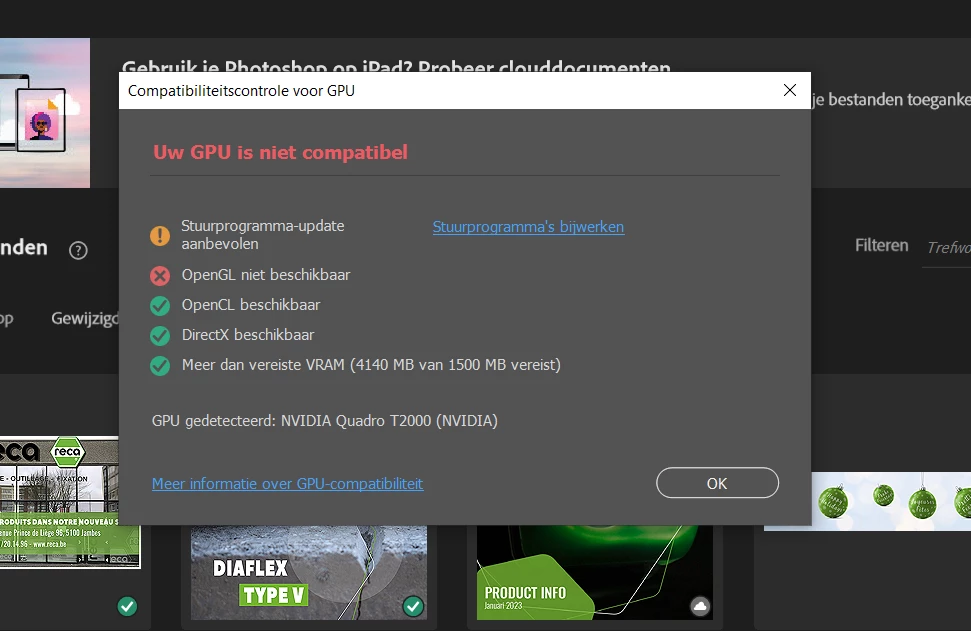
Photoshop error - GPU not compatible - OpenGL not available

  • May 15, 2023
  • 4 replies
  • 2979 views

A few months ago I bought a new  Windows 10 Workstation Laptop for my colleague in Digital Marketing -  the old one was starting to fail.
Now on this new one I have the newest GPU drivers for the Nvidia Quadro T2000 GPU and the latest Photoshop version installed.
However Photoshop keeps showing the Compatibility issue for OPENGL.
I tried the fix Preferences>Technology previews>Deactivate Native Canvas but to no avail.
In Geforce experience i'm not even seeing the option to install a studio driver.


Any suggestions would be most welcome -  thanks in advance.

Simon
This topic has been closed for replies.
Correct answer ZheIncFox

Hello everyone  - in the I end was able to solve it by Disabling the CPU onboard graphics GPU

4 replies

Mark.Dahm
Community Manager
Community Manager
August 14, 2024

@ZheIncFox @Luis38932695n5f6  Open GL is an aging system of APIs for GPUs, and as such it is often unreliable through OS and driver updates; it looks like you could try updating your driver, if an update is available, and that might bring it back.


Photoshop is decreasing its dependency on Open GL, so the fact that it is not working should not be a concern. Anything that uses Open GL in Photoshop also has a CPU fallback, so if OpenGL is off entirely, Photoshop should continue working just fine.


That card should work fine with Photoshop. 

Participant
August 14, 2024

@Mark.Dahm I really appreciate the answer.

Participant
August 14, 2024

Hi, I was given a DELL PRECISION 7540 at work with a Quadro T2000 graphics card, which I imagine is similar to the one you mentioned here. I usually use Photoshop, Illustrator, and Premiere for video editing. Has this graphics card worked well for you? Or should I look for another option to avoid potential issues?

ZheIncFoxAuthorCorrect answer
Participant
May 15, 2023

Hello everyone  - in the I end was able to solve it by Disabling the CPU onboard graphics GPU

D Fosse
Community Expert
Community Expert
May 15, 2023

Yes, dual graphics that conflict continues to be a big problem, to the point where purchasing a laptop for Photoshop is a very risky affair.  You're only safe with a desktop these days.


Glad you got it sorted, others aren't so lucky.

CShubert
Community Manager
Community Manager
May 15, 2023

Hi @ZheIncFox make sure to check out this doc and confirm there is not an issue with compatability/GPU issue:


https://helpx.adobe.com/photoshop/kb/troubleshoot-gpu-graphics-card.html#multiple-gpus


https://helpx.adobe.com/photoshop/kb/basic-troubleshooting.html


It may help if we could see your Photoshop System Info. Launch Photoshop, and select Help >System Info...and copy/paste the text in a reply.