

Jeff Arola
Community Expert
Community Expert
December 27, 2023
Question

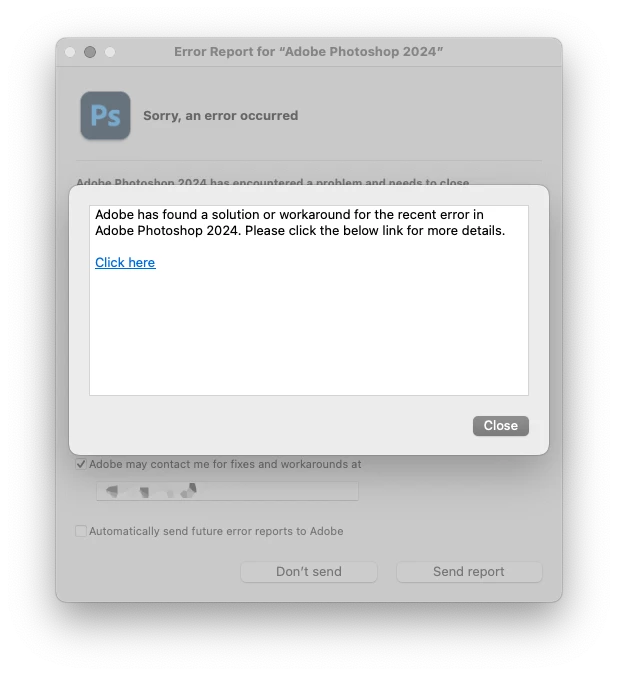
Photoshop Error Report Dialog

  • December 27, 2023
  • 1 reply
  • 213 views

When sending an Error report to Adobe, after clicking Send Report, a dialog pops-up that says Adobe has found a solution.

When one does Click here it just goes to a generic trouble shooting page and doesn't say anything about the specific cause of the crash.

https://helpx.adobe.com/photoshop/kb/troubleshoot-crash-or-freeze.html?trackingid=W2T7JV6Q&mv=in-product&mv2=ps

Then when clicking Close the whole dialog closes including the Error Report dialog without

verifying a report was sent or not.


The crash was the result as written in this thread:

https://community.adobe.com/t5/photoshop-ecosystem-bugs/%E7%89%B9%E5%AE%9A%E3%81%AE%E8%A8%AD%E5%AE%9A%E5%8F%8A%E3%81%B3%E3%83%AC%E3%82%A4%E3%83%A4%E3%83%BC%E6%A7%8B%E9%80%A0%E4%B8%8B%E3%81%AE%E4%BD%9C%E6%A5%AD%E3%81%A7photoshop%E3%81%8C%E3%82%AF%E3%83%A9%E3%83%83%E3%82%B7%E3%83%A5%E3%81%97%E3%81%BE%E3%81%99/idc-p/14320616#M98713


So does that mean no error report is being sent, since Adobe says a solution has been found?


This topic has been closed for replies.

1 reply

RosaPerry
Inspiring
December 28, 2023

I've had the same issue as @Jeff Arola . It happened to me after sending an Error report to Adobe, after clicking Send Report, a dialog pops-up that says Adobe has found a solution with the suggestion to Click here,  it went to a generic trouble shooting page and doesn't say anything about the specific cause of the crash. In my case it was when I was in Camera Raw filter in Photoshop. I had just upgraded to Camera Raw to 16.1. It's been fine ever since. 


Rosa