
Participant
September 1, 2016
Answered

Photoshop.exe- Bad Image Error on Program Opening in Windows 10

  • September 1, 2016
  • 9 replies
  • 37907 views

Software Version: Adobe CC Photoshop 2015.5

Operating System: Windows 10 with latest update

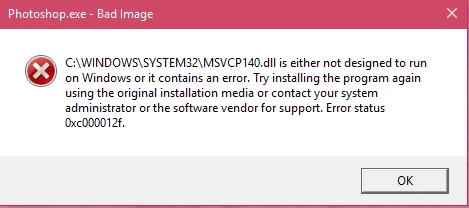
Windows just updated to its newest software and when it did, I was no longer able to run Photoshop 2015.5 or any of the latest versions of Illustrator or InDesign. I received the following error message (picture attached):

C:\WINDOWS\SYSTEM32\MSVCP140.dll is either not designed to run on Windows or it contains an error. Try installing the program again using the original installation media or contacting your system administrator or software vendor for support. Error Status 0xc000012f

I have uninstalled ALL adobe files (including Temp files/download history/etc.) and installed again, to no avail. Any ideas?
This topic has been closed for replies.
Correct answer emiliac69656136

Mohit,

THANK YOU!!!!!! Worked like a charm.

I ended up having to install Visual C++ Redistributable for Visual Studio 2015

-which can be found in this link, if anyone reading this has the same issue:

Download Visual C++ Redistributable for Visual Studio 2015 from Official Microsoft Download Center

-Emilia

9 replies

Abboud
Participant
September 13, 2020

I have the same error message but with Adobe Photoshop 2020

Any suggestion??

Participant
October 15, 2019

Hello, I have had the similar error after installing the trial version of PS and literoom. Tried all what suggested in the thread without a success. I have then removed the c:\windows\system32\MSVCP140.dll (cut and paste in to backup) and search for this MSVCP140.dll in the c: drive, there was a one version in the softwaredistribution folder. Copied this DLL to the original location (c:\windows\system32\) and restarted the machine and started Adobe "Creative Cloud App" and it worked fine. Hope this helps... Cheers Kumar

Participant
August 18, 2018

So, it has been a little over a year since this question has been updated, and I'm having the same trouble.  Do I still need to download the C++ Redistributable 2015 version?  The 2017 version is on my computer, as is a bunch of other ones.  Should I delete those?  Any current help is greatly appreciated.  Thanks!

Mohit Goyal
Community Manager
Community Manager
August 20, 2018

Hi rinphoto,

Sorry to hear that. If you are om Windows 10 then, please check for the pending updates. Also, please remove the C++ Redistributable versions from your machine, restart your machine and reinstall the C++ Redistributable (Which ever latest version available on Microsoft site)

Once you remove any update from your machine, after restart Windows will suggest you the same or the better update accordingly so you may try that as well.

Let us know if that helps.

Regards,

Mohit

Participating Frequently
November 23, 2017

I followed the tutorial to fix up
the first problem and now I have a new one. Grrrrhhhh.

www.youtube.com/watch?v=61vwFxnnh5c

I am now getting the following message
when trying to open up Adobe Illustrator CC 2018

Illustrator.exe – Application Error

The application was unable to
start correctly (0xc000007b)

I need to work.

Mohit Goyal
Community Manager
Community Manager
December 8, 2017

Hi brente,

The application was unable to

start correctly (0xc000007b)

For the above error, please refer the below tutorials to fix this issue.

Unable to start Illustrator CS6 64-bit on Windows 7

Solutions for Photoshop Lightroom start error '0Xc000007b' on Windows OS

Regards,

Mohit

Participating Frequently
November 23, 2017

I was getting the following
message when trying to open up Adobe Illustrator CC 2018

Illustrator.exe – Bad Image
C:\WINDOWS\SYSTEM32\MSVCP140.dll is either not designed to run on Windows or it
contains an error. Try installing the program again using the original
installation media or contact your system administrator or the software vendor
for support. Error status 0xc000012f.

I am now getting the following message
when trying to open up Adobe Illustrator CC 2018

Illustrator.exe – Application Error

The application was unable to
start correctly (0xc000007b)

This is really frustrating as I
have work I need to do.

Participating Frequently
November 21, 2017

I get both of the following (one for Illustrator and one for Photoshop)

  1. Illustrator.exe – Bad Image
    C:\WINDOWS\SYSTEM32\MSVCP140.dll is either not designed to run on Windows or it
    contains an error. Try installing the program again using the original
    installation media or contact your system administrator or the software vendor
    for support. Error status 0xc000012f.
  2. Photoshop.exe – Bad Image
    C:\WINDOWS\SYSTEM32\MSVCP140.dll is either not designed to run on Windows or it
    contains an error. Try installing the program again using the original
    installation media or contact your system administrator or the software vendor
    for support. Error status 0xc000012f.

Reinstalled both Illustrator and Photoshop. Made no difference.

alane49557332
Participant
August 21, 2017

My problem is that I get a similar warning, Photoshop.exe - Bad Image and then

C:\Program File\Adobe Photoshop cc2017\cg.dll

is either not designed to run on Windows or it contains an error. and so on as above.  I've updated to the latest CC I think but still the problem remains.  It was OK until I went away for a couple of days, unplugging the whole shooting match and on return I cannot get Photoshop CC to function.  Lightroom seems to be fine as does Bridge but not CC.

Participant
April 19, 2017

I never usually comment on threads but this issue was actually really annoying to try to resolve. I felt like I searched the entire internet before I actually resolved it.

I was originally getting this message and after doing all of the above here and going through my regedit and restarting my computer a million times, all I had to do was replace the .dll file itself. I followed this guys tutorial on youtube:

www.youtube.com/watch?v=61vwFxnnh5c

Then I had the same error pop up but saying it was the vcruntime140.dll file this time. So I did the same thing and replaced the file following the same guys tutorial and link

www.youtube.com/watch?v=-R3LuYNQf98

Poof, fixed! Now I can photoshop away!

Hope this helps at least one person from pulling their hair out like I was.

Mohit Goyal
Community Manager
Community Manager
September 1, 2016

Hi emiliac,

Sounds to me like a Microsoft runtime issue: Error MSVCR110.dll opening Adobe Creative Cloud apps in Windows 10

Can you make sure you install the Visual C++ Redistributable for Visual Studio 2012 Update 4 from the link above?

Regards,

Mohit

emiliac69656136AuthorCorrect answer
Participant
September 1, 2016

Mohit,

THANK YOU!!!!!! Worked like a charm.

I ended up having to install Visual C++ Redistributable for Visual Studio 2015

-which can be found in this link, if anyone reading this has the same issue:

Download Visual C++ Redistributable for Visual Studio 2015 from Official Microsoft Download Center

-Emilia

Mohit Goyal
Community Manager
Community Manager
September 2, 2016

Great, thanks for sharing the download link.

Regards,

Mohit