
Inspiring
January 11, 2023
Answered

Photoshop Extendscript: get active document weight?

  • January 11, 2023
  • 2 replies
  • 979 views

Hello,

Is there a way to get the weight of the active Photoshop CS6 document?

I tried this, but the result is not accurate enough:

thisDoc = app.activeDocument;

// ----------- get the number of pixels
var savedUnitType = app.preferences.rulerUnits;
app.preferences.rulerUnits = Units.PIXELS;
var px = thisDoc.width.value * thisDoc.height.value;
app.preferences.rulerUnits = savedUnitType;

// ----------- get the number of bits/pixel
var bits = getDocBits(thisDoc);

// ----------- 
alert(px * thisDoc.resolution * bits / 1024 / 1000 / 1000); // Mb

function getDocBits(thisDoc) {
	var bits = thisDoc.bitsPerChannel;
	if (bits == BitsPerChannelType.EIGHT) {
		return 8;
	}else if (bits == BitsPerChannelType.ONE) {
		return 1;
	}else if (bits == BitsPerChannelType.SIXTEEN) {
		return 16;
	}else if (bits == BitsPerChannelType.THIRTYTWO) {
		return 32;
	}
}
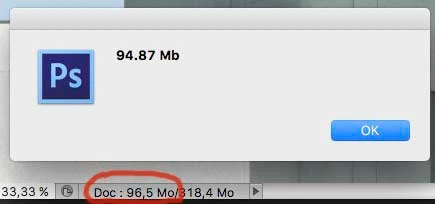
 

This topic has been closed for replies.
Correct answer jazz-y


alert(px * thisDoc.resolution * bits / 1024 / 1000 / 1000);


It seems that you have confused the units of data transfer rate and data storage units.


1 mb = 1024 kb

1 kb = 1024 bytes

1 byte = 8 bits


doc size in bytes = px width * px height * number of channels * bit depth 


thisDoc = app.activeDocument;

// ----------- get the number of pixels
var savedUnitType = app.preferences.rulerUnits;
app.preferences.rulerUnits = Units.PIXELS;
var px = thisDoc.width.value * thisDoc.height.value;
app.preferences.rulerUnits = savedUnitType;

// ----------- get the number of bits/pixel
var bits = getDocBits(thisDoc);
// ----------- 
alert(px * bits * thisDoc.activeChannels.length / 1024 / 1024/ 8 ); // Mb

function getDocBits(thisDoc) {
	var bits = thisDoc.bitsPerChannel;
	if (bits == BitsPerChannelType.EIGHT) {
		return 8;
	}else if (bits == BitsPerChannelType.ONE) {
		return 1;
	}else if (bits == BitsPerChannelType.SIXTEEN) {
		return 16;
	}else if (bits == BitsPerChannelType.THIRTYTWO) {
		return 32;
	}
}


2 replies

jazz-yCorrect answer
Legend
January 11, 2023


alert(px * thisDoc.resolution * bits / 1024 / 1000 / 1000);


It seems that you have confused the units of data transfer rate and data storage units.


1 mb = 1024 kb

1 kb = 1024 bytes

1 byte = 8 bits


doc size in bytes = px width * px height * number of channels * bit depth 


thisDoc = app.activeDocument;

// ----------- get the number of pixels
var savedUnitType = app.preferences.rulerUnits;
app.preferences.rulerUnits = Units.PIXELS;
var px = thisDoc.width.value * thisDoc.height.value;
app.preferences.rulerUnits = savedUnitType;

// ----------- get the number of bits/pixel
var bits = getDocBits(thisDoc);
// ----------- 
alert(px * bits * thisDoc.activeChannels.length / 1024 / 1024/ 8 ); // Mb

function getDocBits(thisDoc) {
	var bits = thisDoc.bitsPerChannel;
	if (bits == BitsPerChannelType.EIGHT) {
		return 8;
	}else if (bits == BitsPerChannelType.ONE) {
		return 1;
	}else if (bits == BitsPerChannelType.SIXTEEN) {
		return 16;
	}else if (bits == BitsPerChannelType.THIRTYTWO) {
		return 32;
	}
}


Legend
January 11, 2023

Are you trying to get compressed size on disk or uncompressed size during editing? Just counting pixels isn't enough because there could be other elements such as adjustment layers, shapes, notes, snapshots, etc.

frmorelAuthor
Inspiring
January 11, 2023

Given the desired final size (width and height) for printing the document, I'm trying to know if I can set its resolution to 480, 360 or 300 dpi *without* enlarge it (I only want to use the ResampleMethod.BICUBIC method during resizing).

At this time, I have three scripts: one for each desired resolution and I'm trying to make just one, with a test according to the document weight.

If my question isn't very easy to understand (sorry for my poor english), I'll join more screen captures.

Legend
January 11, 2023

Just use the height and width divided by finished size.