
Participant
December 6, 2023
Answered

Photoshop extensions missing and option to open in Rosetta also missing

  • December 6, 2023
  • 2 replies
  • 3356 views

Hello,

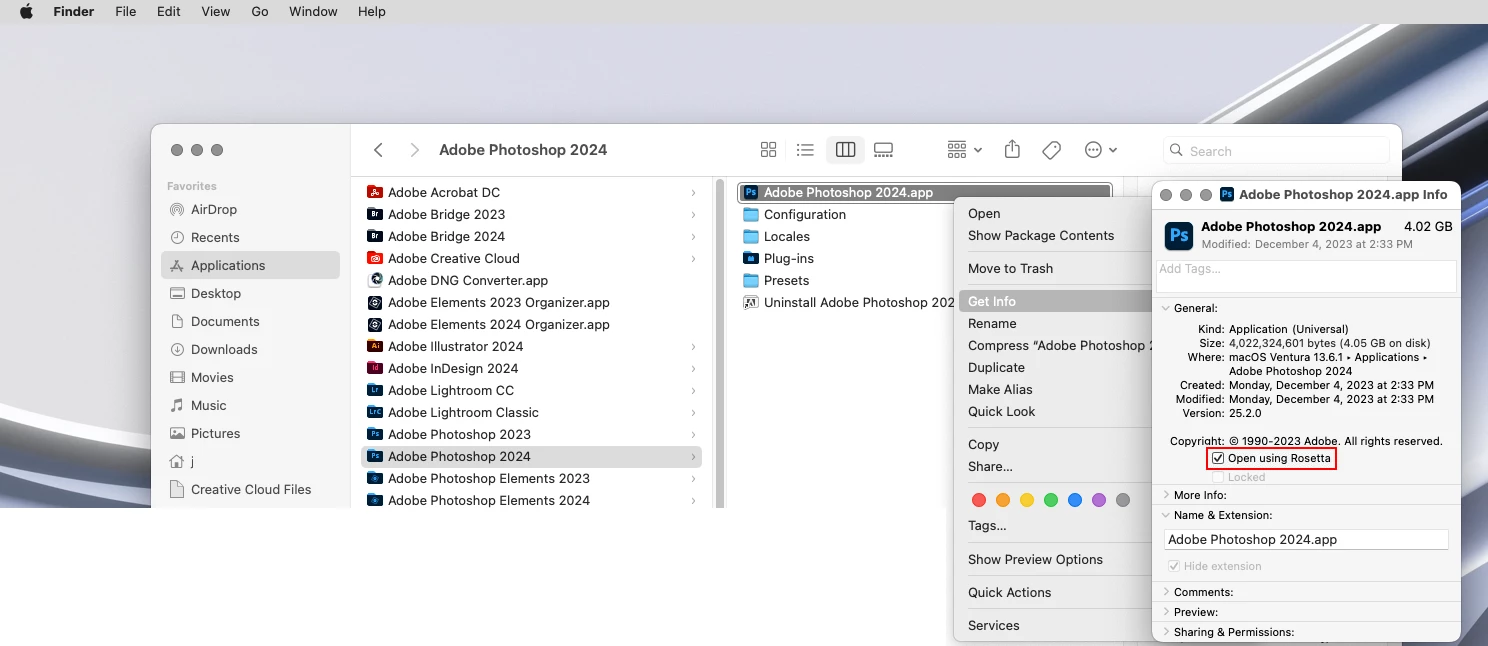
I am trying use photoshop extensions that are not available due to the M1 silicon on my Macbook Pro. (I am using Photoshop 2024.) I have tried to open photoshop using rosetta but when I go to Applications/ Finder/ Photoshop/ Get info, the open in rosetta option isn't there. I have tried to maually instal rosetta using the terminal with the code 

/usr/sbin/softwareupdate --install-rosetta --agree-to-license

 and get this response

Installing Rosetta 2 on this system is not supported.

I tried runnning an app (Steam) that requires rosetta, and was not prompted to install. Does that mean I already have rosetta installed? 

If so, how do I use it to open photoshop so that I can use my extesnions? 
    This topic has been closed for replies.
    Correct answer Jeff Arola

    Go to

    Applications/Adobe Photoshop 2024

    right click on the

    Adobe Photoshop 2024.app

    then click

    Get Info

    and click

    Open using Rosetta


    2 replies

    Conrad_C
    Community Expert
    Community Expert
    December 7, 2023

    The other way to open it, only for the next session, is to choose Open in Intel from the Creative Cloud desktop app. However, this might not work if Rosetta itself isn’t working.


    On my M1 I see a Rosetta 2 Updater in the System Information app under Applications. Is this on your Mac?


    If Rosetta continues to be unavailable, and it keeps telling you it isn’t supported when you try to manually install it, you probably need to ask Apple why it isn’t working, because I am not sure why Rosetta 2 would not install or run on a current Apple Silicon Mac. The only reason I can think of is if macOS was installed in some custom way that doesn’t support Rosetta, like maybe in a virtual machine. In the end, Rosetta troubleshooting is a question for Apple. Normally, it’s supposed to download and install itself if it’s needed, you shouldn’t even have to think about it.

    Participating Frequently
    May 16, 2024

    Using the Creative Cloud app was the only way I could open an extra version of PS I keep just to be able to run it in Rosetta. The option is simply not available in the Get Info window.  Thanks, Conrad!

    Jeff Arola
    Community Expert
    Jeff ArolaCommunity ExpertCorrect answer
    Community Expert
    December 6, 2023

    Go to

    Applications/Adobe Photoshop 2024

    right click on the

    Adobe Photoshop 2024.app

    then click

    Get Info

    and click

    Open using Rosetta


    Participant
    April 12, 2024

    It really works! thank you so much!