
Emilorzz
Participant
May 10, 2019
Question

[Photoshop] Fill selection with random colors

  • May 10, 2019
  • 4 replies
  • 10549 views

I have made this pattern of triangles in photoshop and have a base color on a different layer.
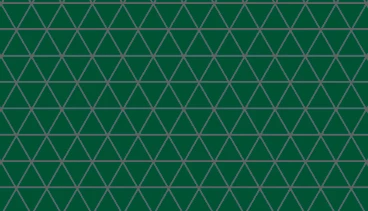
Now I need to fill in these triangles randomly with 3 or 4 different colors like the second image.
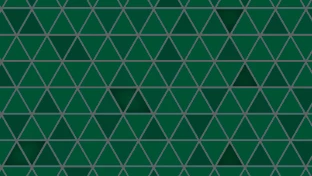
Is there any way to do this faster than manually filling every triangle in a "random" pattern?

    This topic has been closed for replies.

    4 replies

    Chuck Uebele
    Community Expert
    Community Expert
    May 10, 2019

    You can use the scripted fill with a script that I wrote, which is available Here: Scripted Fill UI - Photoshop CS6

    By creating different colored patters like this:

    You can use my script to change the selection of the pattern to each of the different patters. There are setting you have to do do make them line up:

    Use TempFillScript as the script. Once you click the okay button on my UI, the standard UI will show up the number of times that you selected for different patterns.

    Semaphoric
    Community Expert
    Community Expert
    May 10, 2019

    You could try Phiotoshop's Symmetry Fill, which has a Color Randomization feature, but I find it fiddly and hard to get the results I want.

    Norman Sanders
    Legend
    May 10, 2019

    While a script would be a first choice an alternative would be to use your sample as a segment in an overall design by flipping the existing file vertically and/or horizontally and butting or overlapping them in register. It would give the illusion of random placement of the filled-in areas. Since your current design is not precise, it would have to be reconstructed. As you can see from the example below, register is not possible. With accuracy in the first segment this arrangement can be repeated endlessly in both width and height.  (Check into Edit > Transform's Step-and-Repeat feature.)

    (Color lighter so that the random pattern and misregister are easier to see.)

    JJMack
    Community Expert
    Community Expert
    May 10, 2019

    You may be able to script something like that. The script would set random magic wand selection contiguous low tolerance to select a current color then fill the selection with one of your three colors. However, there a good chance you will sometime select the dividing line color so you should test the bounds of all selection and not fill selection that select the line color.

    JJMack
    Emilorzz
    EmilorzzAuthor
    Participant
    May 10, 2019

    I'm fairly new to photoshop so I don't really know how to create such a script even though it could work.

    JJMack
    Community Expert
    Community Expert
    May 10, 2019

    Most Photoshop user are in your Boat. You need programming skill to program a Photoshop script.  While most Photoshop users use Photoshop scripts they never programs and custom scripts for their own use.

    JJMack