
Participant
September 2, 2021
Answered

Photoshop font looks diffrent then Affinity Photo

  • September 2, 2021
  • 4 replies
  • 904 views

 In both I use BankGothic Md BT

Top one is Photoshop font

Bottom one is exporter from Affinity Photo

They have slightly diffrent dimensions, but my main problem are the "quotes", thay are completly different
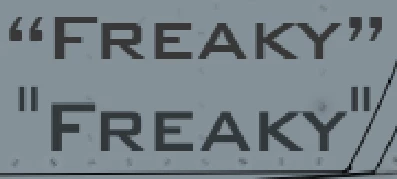
How can I make it looks more like Affinity Photo version?


This topic has been closed for replies.
Correct answer jane-e

Hi

Affinity is using inch marks, while Photoshop is using quotes. @PBArtattack has given you the correct answer as to how to use the incorrect symbols.

https://www.nobledesktop.com/typography-rules

~ Jane

4 replies

c.pfaffenbichler
Community Expert
Community Expert
September 3, 2021

Just to clarify: Why do you want to use inch-marks instead of the »typographically correct« quote marks?  

Conrad_C
Community Expert
Community Expert
September 2, 2021
@PBArtattack wrote:

Edit > Preferences > Type... > turn off "Use Smart Quotes".


That is an OK solution, but professional typographers would have a problem with making Photoshop always use inch marks instead of actual quote marks.


If you prefer to override the quote marks on a case by case basis, it would be better to use the Glyphs panel (View > Glyphs), where at any time you can choose from all character variations available in that font. Double-click the glyph you want to enter it in the text. Below, the Glyphs panel is set to show Punctuation only, and it has inch marks, quote marks, brackets used for quotes in other languges, etc.


As Jeff Arola mentioned, the exact appearance of the type edges can be affected by which Anti-Alias option is selected in the Character panel. See if any of the choices match Affinity Photo better, or see if Affinity Photo has a similar option.


Jeff Arola
Community Expert
Community Expert
September 2, 2021

The difference in apparent size could be due to different anti-alishing between the two programs.

Inspiring
September 2, 2021

Edit > Preferences > Type... > turn off "Use Smart Quotes".

jane-e
Community Expert
jane-eCommunity ExpertCorrect answer
Community Expert
September 2, 2021

Hi

Affinity is using inch marks, while Photoshop is using quotes. @PBArtattack has given you the correct answer as to how to use the incorrect symbols.

https://www.nobledesktop.com/typography-rules

~ Jane