Exit
  • Global community
    • Language:
      • Deutsch
      • English
      • Español
      • Français
      • Português
  • 日本語コミュニティ
  • 한국 커뮤니티
0

Photoshop freezing when I try to work on a file

New Here ,
Aug 26, 2021 Aug 26, 2021

Hi All,


I've been using Photoshop via my Cloud subscription for several years without any problems. Suddenly it has begun freezing when I try to work on any files. I tried uninstalling it and then reinstalled, but to no avail, the same thing is happening. I'm using a PC which has sufficient clout and I run Windows 10.


Please help!


Thanks,

AS

TOPICS
Windows
453
Translate
Report
Community guidelines
Be kind and respectful, give credit to the original source of content, and search for duplicates before posting. Learn more
community guidelines
Adobe
Community Expert ,
Aug 26, 2021 Aug 26, 2021

Hi

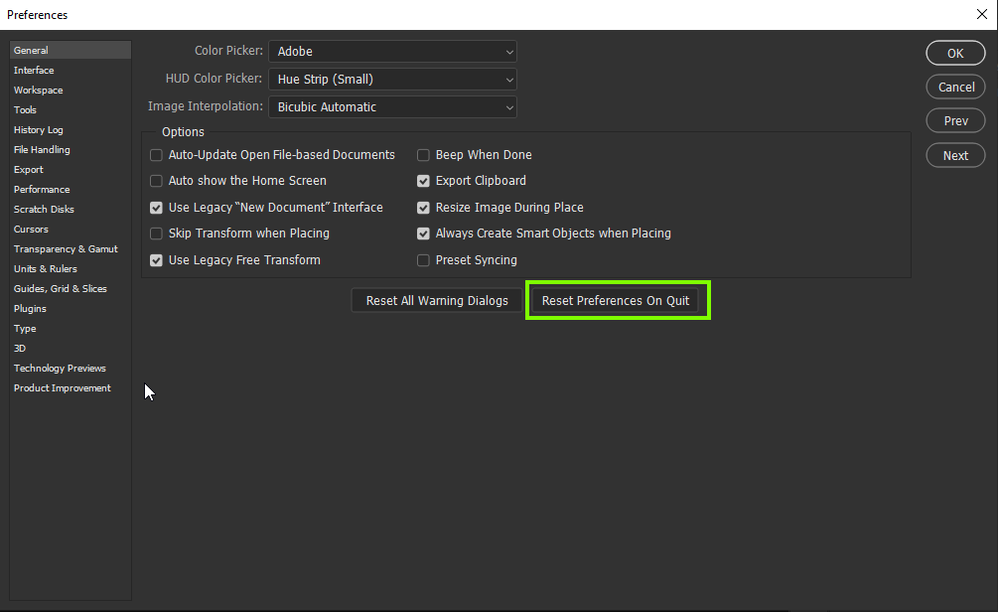
Have you tried resetting your Photoshop preferences

2021-08-26 16_46_22-Adobe Photoshop 2021.png

If that doesn't help, try using the Adobe cleaner tool

https://helpx.adobe.com/creative-cloud/kb/cc-cleaner-tool-installation-problems.html

When you say "sufficient clout" what exactly are your computer specs

Translate
Report
Community guidelines
Be kind and respectful, give credit to the original source of content, and search for duplicates before posting. Learn more
community guidelines
New Here ,
Aug 26, 2021 Aug 26, 2021

Thanks for your reply Ged, appreciated. My PC's spec is:


8GB of RAM

Intel(R) Core(TM) i5-4460 CPU @ 3.20GHz 3.20 GHz
64-bit operating system, x64-based processor
Windows 10 Pro

I haven't yet tried any of the things you mentioned, I'm not tech-savvy. I'll try tonight, thank you!

Translate
Report
Community guidelines
Be kind and respectful, give credit to the original source of content, and search for duplicates before posting. Learn more
community guidelines
New Here ,
Aug 26, 2021 Aug 26, 2021

I've just tried “reset preferences on quit”, then when I re-opened Photoshop it's frozen just as I'm trying to open a PSD, not a big PSD either.

Translate
Report
Community guidelines
Be kind and respectful, give credit to the original source of content, and search for duplicates before posting. Learn more
community guidelines
New Here ,
Aug 26, 2021 Aug 26, 2021

Here's a bit more info, this is a view of task manager during my Photoshop freezing problem just now.

Translate
Report
Community guidelines
Be kind and respectful, give credit to the original source of content, and search for duplicates before posting. Learn more
community guidelines
Adobe Employee ,
Aug 26, 2021 Aug 26, 2021

Have you tried completely restarting the computer by chance? It looks like Photoshop might be waiting for a wedged process shared with the CC Desktop app.

Translate
Report
Community guidelines
Be kind and respectful, give credit to the original source of content, and search for duplicates before posting. Learn more
community guidelines
New Here ,
Aug 26, 2021 Aug 26, 2021

I'll try that now Jeffrey, thanks.


I ran the Adobe Claner Tool earlier but to be frank I didn't know what I was doing.

Translate
Report
Community guidelines
Be kind and respectful, give credit to the original source of content, and search for duplicates before posting. Learn more
community guidelines
New Here ,
Aug 26, 2021 Aug 26, 2021

Oh no, I tried switching my computer off completely, then on, and Photoshop is still freezing.

Translate
Report
Community guidelines
Be kind and respectful, give credit to the original source of content, and search for duplicates before posting. Learn more
community guidelines
New Here ,
Aug 26, 2021 Aug 26, 2021

Is it perhaps something amiss with the latest version, 22.5?


Could it be worth me installing an older version, such as 22.4.3?

Translate
Report
Community guidelines
Be kind and respectful, give credit to the original source of content, and search for duplicates before posting. Learn more
community guidelines
New Here ,
Aug 26, 2021 Aug 26, 2021
LATEST

Ok so I've uninstalled the latest version and installed version 22.4.2 and ...


IT'S WORKING AS IT SHOULD!


...so what's up with the latest version? I'm on Windows 10 and I'm using a fairly new, good computer with adequate spec. 

Translate
Report
Community guidelines
Be kind and respectful, give credit to the original source of content, and search for duplicates before posting. Learn more
community guidelines