Participant
February 13, 2023
Answered

Photoshop GIF export

  • February 13, 2023
  • 1 reply
  • 782 views

Hi, 

i cannot export GIF in Photoshop.

I allready prepared all my frames and set the time length.


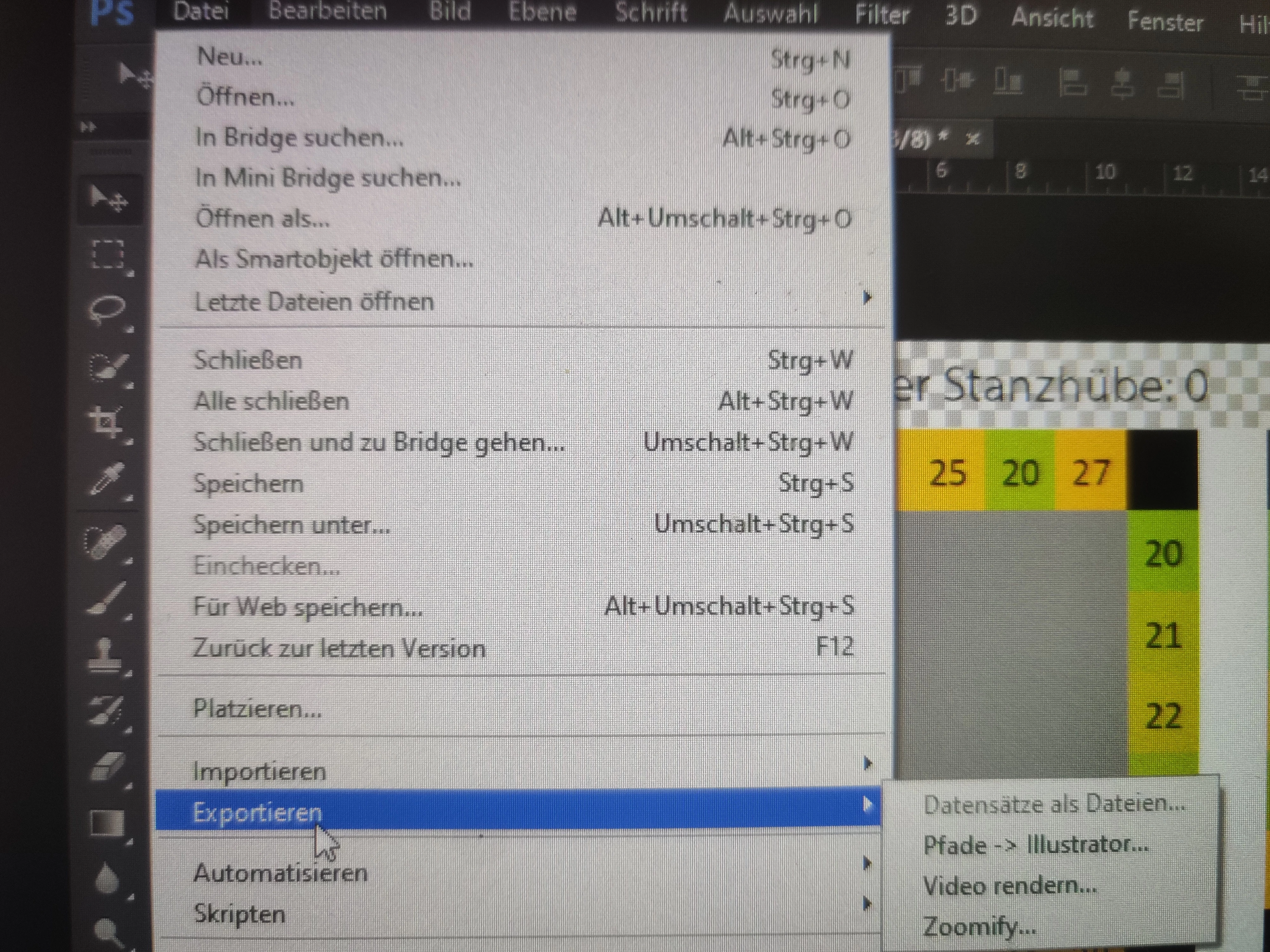
But when I want to save it, i don't have the "Save for Web (Legacy)"-Option (File > Export > Save for Web (Legacy)).


So there are only the Options shown in the Video...


Can someone please explain to me how i can export the .gif file??


When i click render Video, I can only export it in .mp4.
 

This topic has been closed for replies.
Correct answer Linus28385036ev5a

I found a solution, but can't delete the post.

If someone has the same problem, you find the option not under "export" but under "file" in general.


1 reply

Linus28385036ev5aAuthorCorrect answer
Participant
February 13, 2023

I found a solution, but can't delete the post.

If someone has the same problem, you find the option not under "export" but under "file" in general.


Imaginerie
Community Expert
Community Expert
February 13, 2023

It might depend on your OS, because on mine it's still under file>export (see screenshot)
Or maybe it depends on the language?

What Photoshop version do you have?

I am asking because the "mini-bridge" option is not around anymore as far as I know 🙂