
Participant
October 11, 2023
Question

Photoshop Greyscale colors looks like green tinted

  • October 11, 2023
  • 3 replies
  • 1153 views

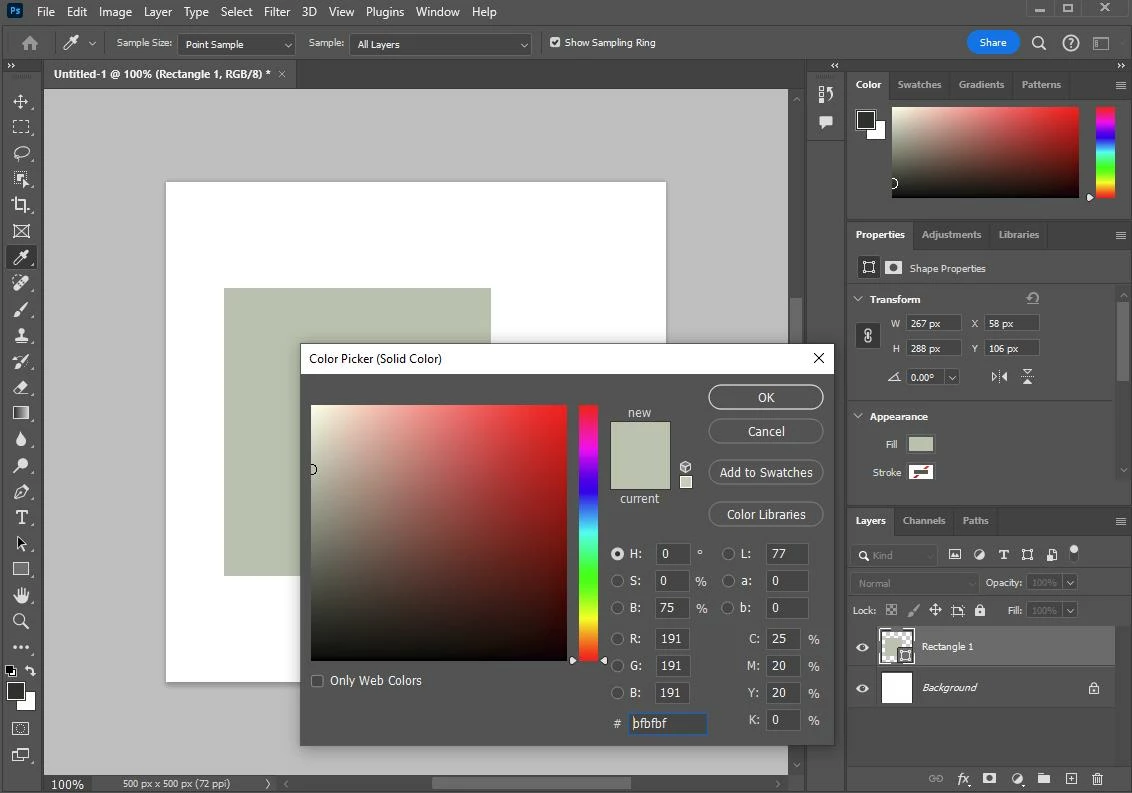
Hi, I just installed the latest Photoshop 25.0 on Windows 10 but all the grey colors look is like green-tinted.
You can see in the attached image all the UI of photoshop is grey but on the canvas and color picker windows it shows green-ish

can anyone help me with this?

This issue happened with Illustrator but it was solved by deleting the settings folder in the appdata>roaming. But it doesn't work with Photoshop. I have not changed any color settings.
My specs: i5 12500H, Intel Iris, RTX 4060


This topic has been closed for replies.

3 replies

Known Participant
November 1, 2024

Me too. I just upgraded to Mac Sequoia 15.1, and grayscale images are tinted this weird green. My research tells me to convert to RGB- and it looks normal: black and white and gray. But why do I have to do that??? Upgrading always results in downtime trying to solve system idiosyncrasies between Apple and Adobe.

D Fosse
Community Expert
Community Expert
October 11, 2023

It's either a defective/broken monitor profile (most likely) or a GPU bug.


Try to uncheck "use graphics processor" in preferences and relaunch. If that clears it, it's a bug in your GPU driver.


But my guess is a broken monitor profile. Bad manufacturer profiles are quite common, and distributed through Windows Update. The proper way to deal with that is to use a calibrator, but if you don't have one, use sRGB IEC61966-2.1 as a temporary measure until you do. Relaunch Photoshop when done, it loads the profile at application startup.


You do that here:


Liveshots
Inspiring
October 11, 2023

That is strange. With the RGB values all set at the same value, it should be a pure grey