
Answered
photoshop icons
Photoshop versions-I like to use multiple versions of Photoshop and keep icons on my taskbar. (windows 11) Is there a way to change the icons to reflect which version the icon represents?

Photoshop versions-I like to use multiple versions of Photoshop and keep icons on my taskbar. (windows 11) Is there a way to change the icons to reflect which version the icon represents?
You can change the icon by right-clicking on the Photoshop icon in the Task Bar, right-clicking the Photoshop icon (for the program, not any recent files), sand selecting Properties, in the Shortcut tab:
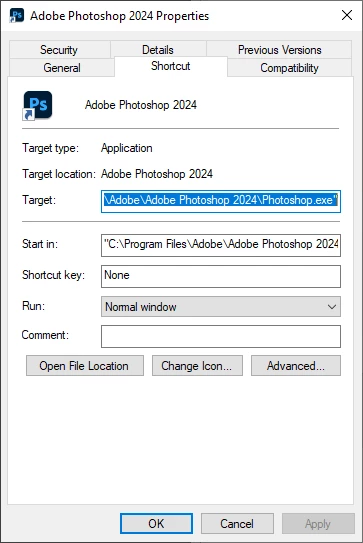
You would have to supply your own replacement icons, though.
Already have an account? Login
Enter your E-mail address. We'll send you an e-mail with instructions to reset your password.
 AdChoices