
Photoshop illustration projects with 300 dpi and up still look pixelated and poor quality!!
- May 20, 2020
- 1 reply
- 3068 views
Hi all! I'm betting this is a problem that has a very simple solution, but I'm stuck, I have a deadline for an illustration for work and can't seem to find my way out of this.
I have been doing illustration for a while now, I always set up my canvas with 300 dpi or higher and brush work is always nice and smooth and high res.
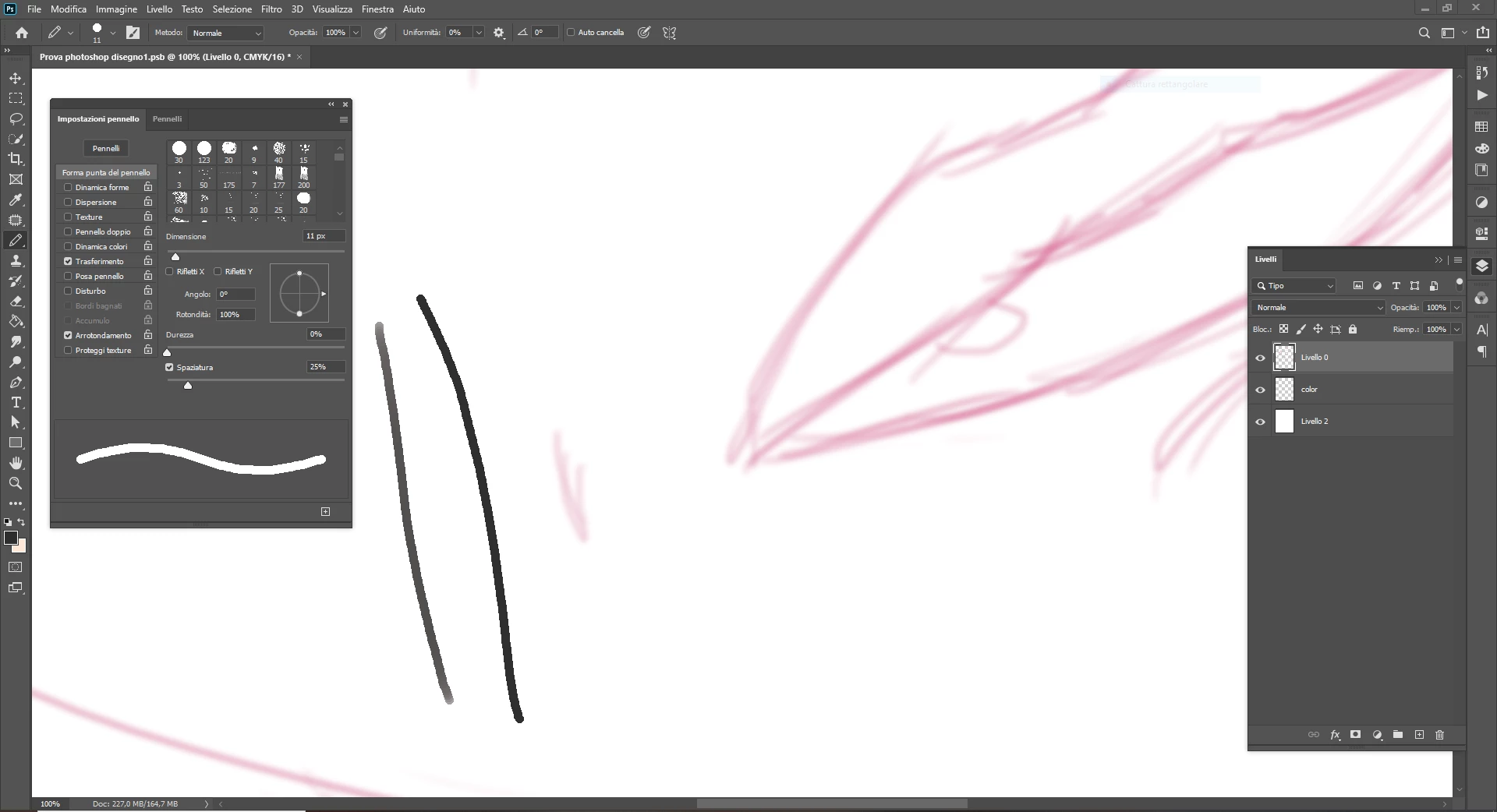
Yesterday I was feeling proactive and finally updated Photoshop to the latest version and, for good measure, cleared up some memory space by doing Edit > Purge > All. Those are the only two things I did. Now, no matter how high I set the resolution for my canvas, all brush work is extremely pixelated (both with and without using a drawing tablet). This even happens with files that I had created before this, with 300 dpi or higher and on which I had already drawn very thin non pixelated lines. I'm attaching a very quick pink sketch I did and never finished: the new line is the pixelated black one.
HELP! What happened? It really makes no sense to me that resolutions of 300, 600, 1200 dpi seem to give the very same result (on simple canvases of 1000 x 1000 px).
Like I said, this probably has a very simple solution that I can't see right now. All suggestions welcome and appreciated! Ta 🙏
 AdChoices