Participant
April 29, 2022
Question

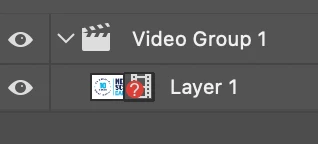
Photoshop Image sequence Import issue. Red Question mark circle over film icon

  • April 29, 2022
  • 1 reply
  • 2333 views

Does anyone have any idea why I am getting this error? Hovering over the icon gives no explination and I'm not finding any answers online. 


When I import an image sequence there is a little red questionmark icon that appears and when I play or scrub the timeline nothing happens. I've tried: reinstalling, reseting preferences, accessing sequence locally. Not sure what else to do. I work in motion design so I really need access to my timeline. 

This topic has been closed for replies.

1 reply

Legend
April 29, 2022

That means that Photoshop can't find the video file that is associated with that video layer. Close and reopen the file to get the relink dialog: 

Or right click the layer and choose Replace Footage to find the video file so Photoshop can load it.


andyj29576424
Participant
May 12, 2022

These seems to be a different problem, and one I'm experiencing as well- when opening an image sequence, I select the first image in the sequence, then check "image sequence" and open, and it confirms the frame rate, and opens the sequence, displayed as "layer 1" icon in video group 1 in the layers panel. But the icon in the layers panel has a question mark:


The sequence wont play in the timeline, only shows the initial frame for all frames when scrubbing the timeline. Further, right clicking the layer doesnt give the replace footage option, instead only this:


And from here, rasterize or convert to smart object doesnt solve anything- the question mark goes away, but the timline only shows the same static first frame at all points in time.

Participant
May 16, 2022

I've been having the same problem. Think it's an issue with the latest update of PS. Just downloaded the PS Beta version and now it's working fine - no red question mark and the image sequence plays out in the timeline like it's supposed to. Hope this helps!