
Participant
September 21, 2021
Question

photoshop incredibly slow and laggy with shape tool

  • September 21, 2021
  • 3 replies
  • 1517 views

using the shape tool, no matter how simple is so slow, whereas the rest of the program is fine. Just clicking on a shape takes a couple seconds of nothing before it is selected, and even worse if you want to create, edit one (changing colour, stroke etc, all super slow).
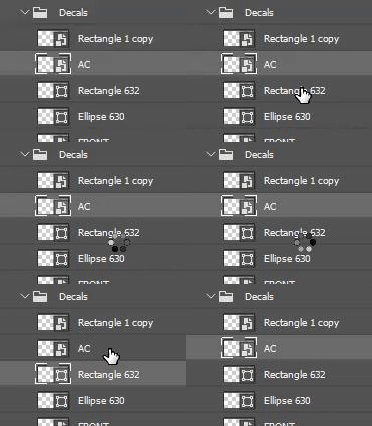


As you can see, selecting a rectangle takes seconds to complete, whereas a smart object is instantanious.


Any ideas what might be causing this, and how to fix it? An older version of PS (CS6 iirc) was the same on this machine, never got to the bottom of it but its becoming intolerable.

Current version should be up to date, same with drivers etc.

Running a AMD Ryzen 7 2700 8 core CPU and nvidia RTX 2070 GPU.

I remember a LONG time ago this issue was never present on much worse hardware.

3 replies

Participant
February 5, 2025

I am having this same issue! Shapes take minutes to load when there used to be no issue at all. This just started for me a couple of weeks ago.

Participant
February 5, 2025

After playing around with some document settings, I just noticed that this issue only happens when working in the CMYK colorspace. Switching to RGB made the problem go away.

chilledout
Participant
May 3, 2025

Same exact issue running on Apple M4 Max. Works fine in RGB, but shapes have extreme lag in CMYK.

Participant
February 1, 2024

Same here. I don't use this tool for some years now, since it makes impossible to work. Have to convert to smart object when working with another designer file. Also, 'Deactivate Native Canvas' won't work. Running latest Photoshop version in Macbook Air M1.

Participant
November 6, 2024

TURN OFF Prefrence  > Performance > Graphic processing settings > Advenced settings > Anti-alias guides and Path

Participant
November 12, 2024

I know its been 3 years, but when a new suggestion appears I try it. To no avail, still laggy working with shapes. Fast with smart objects.

Adam Jerugim
Inspiring
September 21, 2021

Please try going to Preferences > Technology Previews and enable 'Deactivate Native Canvas', then quit and restart the application. Does the issue still occur?