
Participating Frequently
August 2, 2021
Answered

Photoshop is not letting me save a 150x150 pixel image as anything but PSD or TIF

  • August 2, 2021
  • 4 replies
  • 985 views

I am working to create a YouTube watermark. They specify that the watermarks must be 150x150 pixels. I created a new document as such, but I cannot save it as anything but a PSD or TIF file. I have enabled legacy saving, I have gone through "Save A Copy", but nothing works.
    This topic has been closed for replies.
    Correct answer Nancy OShea

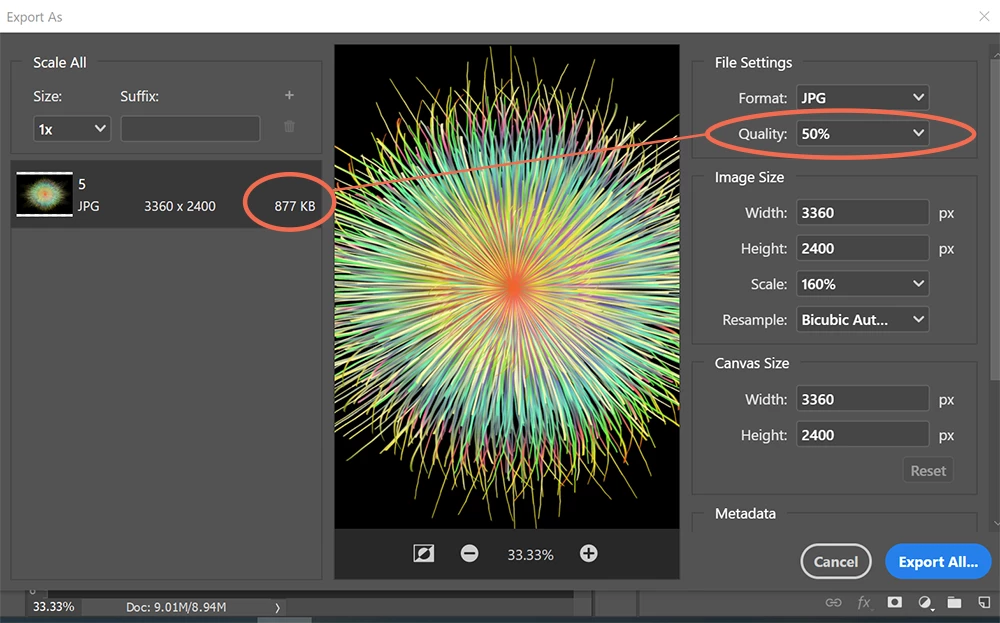
    Go to File > Export > Export As > JPG...

    Change Image Size to 150px x 150px  See screenshot.


    4 replies

    Nancy OShea
    Community Expert
    Nancy OSheaCommunity ExpertCorrect answer
    Community Expert
    August 3, 2021

    Go to File > Export > Export As > JPG...

    Change Image Size to 150px x 150px  See screenshot.


    Nancy O'Shea— Product User & Community Expert
    Participating Frequently
    August 4, 2021


    Well, then! Thank you, for this! I'm definitely going to go this route in the future.


    Do you know why you can only save RGB 32 as PSD or TIF files?

    Nancy OShea
    Community Expert
    Community Expert
    August 4, 2021
    quote

    Do you know why you can only save RGB 32 as PSD or TIF files?

    ========

    Yes.  Because JPG is 8-bit, not 16 or 32-bit.


    Nancy O'Shea— Product User & Community Expert
    jane-e
    Community Expert
    Community Expert
    August 3, 2021

    Hi @SuperSentaiSamuraiScumdog 

    • What is your image size in pixels? (Image > Image Size)
    • What is your color mode? (Image > Mode)
    • How many bits? (Image > Mode)
    • What format do you want to save to?

    ~ Jane

    Participating Frequently
    August 4, 2021

    My image size is 150 pixels.

    The color mode is RGB 32.

    I wanted to save as PNG or JPG.


    For whatever reason, Photoshop would not let me save the RGB 32 file as anything but PSD or TIF. I opened a new document and set it to RGB 8. I was able to save as a PNG, JPG, or any of the other file types in both "Save as" and "Save a copy".


    I don't understand why Photoshop offers RGB 8, 16, and 32, when you can't save RGB 32 as anything outside PSD or TIF. I'm guessing RGB 16 is the same.

    Jumpenjax
    Community Expert
    Community Expert
    August 2, 2021

    Have you tried saving as a .png file? But like S_Sans says. Pictures would be helpful.

    Lee- Graphic Designer, Print Specialist, Photographer
    Participating Frequently
    August 4, 2021

    It would only let me save as a TIF or PSD file, nothing else.


    I found the solution -- I had it set to RGB 32. Once I opened a new document as RGB 8 and dragged/dropped the image, I was able to save it as I needed. I don't understand how this happened... I don't understand why Photoshop offers RGB 8, 16, and 32, but you can't save 32 as anything but a TIF or PSD. I'm guessing it's the same for RGB 16....

    Legend
    August 4, 2021

    " I don't understand why Photoshop offers RGB 8, 16, and 32, but you can't save 32 as anything but a TIF or PSD. "

    You can't save in other formats because the other formats can't do it. For example, JPEG only holds 8 bit, while PNG holds 8 or 16 bit. 32 bit is mainly used for HDR workflows, as I understand it. TIFF is only required to support 8 bit, so while extensions exist, test carefully.


    16 bit is widely used both as a final format for high definition work, and as an intermediate format to avoid round-off.

    S_Gans
    Community Expert
    Community Expert
    August 2, 2021

    Hi. Will you please share a screenshot of screen, your Layers Panel and your Channels Panel, so we can maybe troubleshoot? Which OS are you using?

    Adobe Community Expert / Adobe Certified Instructor
    Participating Frequently
    August 4, 2021

    I'm using Windows 10. I have the most recently-updated Photoshop. I haven't used it to do this kind of work in quite some time. I don't like the new Adobe approach. Premiere is the same exact way, you have to go through 30 steps to do simple things, like create a title card. I don't understand why companies keep making their programs harder to use. It's not just Adobe.


    Thank you, for replying. The file was RGB 32. I opened a new document, 150x150 pixels, RGB 8, and was able to "Save as" and "Save a copy" as every file type outside PSD and TIF (there are three or four other options, but none that I recognize or can remember to type here).


    Do you know why RGB 32 won't save as anything outside PSD or TIF?

    davescm
    Community Expert
    Community Expert
    August 4, 2021

    The jpeg file format does not support 32 bits per channel. 

    Dave