Exit
  • Global community
    • Language:
      • Deutsch
      • English
      • Español
      • Français
      • Português
  • 日本語コミュニティ
  • 한국 커뮤니티
1

Photoshop - Italic T missing from Character Panel, all fonts are italicized

Community Beginner ,
Apr 04, 2022 Apr 04, 2022

I have had this problem for several weeks. All my fonts are italicized, regardless of font style or which font is used. The issue seemed to have appeared after using a file that was created by my marketing agency that contained a font like this.


This is Open Sans Extra Bold.

Licia229867792cm4_1-1649106338746.png


I have tried the following without success:

 -  De-selecting the italics T in the character panel - there isn't one.
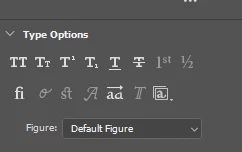
Licia229867792cm4_0-1649106242361.png

- Resetting the tools in Preferences
- Checking to see that an italic version of the font isn't selected
- Testing multiple fonts - all fonts have the same issue


Does anyone know how to fix this?


Version of Photoshop: 2022: 23.1.1.202
TOPICS
Actions and scripting , Windows
2.7K
Translate
Report
Community guidelines
Be kind and respectful, give credit to the original source of content, and search for duplicates before posting. Learn more
community guidelines

correct answers 1 Correct answer

Community Expert , Apr 04, 2022 Apr 04, 2022

Your screenshot is of the Properties tab.


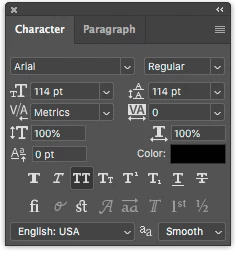
What do you see under the Character tab?  Window > Character

WarrenHeaton_0-1649109531099.png


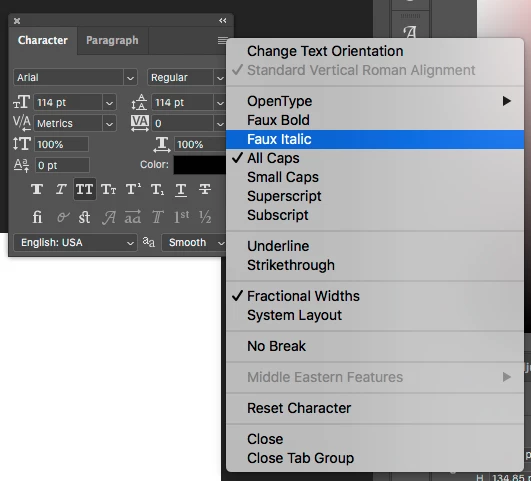
And if you view the Character pop-up menu, do you see "Faux Italic" listed?

WarrenHeaton_2-1649109623918.png


Have you tried the Reset Character option at the bottom of this list?

Translate
Adobe
Community Expert ,
Apr 04, 2022 Apr 04, 2022

Your screenshot is of the Properties tab.


What do you see under the Character tab?  Window > Character

WarrenHeaton_0-1649109531099.png


And if you view the Character pop-up menu, do you see "Faux Italic" listed?

WarrenHeaton_2-1649109623918.png


Have you tried the Reset Character option at the bottom of this list?

Translate
Report
Community guidelines
Be kind and respectful, give credit to the original source of content, and search for duplicates before posting. Learn more
community guidelines
Community Beginner ,
Apr 04, 2022 Apr 04, 2022

Oh - you got it - the italic T was selected in the Character pop-up menu. I was now able to de-select it. The font is now corrected!  The Faux Italic was not selected.  


Thank you!

Translate
Report
Community guidelines
Be kind and respectful, give credit to the original source of content, and search for duplicates before posting. Learn more
community guidelines
LEGEND ,
Apr 04, 2022 Apr 04, 2022
LATEST

You may mark correct answer, while this thread now should be moved to Discussions.

Translate
Report
Community guidelines
Be kind and respectful, give credit to the original source of content, and search for duplicates before posting. Learn more
community guidelines