
Participant
August 4, 2023
Answered

Photoshop Javascript: Delete corners of an image

  • August 4, 2023
  • 2 replies
  • 602 views

I'm using the latest Photoshop on PC. Here's what I'm trying to automate... I've demonstrated the top left corner, but I wish to do all four corners in the same manner:
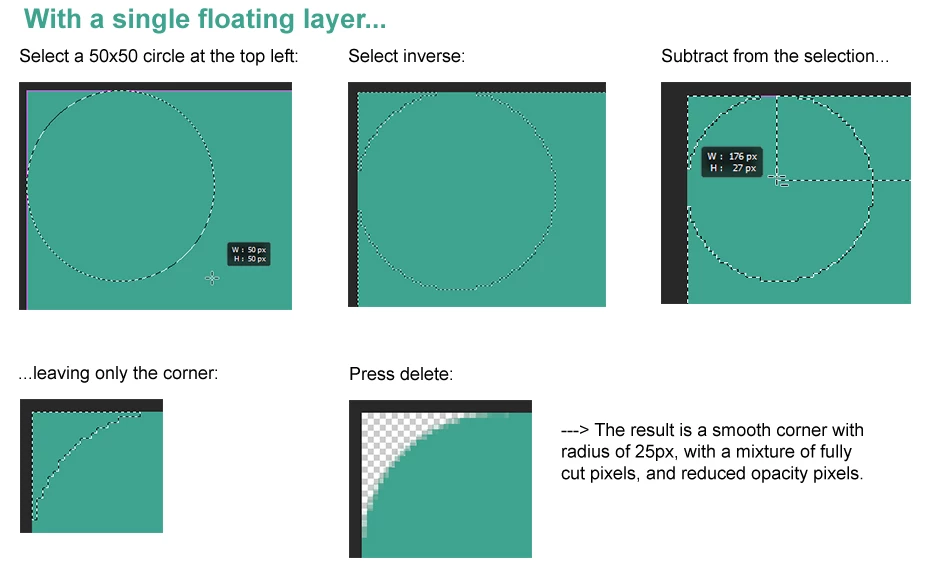
 

Best I can do so far... I can make a selection and CUT, but cutting isn't going to work because it fully removes the pixels of colour... whereas I actually need to fully cut some, and reduce opacity of others, by a varied amount.


I thought about creating an array of pixel addresses and opacity requirements, and feeding it through a loop, one pixel at a time. I don't mind processor-intensive. But, I don't think I can do this with selection... I can only cut; not set opacity.


Half-baked proof of concept which won't work:

//Layer from background:
docRef.activeLayer.isBackgroundLayer = false;
 
//(topleft, bottomleft, bottomright, topright)
var shapeRef = [ [10,10], [10,90], [90,90], [90,10] ];
docRef.selection.select(shapeRef);
 
//docRef.selection.select([[6, 6], [10, 10]], SelectionType.EXTEND);
docRef.selection.cut();
 
 
If anyone can help me, I will really appreciate it. My head isn't really up to this, this week, I'm so stressed.
Thank you!
This topic has been closed for replies.
Correct answer c.pfaffenbichler
// createRectangluarVectorMaskWithRoundCorners
// create vector mask with rectangle with round corners;
// 2023, use it at your own risk;
if (app.documents.length > 0) {
    var originalRulerUnits = app.preferences.rulerUnits;
    app.preferences.rulerUnits = Units.PIXELS;
    var myDocument = app.activeDocument;
    var theWidth = myDocument.width;
    var theHeight = myDocument.height;
// create path;
    rectangularPathWithRoundCorners([0,0,theWidth,theHeight], 100);
    applyVectorMask();
// reset;
    app.preferences.rulerUnits = originalRulerUnits;
};
//////
function rectangularPathWithRoundCorners (theBounds, theRadius) {
var idpixelsUnit = stringIDToTypeID( "pixelsUnit" );
    var desc5 = new ActionDescriptor();
        var ref1 = new ActionReference();
        ref1.putProperty( stringIDToTypeID( "path" ), stringIDToTypeID( "workPath" ) );
    desc5.putReference( stringIDToTypeID( "null" ), ref1 );
        var desc6 = new ActionDescriptor();
        var idunitValueQuadVersion = stringIDToTypeID( "unitValueQuadVersion" );
        desc6.putInteger( idunitValueQuadVersion, 1 );
        desc6.putUnitDouble( stringIDToTypeID( "top" ), idpixelsUnit, theBounds[1] );
        desc6.putUnitDouble( stringIDToTypeID( "left" ), idpixelsUnit, theBounds[0] );
        desc6.putUnitDouble( stringIDToTypeID( "bottom" ), idpixelsUnit, theBounds[3] );
        desc6.putUnitDouble( stringIDToTypeID( "right" ), idpixelsUnit, theBounds[2] );
        desc6.putUnitDouble( stringIDToTypeID( "topRight" ), idpixelsUnit, theRadius );
        desc6.putUnitDouble( stringIDToTypeID( "topLeft" ), idpixelsUnit, theRadius );
        desc6.putUnitDouble( stringIDToTypeID( "bottomLeft" ), idpixelsUnit, theRadius );
        desc6.putUnitDouble( stringIDToTypeID( "bottomRight" ), idpixelsUnit, theRadius );
    desc5.putObject( stringIDToTypeID( "to" ), stringIDToTypeID( "rectangle" ), desc6 );
executeAction( stringIDToTypeID( "set" ), desc5, DialogModes.NO );
};
//////
function applyVectorMask () {
// =======================================================
var idpath = stringIDToTypeID( "path" );
    var desc8 = new ActionDescriptor();
        var ref2 = new ActionReference();
        ref2.putClass( idpath );
    desc8.putReference( stringIDToTypeID( "null" ), ref2 );
        var ref3 = new ActionReference();
        ref3.putEnumerated( idpath, idpath, stringIDToTypeID( "vectorMask" ) );
    desc8.putReference( stringIDToTypeID( "at" ), ref3 );
        var ref4 = new ActionReference();
        ref4.putEnumerated( idpath, stringIDToTypeID( "ordinal" ), stringIDToTypeID( "targetEnum" ) );
    desc8.putReference( stringIDToTypeID( "using" ), ref4 );
executeAction( stringIDToTypeID( "make" ), desc8, DialogModes.NO );
};

2 replies

Participant
August 4, 2023

I've continued working and have managed to pull together a functioning solution BUT it is very, very slow.


Code below is my proof of concept that works on one corner only, and it takes 50 seconds to run (Windows machine, very old but high spec).


It also relies on two pixel arrays - the first is for deleting (cutting) pixels entirely (that part of the code is fast) and the second array is for changing the opacity of individual pixels - i.e. feathering (this is the slow part of the code).


It works on the active document if anyone wants to try it. I might build this out (add the other 3 corners) but with a run time of 3.5 minutes per image I wonder how realistic it really is. It might be better if I use some external source... maybe invoke an Actions (.atn) file from my main script, to add a layer mask and a rectangle with rounded corners, etc. But I'm trying to keep everything as portable as possible, for users.


//-------------------------------------------------------------------------------------
//Cut pixels that can be fully deleted:

//Array of pixels to cut:
//0 = x position
//1 = y position
//2 = x runlength, for efficiency
var cutPixels = [
		[0, 0, 17],
		[0, 1, 14],
		[0, 2, 12],
		[0, 3, 10],
		[0, 4, 9],
		[0, 5, 7],
		[0, 6, 6],
		[0, 7, 5],
		[0, 8, 4],
		[0, 9, 4],
		[0, 10, 3],
		[0, 11, 2],
		[0, 12, 2],
		[0, 13, 1],
		[0, 14, 1],
		[0, 15, 0],
		[0, 16, 0],
		[0, 17, 0],
];

docRef = app.activeDocument;		

//Layer from background:
docRef.activeLayer.isBackgroundLayer = false;


//(topleft, bottomleft, bottomright, topright)
//var shapeRef = [ [10,10], [10,90], [90,90], [90,10] ];
//docRef.selection.select(shapeRef);

for(var p = 0; p < cutPixels.length; p++) {
	docRef.selection.select([ [cutPixels[p][0],cutPixels[p][1]],
							  [cutPixels[p][0],cutPixels[p][1]+1],
							  [cutPixels[p][0]+1+cutPixels[p][2],cutPixels[p][1]+1],
							  [cutPixels[p][0]+1+cutPixels[p][2],cutPixels[p][1]] ],
							  SelectionType.EXTEND);

};

docRef.selection.cut();

//End of cut pixels
//-------------------------------------------------------------------------------------
//Change opacity of softener pixels:

//Array of pixels to change opacity:
//0 = x position
//1 = y position
//2 = opacity
var opacityPixels = [
	[18, 0, 20],[19, 0, 40],[20, 0, 55],[21, 0, 70],[22, 0, 80],[23, 0, 90],
	[15, 1, 20],[16, 1, 50],[17, 1, 75],
	[13, 2, 30],[14, 2, 60],[15, 2, 95],
	[11, 3, 20],[12, 3, 60],[13, 3, 95],
	[10, 4, 40],[11, 4, 80],
	[8, 5, 15],[9, 5, 55],
	[7, 6, 15],[8, 6, 65],
	[6, 7, 15],[7, 7, 65],
	[5, 8, 15],[6, 8, 65],
	[5, 9, 55],
	[4, 10, 40],
	[3, 11, 20],[4, 11, 80],
	[3, 12, 60],
	[2, 13, 30],[3, 13, 95],
	[2, 14, 65],
	[1, 15, 25],[2, 15, 95],
	[1, 16, 50],
	[1, 17, 75],
	[0, 18, 20],
	[0, 19, 40],
	[0, 20, 55],
	[0, 21, 70],
	[0, 22, 80],
	[0, 23, 90]
];

var selRegion, cornerSize = 1;  // size of corner to select

for(var p = 0; p < opacityPixels.length; p++) {
	docRef.selection.select([ [opacityPixels[p][0],opacityPixels[p][1]],
							  [opacityPixels[p][0],opacityPixels[p][1]+1],
							  [opacityPixels[p][0]+1,opacityPixels[p][1]+1],
							  [opacityPixels[p][0]+1,opacityPixels[p][1]] ],
							  SelectionType.EXTEND);

	// Create a temporary document to sample color
	var tempDoc = app.documents.add(cornerSize, cornerSize, 72.0, "temp", NewDocumentMode.RGB, DocumentFill.TRANSPARENT);
	app.activeDocument = docRef; // Switch back to the original document
	docRef.selection.copy(); // Copy the selection

	app.activeDocument = tempDoc; // Switch to the temporary document
	tempDoc.paste(); // Paste the copied selection

			//Sample the pixel color of the top left pixel (i.e. the only one...)
			//https://stackoverflow.com/a/48192241
			// Add a Color Sampler at a given x and y coordinate in the image.
			var pointSample = tempDoc.colorSamplers.add([0,0]);

			// Obtain array of RGB values.
			var rgb = [
				pointSample.color.rgb.red,
				pointSample.color.rgb.green,
				pointSample.color.rgb.blue
			];
			
			app.foregroundColor.rgb.red = rgb[0];
			app.foregroundColor.rgb.green = rgb[1];
			app.foregroundColor.rgb.blue = rgb[2];
			

	// Switch back to original document and delete temp
	app.activeDocument = docRef;
	tempDoc.close(SaveOptions.DONOTSAVECHANGES);

	var newLayer = docRef.artLayers.add(); // Add a new layer
	docRef.selection.fill(app.foregroundColor, ColorBlendMode.NORMAL, 100); // Fill with the foreground color
	newLayer.opacity = opacityPixels[p][2]; // Set the layer opacity

	docRef.activeLayer = docRef.artLayers[1]; // Switch to original layer
	docRef.selection.clear(); // Clear the selected pixel
	docRef.selection.deselect();

	docRef.activeLayer = newLayer; // Switch back to new layer
	// Merge the new layer with the previous layer
	newLayer.merge();

};

//End of change opacity
//-------------------------------------------------------------------------------------


c.pfaffenbichler
Community Expert
Community Expert
August 4, 2023

Why don’t you just use the Rectangle Tool to create a Vector Mask and set the Corner Radius in the Options Bar? 

Participant
August 4, 2023

Yes manually I tried with a layer mask and vector mask, but I can't automate it. I've tried with the ScriptingListener but I run into various errors along the way, I can't figure it out. Best I've managed is to create a layer mask, but then creating the rectangle stumps me. Thanks for your suggestion - this does feel like the most efficient manual method to replicate.

c.pfaffenbichler
Community Expert
c.pfaffenbichlerCommunity ExpertCorrect answer
Community Expert
August 5, 2023
// createRectangluarVectorMaskWithRoundCorners
// create vector mask with rectangle with round corners;
// 2023, use it at your own risk;
if (app.documents.length > 0) {
    var originalRulerUnits = app.preferences.rulerUnits;
    app.preferences.rulerUnits = Units.PIXELS;
    var myDocument = app.activeDocument;
    var theWidth = myDocument.width;
    var theHeight = myDocument.height;
// create path;
    rectangularPathWithRoundCorners([0,0,theWidth,theHeight], 100);
    applyVectorMask();
// reset;
    app.preferences.rulerUnits = originalRulerUnits;
};
//////
function rectangularPathWithRoundCorners (theBounds, theRadius) {
var idpixelsUnit = stringIDToTypeID( "pixelsUnit" );
    var desc5 = new ActionDescriptor();
        var ref1 = new ActionReference();
        ref1.putProperty( stringIDToTypeID( "path" ), stringIDToTypeID( "workPath" ) );
    desc5.putReference( stringIDToTypeID( "null" ), ref1 );
        var desc6 = new ActionDescriptor();
        var idunitValueQuadVersion = stringIDToTypeID( "unitValueQuadVersion" );
        desc6.putInteger( idunitValueQuadVersion, 1 );
        desc6.putUnitDouble( stringIDToTypeID( "top" ), idpixelsUnit, theBounds[1] );
        desc6.putUnitDouble( stringIDToTypeID( "left" ), idpixelsUnit, theBounds[0] );
        desc6.putUnitDouble( stringIDToTypeID( "bottom" ), idpixelsUnit, theBounds[3] );
        desc6.putUnitDouble( stringIDToTypeID( "right" ), idpixelsUnit, theBounds[2] );
        desc6.putUnitDouble( stringIDToTypeID( "topRight" ), idpixelsUnit, theRadius );
        desc6.putUnitDouble( stringIDToTypeID( "topLeft" ), idpixelsUnit, theRadius );
        desc6.putUnitDouble( stringIDToTypeID( "bottomLeft" ), idpixelsUnit, theRadius );
        desc6.putUnitDouble( stringIDToTypeID( "bottomRight" ), idpixelsUnit, theRadius );
    desc5.putObject( stringIDToTypeID( "to" ), stringIDToTypeID( "rectangle" ), desc6 );
executeAction( stringIDToTypeID( "set" ), desc5, DialogModes.NO );
};
//////
function applyVectorMask () {
// =======================================================
var idpath = stringIDToTypeID( "path" );
    var desc8 = new ActionDescriptor();
        var ref2 = new ActionReference();
        ref2.putClass( idpath );
    desc8.putReference( stringIDToTypeID( "null" ), ref2 );
        var ref3 = new ActionReference();
        ref3.putEnumerated( idpath, idpath, stringIDToTypeID( "vectorMask" ) );
    desc8.putReference( stringIDToTypeID( "at" ), ref3 );
        var ref4 = new ActionReference();
        ref4.putEnumerated( idpath, stringIDToTypeID( "ordinal" ), stringIDToTypeID( "targetEnum" ) );
    desc8.putReference( stringIDToTypeID( "using" ), ref4 );
executeAction( stringIDToTypeID( "make" ), desc8, DialogModes.NO );
};