
dukeo31845930
Participant
May 19, 2023
Answered

Photoshop Kerning Issue

  • May 19, 2023
  • 2 replies
  • 1469 views

Hello,

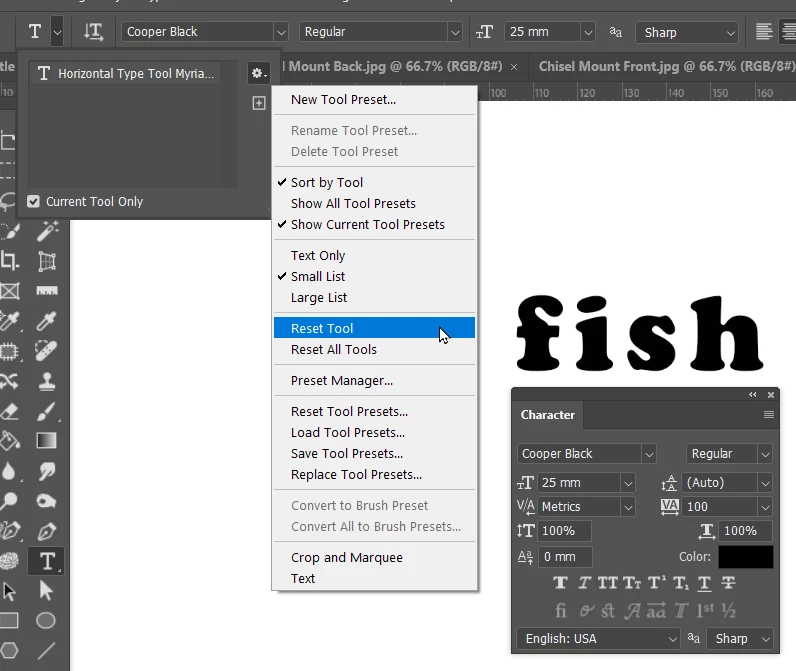
I am working on a project in Photoshop and I ran into an issue involving the kerning. I am using the fonts, Cooper Std and Avenir and I noticed when typing out the letters (f & i) in lowercase they are close together in comparison to other letters. I then proceeded to utilize the kerning tab to create spacing in between the letters (f & i) but it seems to be not working. I was wondering does anyone know how to reset/fix this issue? I attached a screen shot below for reference. Any help would be appreciated, thank you.
This topic has been closed for replies.
Correct answer Trevor.Dennis

Try resetting the Type tool.

2 replies

Trevor.Dennis
Community Expert
Trevor.DennisCommunity ExpertCorrect answer
Community Expert
May 20, 2023

Try resetting the Type tool.

dukeo31845930
Participant
May 20, 2023

Thank you for your response. Much appreciated.

jane-e
Community Expert
Community Expert
May 20, 2023


I noticed when typing out the letters (f & i) in lowercase they are close together in comparison to other letters.

By @dukeo31845930


Instead of kerning, it is probably ligatures.


Here is the fi with ligaturures on:


Here is the fi with ligatures off:

Character panel menu > Open Type > Standard Ligatures


Consider keeping ligatures on, as they are proper in typography.


Ligatures with Nigel French:

 https://www.linkedin.com/learning/type-tips/getting-the-most-from-discretionary-liigatures


Jane


dukeo31845930
Participant
May 20, 2023

Thank you for your response, this greatly helped. Much appreciated.