
annam10785803
Participant
September 6, 2018
Answered

Photoshop Layer Mask error

  • September 6, 2018
  • 5 replies
  • 938 views

Hey all,

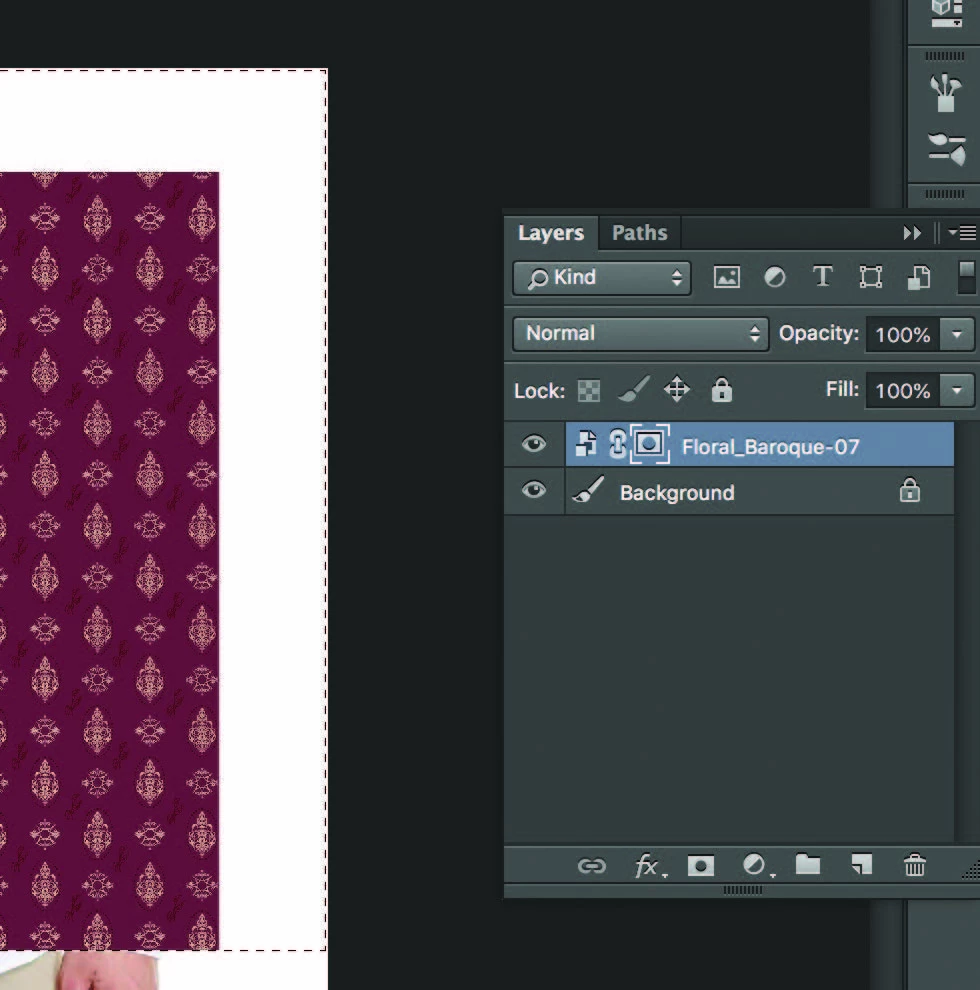
I'm having a few problems creating a layer mask when I select the layer mask tool a locked symbol with square/circle icon appears?

Normally a separate white or black box appears but, I'm not sure why it's changed or if I'm doing something different.

Any advice would be great!
Thanks,

Anna

This topic has been closed for replies.
Correct answer JJMack

If you create a Path you can add an additional Vector Layer Mask. and you can target existing layer masks normal or vector to edit an existing layer mask

5 replies

c.pfaffenbichler
Community Expert
Community Expert
September 6, 2018

annam10785803, do you stick with your claim that the Layer in your original screenshot did not have a Layer Mask even though the screenshot  seems to indicate otherwise?

If so could you please provide that file for testing?

Bojan Živković11378569
Community Expert
Community Expert
September 6, 2018

Try with this:

  1. Click on Layers panel menu
  2. Select Panel Options...
  3. Click on radio on the left side of thumbnail
  4. Click Ok to confirm

JJMack
Community Expert
JJMackCommunity ExpertCorrect answer
Community Expert
September 6, 2018

If you create a Path you can add an additional Vector Layer Mask. and you can target existing layer masks normal or vector to edit an existing layer mask

JJMack
c.pfaffenbichler
Community Expert
Community Expert
September 6, 2018

Possible work-around: Group the Layer and add a Layer Mask to the Group.

To verify if the Layer already has a Layer Mask see if

Layer > Layer Mask > Delete

is available when the Layer is selected (and unlocked).

Normally a separate white or black box appears

Maybe the Layers Panel’s Panel Options have been changed to »Thumbnail Size: None«.

c.pfaffenbichler
Community Expert
Community Expert
September 6, 2018

If a Layer already has a Layer Mask one can naturally not add another one.

annam10785803
Participant
September 6, 2018

I thought that also but neither layers have any additional masks.

They a both just plain JPG images but, once I select the layer mask tool I get the same icons.

c.pfaffenbichler
Community Expert
Community Expert
September 6, 2018
I thought that also but neither layers have any additional masks.

Please look at the screenshot you posted, a Layer Mask seems to be indicated on the Layer »Floral-Baroque-07«.