
Participant
July 13, 2021
Question

Photoshop Legacy PencilBrush stroke not scaling with brush

  • July 13, 2021
  • 2 replies
  • 492 views

Hello


I have been having issues since updating photoshop with one brush in particular.


Its the PencilBrush tool - this has been one of my favorite sketching brushes but it has stopped working as it once was. when increasing the size of the brush, it doesnt seem to scale the stroke instead making a scattered line of texture .


Let me be clear, I am not talking about the cursor. I havent got Caps lock on - the cursor scales fine, but the mark just doesnt seem to behave the same way when larger as it does at its default size. 


I have also tried updating Wacom drivers and have reset the tools but this didnt help either

You can see in the image below that i have scaled the brush from 9px to 50px but the stroke width is barely any different and the texture is no longer constant.
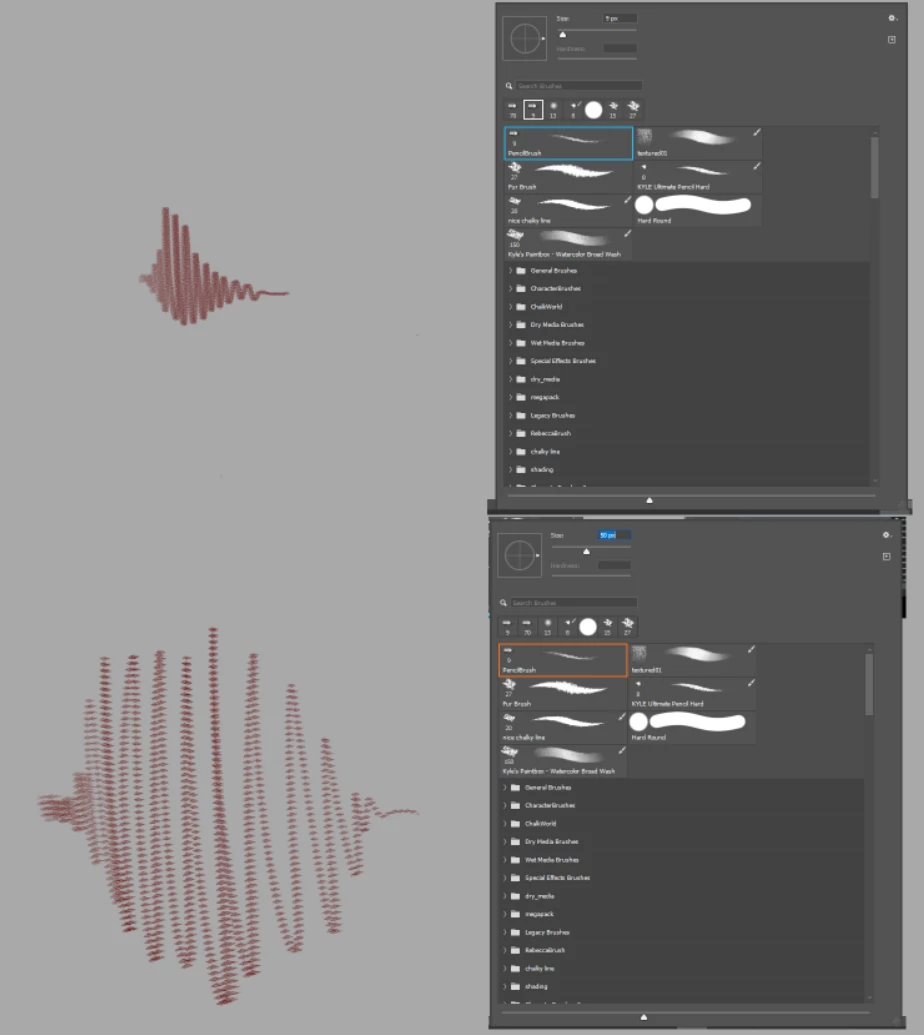
 

Any suggestions would be greatly appreciated.


Thanks

This topic has been closed for replies.

2 replies

Jeff Arola
Community Expert
Community Expert
July 17, 2021

I believe if you change the Shape to something like Erodible Round then the size will adjust.


Kevin Stohlmeyer
Community Expert
Community Expert
July 13, 2021

Check your spacing settings in the Brush settings panel. Set it to 0

AP-AndyAuthor
Participant
July 14, 2021

Hi Kevin


Thanks so much for your reply.

Yes the spacing in the brush helps the line become smoother, thank you.

However it doesnt do much for the size of the line. 

I found that changing the softness goives more variation here, but its the removes some of the sharpness. Also the angle of the pen was always key to getting a varied line, where i could get sharper lines with the pen at a higher angle, but block ot rough shadows with the pen held flatter at a lower angle. this doesnt seem to effect it much anymore. 


thanks


Trevor.Dennis
Community Expert
Community Expert
July 14, 2021

Can you clarify what tool and preset you are using?  It looks more like a brush stroke than pencil.  Hardness doesn't make any difference with the pencil because it does not have anti aliasing.  The pencil tool can use things like size and opacity jitter though so we need to see what the settings are.


Can you show us a screen shot of the Brush Settings panel? If any of the settings has a check mark, select that setting so we can see what the seettinhs are.