
Zee333
Inspiring
August 17, 2023
Question

Photoshop Library greyed out
  • August 17, 2023
  • 2 replies
  • 1449 views

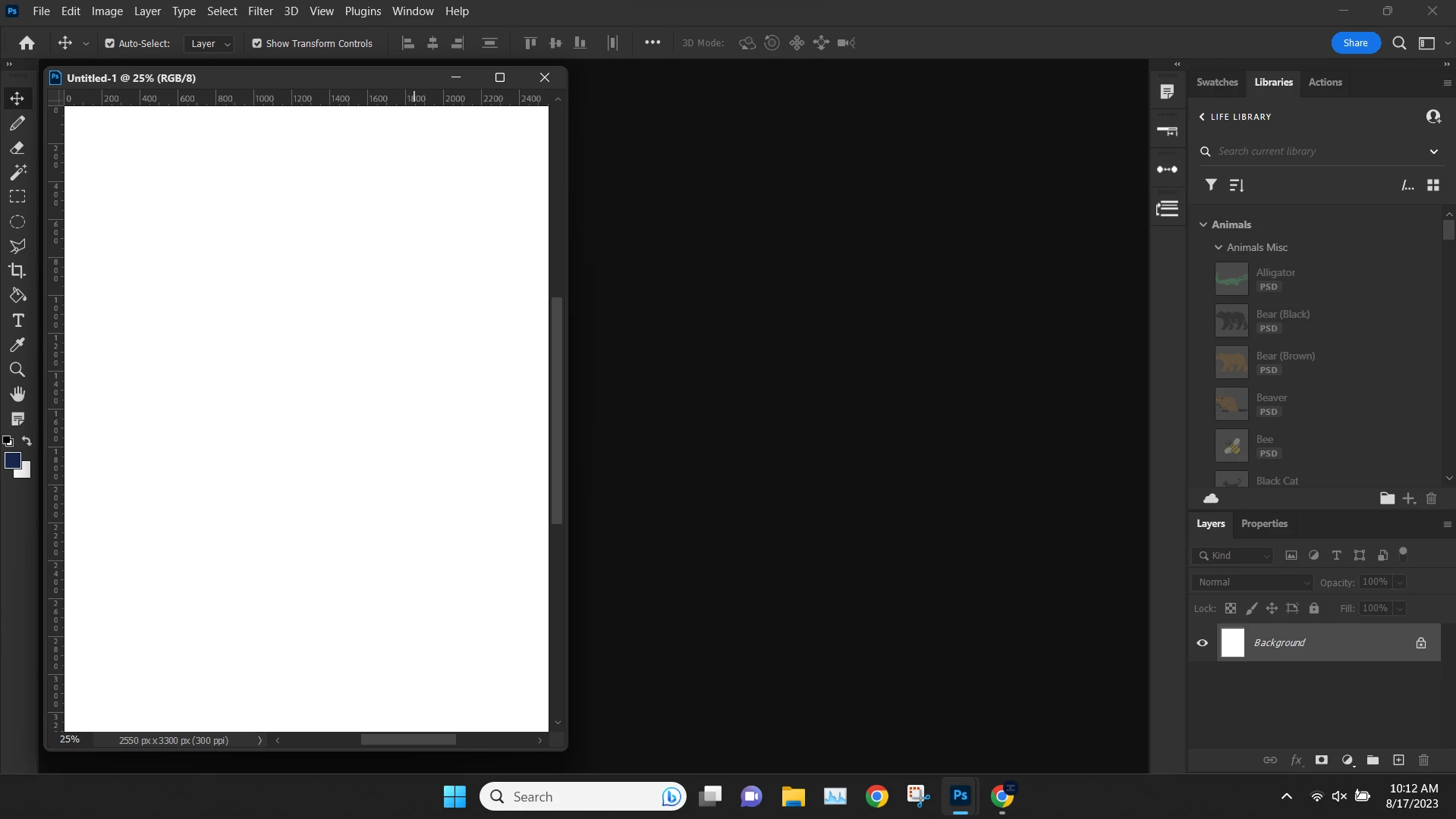
Hey everyone this is a issue that keeps happening for me and I can't figure out what it is or how to fix it. The issue is my library is showing up in the libraries panel but all the elements in the library are greyed out and I can't open any of them or drag them into a document. Sometimes restarting my computer fixes it and sometimes (like today) it doesn't. Does anyone know what this issue is/how to fix it?

Any insight is appreciated!

2 replies

michaell90664989
Participant
November 19, 2024

Hi
I know it an old thread, but we are having the same problem, PS 23.0.1, Win 11)
We are sharing a CC library ( 1 Tera) with around 10.000 pds files, all created in PS.
With the last year we have expirenced this 'grayed out' problem, unable to open the files via the CC library
in PS.
For some of the files, it seems that PS = CC does not recognize the psd file as an adobe file.
It may seems as CC cannot read the properties of the files => no resolution etc.
My companion uploaded around 20 files to the CC library of which I only can open 2 (two). !!
The 20 files was initially stored in the same CC library.
See pictures.
I havn't yet dared delete the 'Component' folder in the CC Adobe dcx area. 90 Gigs.
Btw: Would that help ?
I can download the grayed files via my adobe website account, but that's rather troublesome

Please advise what to do.

If this sublect is not your turf anymore, please pass it on, to whoever ...

Thanks .


Sameer K
Community Manager
Community Manager
August 17, 2023

Hey, @Zee333. Welcome to the Photoshop Community. I'll need more info to help you figure this out. Please share the system info of Photoshop from Help > System info > Copy & paste into a text document > Upload as an attachment here to share with us.


The Libraries panel is directly connected to the Creative Cloud desktop app & its updates. Have you recently opened Creative Cloud to check for updates? If not, try that.

Try this when this happens again:

  • Go to the Window menu in Photoshop > Library to hide the panel.
  • Repeat the same to unhide the panel again. This will refresh the Library component, and it should help to some extent.


If this does not help, press CTRL + ALT + T (Win) in the Creative Cloud app to launch Creative Cloud Troubleshooter & select 'Close Creative Cloud and related processes' > click on Go.


Check the task manager > Processes > & close any Adobe-related processes.


Open Creative Cloud & Photoshop again and let us know if the error persists.

Thanks!
Sameer K


Zee333
Zee333Author
Inspiring
August 17, 2023

Hey Sameer, Thanks for getting back to me!

The issue resolved on it's own this time so I don't know if the System Info is still relevant but I've attatched it below. This issue will happen for hours at a time and then resolve itself. I have tried a few different ways to fix it but nothing I do seems to help consistently and through my research I haven't been able to find this specific issue documented. Thanks for the tips on what to do if this happens again (because it will happen again) I'll be sure to try those out and come back here to let you know if the work.

Thanks Again,

Zee333 


Zee333
Zee333Author
Inspiring
September 10, 2025

I am still intermittently experiencing this issue and the above methods do not resolve the issue. All apps are up to date and I am able to download the files from the creative cloud app but the library in photoshop is still greyed out and unusable. Text settings are not greyed out but they don't work either.


The files say "This item is not supported in Photoshop" when hovered over, the text settings don't say the same but do not apply when clicked.