Participant
September 26, 2024
Question

Photoshop Metadata automation

  • September 26, 2024
  • 3 replies
  • 826 views
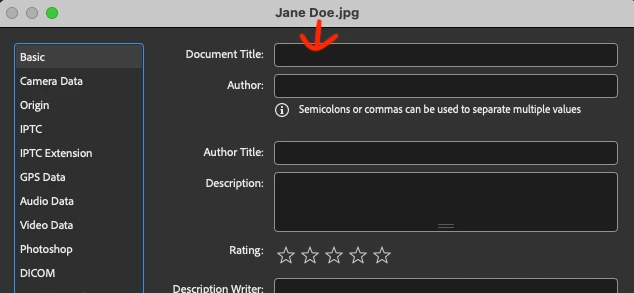
Is there a way to automate adding the current file name to the document title metadata? I have to do this to a couple hundred images, so it would be nice if it was automated versus having to do them manually.

 

This topic has been closed for replies.

3 replies

Stephen Marsh
Community Expert
Community Expert
September 28, 2024

For the sake of completeness, here is an example of a command line for ExifTool:


exiftool -overwrite_original_in_place '-title<${filename;s/\.[^.]*$//}' -r '/Path/to/the folder containing the files/'


This command is formatted for the Mac, Windows would use " double straight quotes rather than ' single straight quotes.  After the -r and space, one can drag the root/top-level folder from the Mac Finder or Windows Explorer into the Terminal or CMD window to complete the path to the folder and press return/enter to execute. It is recommended that you work on a few duplicate files in a new folder for testing until you are comfortable.


Stephen Marsh
Community Expert
Community Expert
September 26, 2024

Although possible in Photoshop to directly batch edit metadata without opening each file, this is generally best performed in Adobe Bridge.


This has come up before and there are multiple scripts in the Photoshop and Bridge forums, or ExifTool commands etc. The forum or site search function should return these discussions with a suitable search term.


Here are some Bridge scripts:


// https://imagesimple.wordpress.com/2011/08/24/cs5-filename-to-title-script/
#target bridge
   if( BridgeTalk.appName == "bridge" ) {
FT = MenuElement.create("command", "Add FileName to Title", "at the end of Tools");
}
FT.onSelect = function () {
   AddFilenameToTitle();
   }
function AddFilenameToTitle(){
var thumbs = app.document.selections;
if(!thumbs.length) return;
if (ExternalObject.AdobeXMPScript == undefined)  ExternalObject.AdobeXMPScript = new
ExternalObject("lib:AdobeXMPScript");
for(var a in thumbs){
var selectedFile = thumbs[a].spec;
var Title = decodeURI(selectedFile.name).replace(/\.[^\.]+$/, '')
      var myXmpFile = new XMPFile( selectedFile.fsName, XMPConst.UNKNOWN,
XMPConst.OPEN_FOR_UPDATE);
  var myXmp = myXmpFile.getXMP();
        myXmp.deleteProperty(XMPConst.NS_DC, "title");
        myXmp.appendArrayItem(XMPConst.NS_DC, "title", Title, 0,
XMPConst.ALIAS_TO_ALT_TEXT);
        myXmp.setQualifier(XMPConst.NS_DC, "title[1]",
"http://www.w3.org/XML/1998/namespace", "lang", "x-default");
        if (myXmpFile.canPutXMP(myXmp)) {
        myXmpFile.putXMP(myXmp);
         myXmpFile.closeFile(XMPConst.CLOSE_UPDATE_SAFELY);
         }
    }
}


Or:


/**
* @@@BUILDINFO@@@ FilenametoTitle.jsx !Version! Tue Nov 26 2019 09:07:36 GMT-0500
*/
/*
Utility Pack Scripts created by David M. Converse ©2018-19

Writes filename to Title metadata field.

/* Modified 30 March 2020 by Stephen Marsh to retain original filename in full */

/*
Licensed under the Apache License, Version 2.0 (the "License");
you may not use this file except in compliance with the License.
You may obtain a copy of the License at

    http://www.apache.org/licenses/LICENSE-2.0

Unless required by applicable law or agreed to in writing, software
distributed under the License is distributed on an "AS IS" BASIS,
WITHOUT WARRANTIES OR CONDITIONS OF ANY KIND, either express or implied.
See the License for the specific language governing permissions and
limitations under the License.
*/

#target bridge

if (BridgeTalk.appName == 'bridge') {
    try {
        var FilenametoTitle = new Object; //id object for this script
        #include "prefsReader.jsxinc" //shared prefs read code

        //create menu
        if (useMenu == true) { //use Tools submenu
            if (MenuElement.find('utilPack') == null) { //submenu not yet created
                MenuElement.create('menu', 'Utility Script Pack', 'at the end of Tools', 'utilPack');
            }
            var ftCmd = MenuElement.create('command', 'Filename to Title', 'at the end of utilPack');
        }
        else { //do not use submenu
            var ftCmd = MenuElement.create('command', 'Filename to Title', 'at the end of Tools');
        }

        if (useCMenu == true) { //use contextual submenu
            if (MenuElement.find('cutilPack') == null) {
                MenuElement.create('menu', 'Utility Script Pack', 'after Thumbnail/Open', 'cutilPack');
            }
            var ftContCmd = MenuElement.create('command', 'Filename to Title', 'at the end of cutilPack'); //add to Contextual menu
        }
        else { //do not use contextual submenu
            var ftContCmd = MenuElement.create('command', 'Filename to Title', 'after Thumbnail/Open', this.menuID); //add to Contextual menu
        }
    }
    catch (e) {
        //alert(e + e.line);
    }
}

ftCmd.onSelect = function () {
    ftAddFilenameToTitle();
}

ftContCmd.onSelect = function () {
    ftAddFilenameToTitle();
}

function ftAddFilenameToTitle() {
    try {
        var ftThumbs = app.document.selections; //get selected thumbnails
        if (!ftThumbs.length) return; //nothing selected
        if (ExternalObject.AdobeXMPScript == undefined) ExternalObject.AdobeXMPScript = new ExternalObject('lib:AdobeXMPScript');
        for (var a in ftThumbs) { //loop through thumbs
            var ftTitle = ftThumbs[a].name; //get filename
            //remove filename after last dash character
            //to retain filename after dash, comment out lines 69-73
            //ftTitle = ftTitle.split('-');
            //if(ftTitle.length > 1){
            //    ftTitle.length--;
            //    }
            //ftTitle = ftTitle.join('-');
            //remove filename after last period character
            //ftTitle = ftTitle.split('.');
            //if(ftTitle.length > 1){
            //    ftTitle.length--;
            //    }
            //ftTitle = ftTitle.join('.');
            var ftMeta = ftThumbs[a].synchronousMetadata;
            var ftXMP = new XMPMeta(ftMeta.serialize());
            ftXMP.deleteProperty(XMPConst.NS_DC, 'title'); //delete old title
            ftXMP.appendArrayItem(XMPConst.NS_DC, 'title', ftTitle, 0, XMPConst.ALIAS_TO_ALT_TEXT); //write new title
            ftXMP.setQualifier(XMPConst.NS_DC, 'title[1]', 'http://www.w3.org/XML/1998/namespace', 'lang', 'x-default');
            var ftUpdatedPacket = ftXMP.serialize(XMPConst.SERIALIZE_OMIT_PACKET_WRAPPER | XMPConst.SERIALIZE_USE_COMPACT_FORMAT);
            ftThumbs[a].metadata = new Metadata(ftUpdatedPacket); //write to file
        }
    }
    catch (e) {
        //alert(e + e.line);
    }
}


Or:


// Filename to metadata title.jsx
// https://forums.adobe.com/message/3596812
#target bridge
   if( BridgeTalk.appName == "bridge" ) {
FT = MenuElement.create("command", "Add FileName to Description", "at the end of Tools");
}
FT.onSelect = function () {
var thumbs = app.document.selections;
if(!thumbs.length) return;
if (ExternalObject.AdobeXMPScript == undefined)  ExternalObject.AdobeXMPScript = new ExternalObject("lib:AdobeXMPScript");
for(var a in thumbs){
var selectedFile = thumbs[a].spec;
var FileName = decodeURI(selectedFile.name).replace(/\.[^\.]+$/, '')
      var myXmpFile = new XMPFile( selectedFile.fsName, XMPConst.UNKNOWN, XMPConst.OPEN_FOR_UPDATE);
  var myXmp = myXmpFile.getXMP();
var Desc=[];
var count =  myXmp.countArrayItems(XMPConst.NS_DC, "description");
for(var i = 1;i <= count;i++){
Desc.push(myXmp.getArrayItem(XMPConst.NS_DC, "description", i));
    }
Desc=Desc.toString() + " " + FileName;
        myXmp.deleteProperty(XMPConst.NS_DC, "description");
        myXmp.appendArrayItem(XMPConst.NS_DC, "description", Desc, 0, XMPConst.ALIAS_TO_ALT_TEXT);
        myXmp.setQualifier(XMPConst.NS_DC, "description[1]", "http://www.w3.org/XML/1998/namespace", "lang", "x-default");
        if (myXmpFile.canPutXMP(myXmp)) {
        myXmpFile.putXMP(myXmp);
         myXmpFile.closeFile(XMPConst.CLOSE_UPDATE_SAFELY);
         }
    }
}


https://prepression.blogspot.com/2017/11/downloading-and-installing-adobe-scripts.html


Stephen Marsh
Community Expert
Community Expert
September 26, 2024

And here is a Photoshop script for root/top-level files in a selected folder:


/* 
Add filename as Title metadata to images in top level of selected folder.jsx
v1.0 - 30th November 2023, Stephen Marsh
https://community.adobe.com/t5/photoshop-ecosystem-discussions/edit-metadata-title-to-equal-filename/m-p/14266175
Based on
https://forums.adobe.com/thread/2584026
*/

#target photoshop;

var inputFolder = Folder.selectDialog("Select folder to add the filename as Title metadata");
if (inputFolder != null) {
    var fileList = inputFolder.getFiles(/\.(jpg|jpeg|tif|tiff|psd|psb|png|webp)$/i);
    for (var a in fileList) {
        var docName = fileList[a].name.replace(/\.[^\.]+$/, '');
        setTitle(fileList[a], docName);
    }
}

function setTitle(theFile, theValue) {
    if (!ExternalObject.AdobeXMPScript) ExternalObject.AdobeXMPScript = new ExternalObject('lib:AdobeXMPScript');
    var xmpFile = new XMPFile(File(theFile).fsName, XMPConst.UNKNOWN, XMPConst.OPEN_FOR_UPDATE);
    var xmp = xmpFile.getXMP();
    xmp.deleteProperty(XMPConst.NS_DC, "title");
    xmp.setLocalizedText(XMPConst.NS_DC, "title", null, "x-default", theValue);
    if (xmpFile.canPutXMP(xmp)) {
        xmpFile.putXMP(xmp);
    }
    xmpFile.closeFile(XMPConst.CLOSE_UPDATE_SAFELY);
}


Or this variation on the previous Photoshop script, where you can select multiple files rather than their parent folder:


/* 
Add filename as Title metadata to selected images.jsx
v1.0 - 27th September 2024, Stephen Marsh
https://community.adobe.com/t5/photoshop-ecosystem-discussions/photoshop-metadata-automation/td-p/14883408
Based on
https://community.adobe.com/t5/photoshop-ecosystem-discussions/edit-metadata-title-to-equal-filename/m-p/14266175
*/

#target photoshop;

var inputFiles = File.openDialog("Select files to add the filename as Title metadata", /\.(jpg|jpeg|tif|tiff|psd|psb|png|webp)$/i, true);
if (inputFiles != null) {
    for (var a in inputFiles) {
        var docName = inputFiles[a].name.replace(/\.[^\.]+$/, '');
        setTitle(inputFiles[a], docName);
    }
}

/*
var inputFolder = Folder.selectDialog("Select folder to add the filename as Title metadata");
if (inputFolder != null) {
    var fileList = inputFolder.getFiles(/\.(jpg|jpeg|tif|tiff|psd|psb|png|webp)$/i);
    for (var a in fileList) {
        var docName = fileList[a].name.replace(/\.[^\.]+$/, '');
        setTitle(fileList[a], docName);
    }
}
*/

function setTitle(theFile, theValue) {
    if (!ExternalObject.AdobeXMPScript) ExternalObject.AdobeXMPScript = new ExternalObject('lib:AdobeXMPScript');
    var xmpFile = new XMPFile(File(theFile).fsName, XMPConst.UNKNOWN, XMPConst.OPEN_FOR_UPDATE);
    var xmp = xmpFile.getXMP();
    xmp.deleteProperty(XMPConst.NS_DC, "title");
    xmp.setLocalizedText(XMPConst.NS_DC, "title", null, "x-default", theValue);
    if (xmpFile.canPutXMP(xmp)) {
        xmpFile.putXMP(xmp);
    }
    xmpFile.closeFile(XMPConst.CLOSE_UPDATE_SAFELY);
}


Participant
September 27, 2024

Thanks Stephen, I tried this Bridge script you'd created from another post but I'm getting the error below. Am i doing something wrong? 

https://community.adobe.com/t5/photoshop-ecosystem-discussions/edit-metadata-title-to-equal-filename/m-p/14268068#M768067

kglad
Community Expert
Community Expert
September 26, 2024

in the future, to find the best place to post your message, use the list here, https://community.adobe.com/

p.s. i don't think the adobe website, and forums in particular, are easy to navigate, so don't spend a lot of time searching that forum list. do your best and we'll move the post (like this one has already been moved) if it helps you get responses.


<"moved from cc desktop">