
Question
Photoshop not detecting GPU (RTX 4090)
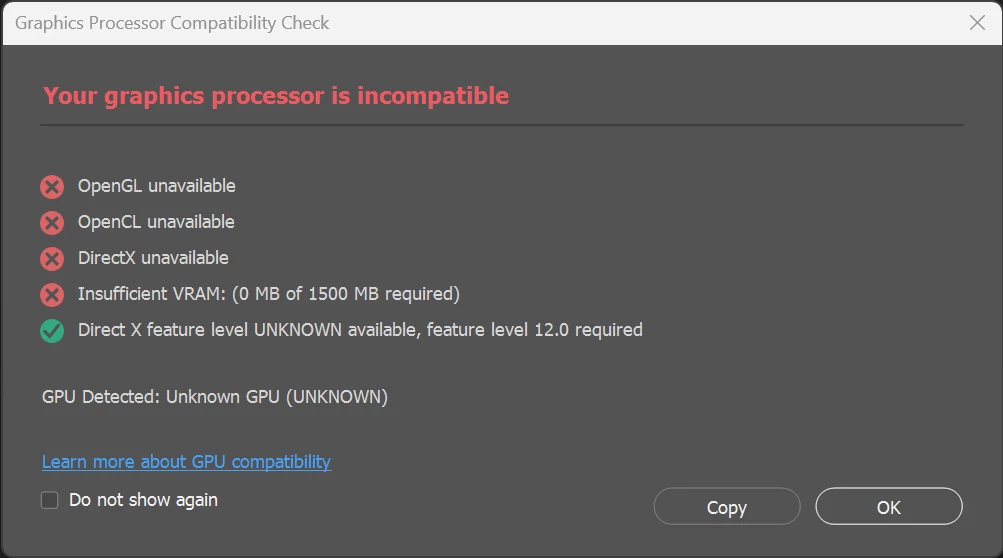
Neither Photoshop 25.1 nor 25.3 (beta) detect my graphics cards: Nvidia RTX 4090 and RTX 2080 TI. Adobe Lightroom, Davinci Resolve and Nuke have no problem working with the GPU on Windows 11.
- I have deleted the preferences for Photoshop.
- I have deleted the GPU folder and logs fpr CameraRaw.
- I verified that sniffer.exe detects both graphics cards.
- I have used Manage 3D to assign the RTX 4090 to Photoshop and sniffer.exe
- Installed the latest studio drivers (2023-11-01)
- Used GPU-Z to verify that everything looks normal.
The error remains the same:
I tried Adobe customer support and they told me to install the latest AMD GPU driver - Haha 🙂
I would appreciate any help here.
 AdChoices