
Photoshop not detecting RAM, VRAM and UNKOWN GPU detected
Hi Everyone. Please help me fix this problem.
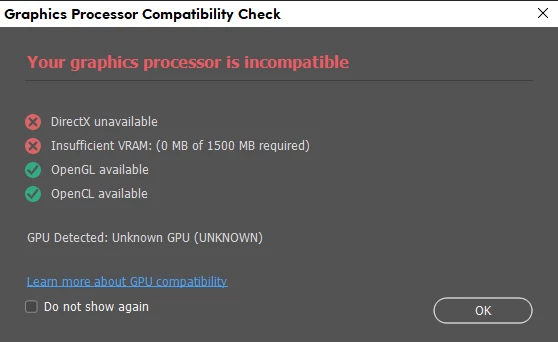
After a fresh installation of Windows 10 and reinstalling Photonhop in my m, chine I get the following message when opening photoshop.
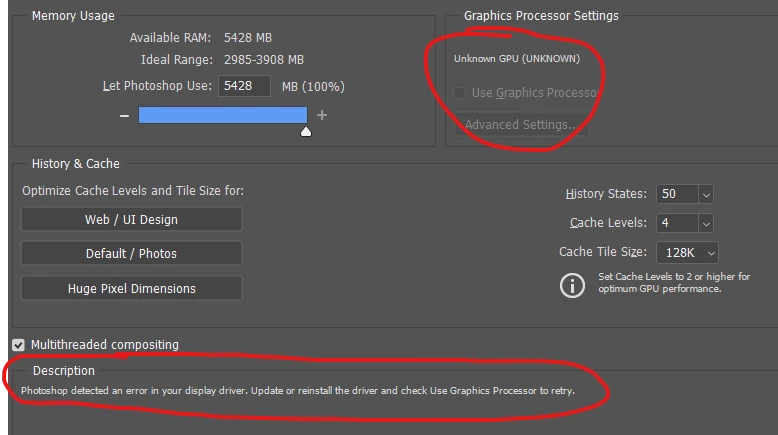
And after checking the "Performance Tab" under "Edit Preferences", I see that photoshop doesn't detect all m. Therethere are 8GB of RAM installed in my machine but, PS only detects 5428MB. And also, it says that there are problems with the display driver
I have also checked the version of my DirectX and the Virtual Memory of my graphic card and I have DirectX12 and 1792MB of Virtual Memory
------------------
System Information
------------------
Time of this report: 2/14/2023, 02:06:12
Machine name: DESKTOP-4LA12PO
Machine Id: {196DD309-F1F2-4AE8-B8A0-682DB89457A5}
Operating System: Windows 10 Pro 64-bit (10.0, Build 19045) (19041.vb_release.191206-1406)
Language: English (Regional Setting: English)
System Manufacturer: Dell Inc.
System Model: Latitude E5430 non-vPro
BIOS: A07 (type: UEFI)
Processor: Intel(R) Core(TM) i5-3320M CPU @ 2.60GHz (4 CPUs), ~2.6GHz
Memory: 8192MB RAM
Available OS Memory: 8066MB RAM
Page File: 4963MB used, 5021MB available
Windows Dir: C:\Windows
DirectX Version: DirectX 12
---------------
Display Devices
---------------
Card name: Intel(R) HD Graphics 4000
Manufacturer: Intel Corporation
Chip type: Intel(R) HD Graphics Family
DAC type: Internal
Device Type: Full Device (POST)
Device Key: Enum\PCI\VEN_8086&DEV_0166&SUBSYS_053C1028&REV_09
Device Status: 0180200A [DN_DRIVER_LOADED|DN_STARTED|DN_DISABLEABLE|DN_NT_ENUMERATOR|DN_NT_DRIVER]
Device Problem Code: No Problem
Driver Problem Code: Unknown
Display Memory: 1792 MB
Dedicated Memory: 32 MB
Shared Memory: 1760 MB
Current Mode: 1600 x 900 (32 bit) (60Hz)
I do not understand what can be the problem. I have updated all the drivers, and I tried downloading the previous version of Photoshop up to 21.0, but I always have the same problem.
What doesn't make sense is that before the fresh installation of Win 10, I had the latest version 24.11 of Photoshop and it was working fine.
I have followed most of the guides online I could find but I still have no luck
Any advice on how to fix this?
Thanks in advance
 AdChoices