
Photoshop not presenting alpha channel as expected (like I'm seeing GIMP does)
Greetings,
I have a need to edit the channels independently (the values in my image mean things numerically rather than just what it looks like visually - so I need to edit the grayscale values in each of the R - G - B - and A channels seperately).
I've searched through google and other forum posts and others bring up the concept of not understanding alpha versus transparency - but I have yet to see an explanation that fully explains what I'm experiencing.
The closest was http://forums.adobe.com/message/2563436#2563436 But while I saw the exact same symptoms being described, the specific question was never really answered.
Hopefully, a concrete example with pictures will be able to communicate the issue and solicit a useful explanation and/or solution.
While, I'm specifically working with an RGBA image, below is a screenshot of a PNG that demonstrates the exact same behavior or symptom. The screenshot below represents the PNG inside GIMP and PS CS4. BTW, if you'd like to see or play with the image yourself, you can grab the same image at http://www.libpng.org/pub/png/img_png/imgcomp-440x330.png
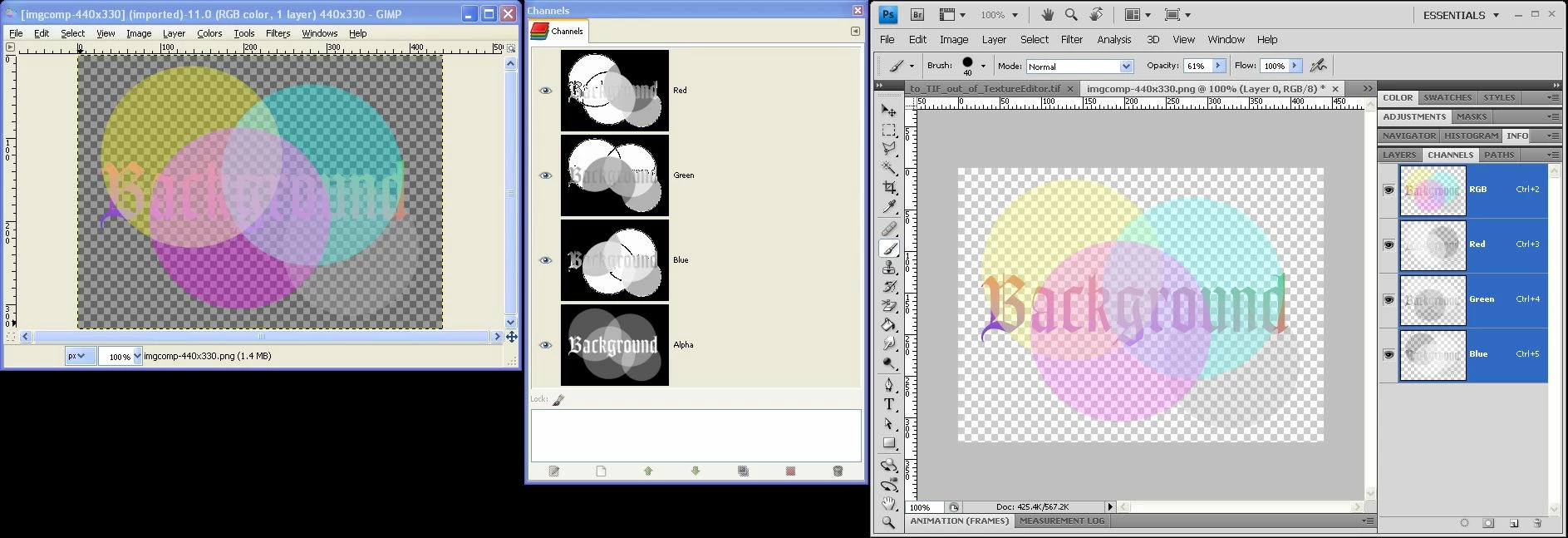
GIMP, interestingly enough loads the PNG as expected - I see the transparency of the image treated as a true alpha channel.
In PS CS4 however, the transparency seems to be somehow embedded in the Red - Green - and Blue channels; but NO seperate alpha channel.
I can create the alpha channel through Select - Load Selection - Layer 0 Transparency - and pasting that into a newly created alpha channel - but the color channels still have the transparency mixture symptom - rather than showing the JUST the color component of that channel. (Note the channel differences of the GIMP's Red Channel versus PS's Red Channel - Said in another way, the yellow ball in the upper left of the image should have a red value of 255, so the Red Channels grayscale upper left ball should be white like it is in GIMP, rather than Gray as it is in PS).
I never thought I'd experience GIMP being superior to Photoshop - so hopefully somebody can shed light on what is going on - what configuration I may have myself in - or a process to get the channels seperated out in the manner I wish to work with them. Furthermore, maybe somebody can educate the Photoshop community what the difference between transparency and alpha[transparency] is. I haven't found quite the right explanation that makes the light go off in my head yet. As best as I have gleened "Alpha", which can be applied to any kind of channel, typically is in reference to transparency - and is applied as a document-whole transparency (as opposed to transparencies applied at a layer level - such as a layer mask).
 AdChoices