Participant
January 4, 2022
Question

Photoshop not see all my memory

  • January 4, 2022
  • 4 replies
  • 621 views

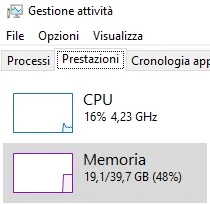
In my system I have 40Gb of RAM


but when I open a preferences panel on photoshop the available ram is only 32Gbyte ( in italian: RAM disponibile )
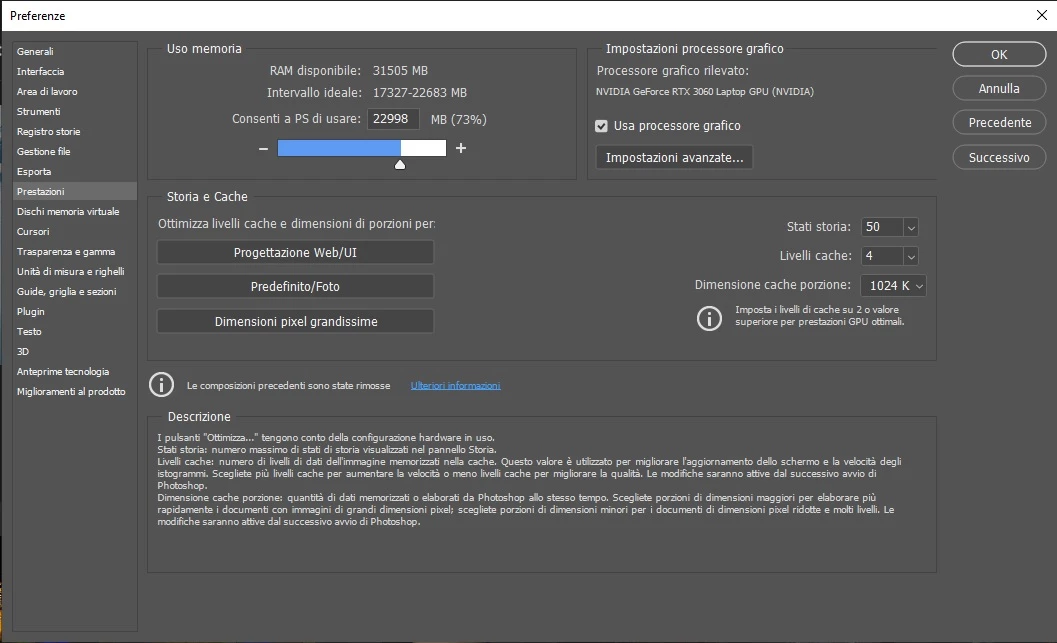


How can I fix it ?


Thank you in advance

This topic has been closed for replies.

4 replies

Ivan Zajats
Inspiring
January 5, 2022

I've got PS 2017 and 8GB RAM, the same problem, it sees only 3GB!!!

davescm
Community Expert
Community Expert
January 5, 2022

PS2017 did not have the same issue. Can you go to Help - System Info and press copy. Then paste the info here.

Dave

Ivan Zajats
Inspiring
February 14, 2022

davescm
Community Expert
Community Expert
January 4, 2022

This is the other thread. I'm not sure why my answer is marked correct in that thread as the issue is not solved

https://community.adobe.com/t5/photoshop-ecosystem-discussions/reduction-in-available-ram/m-p/12521155


Dave

RosaPerry
Inspiring
January 5, 2022

@davescm I also have the same issue, even with the newest version of Photoshop. I've tried to get answers from the community. 
It was addressed in a thread here: https://community.adobe.com/t5/photoshop-ecosystem-discussions/bug-wrong-ram-allocation-set-by-photoshop-22-4-3-compared-to-system-on-windows-10/m-p/12326119#M574977
and the response was this:-

nikunj.m  Adobe Employee , Aug 20, 2021
Hi, We're sorry about the trouble due to Photoshop not recognizing the correct amount of RAM on the computer. Our product team has logged this issue as a bug & they are working on a fix for this issue. Please add your vote to the bug here: https://feedback.photoshop.com/conversations/photoshop/photoshop-224-does-not-recognize-full-memory-ram-windows/609e58f1edbd975548b03a8b You can also follow the thread for updates related to the developments related to the issue. Regards, Nikunj
Rosa
davescm
Community Expert
Community Expert
January 4, 2022

This has been the case for a few versions now. Photoshop sees less RAM than it used to . On my system 48GB are ignored by Photoshop:


There is an older thread on this, if I can find it, I'll link it.


Dave

CrazyLifeAuthor
Participant
January 4, 2022

Versione di Adobe Photoshop: 23.1.0 20211208.r.143 83e47c5 x64
Sistema operativo: Windows 10 64 bit
Versione: 10 10.0.19044.1415
Architettura di sistema: Famiglia CPU Intel:6, Modello:13, Stepping:1 con MMX, Intero SSE, SSE FP, SSE2, SSE3, SSE4.1, SSE4.2, AVX, AVX2, HyperThreading
Conteggio processore fisico: 8
Conteggio processore logico: 16
Velocità processore: 2304 MHz
Memoria incorporata: 40661 MB
Memoria disponibile: 27187 MB
Memoria disponibile per Photoshop: 31505 MB