
Participant
December 25, 2017
Answered

Photoshop not working in layers

  • December 25, 2017
  • 2 replies
  • 2497 views

I just bought a Huion H640P. I tried to use it in layers in Photoshop CC 2018, but it draws in white. Even though I have black selected or any other color for that matter, it draws in white. This only happens when I use my pen (Not the pen tool, the drawing pen that came with the tablet).
    This topic has been closed for replies.
    Correct answer Trevor.Dennis

    It might be easier if you copy your entire workspace to the clipboard, and paste to this thread.  You will need the Brush tool selected, and the layer that you are drawing on.

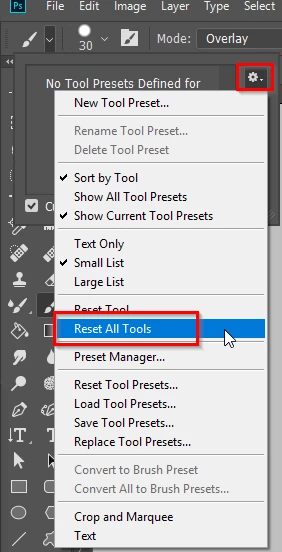
    Otherwise, as well as resetting Preferences, also reset all tools from the options bar

    2 replies

    Trevor.Dennis
    Community Expert
    Trevor.DennisCommunity ExpertCorrect answer
    Community Expert
    December 25, 2017

    It might be easier if you copy your entire workspace to the clipboard, and paste to this thread.  You will need the Brush tool selected, and the layer that you are drawing on.

    Otherwise, as well as resetting Preferences, also reset all tools from the options bar

    Sahil.Chawla
    Adobe Employee
    Adobe Employee
    December 25, 2017

    Hi,

    Could you please elaborate your issue a bit more, so that we can provide you a possible solution?

    Also, please let us know which version for Photoshop are you using & on which operating system?

    Please try resetting the preferences of Photoshop & let us know if it helps: Preferences in Photoshop

    If the above suggestion doesn't work then make sure that you are using the latest drivers for your tablet.

    Regards,

    Sahil

    Participant
    December 25, 2017

    Hi,

    I would be happy to tell you more about my issue. Recently, I have discovered that it doesn't actually draw in white. It simply changes to the eraser tool. While it may look like it is in the pencil tool, it's not. Also, whenever I use my stylus, no matter what tool I'm using, it draws (Keep in mind that it doesn't actually draw, it turns into an eraser). For example, if i'm using the stamp tool, then I draw with my stylus, it turns into an eraser. Even though it looks like I have the stamp tool equipped.

    I'm currently using macOS High Sierra v10.13.2.
    I'm using Photoshop CC 2018.

    Good regards

    Theresa J
    Community Expert
    Community Expert
    December 27, 2017

    I am not familiar with the Huion H640P. Did you instal a driver utility for the pen? I’ve only used Wacom products and they are managed with a utility that controls preferences, including eraser and pen pressure settings. The solution to your problem is probably with the pen, not Photoshop. Check and make sure you have the most currently utitlity installed for the pen.