Answered
Photoshop Options
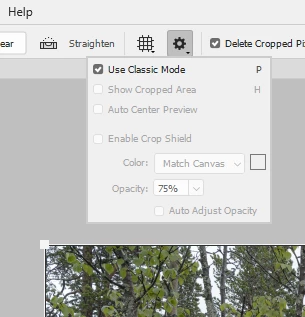
I have a problem with the large handles on the crop tool in 2020. How can I revert to Classic mode ? I can't seem to find an options menu.
Many thanks.

I have a problem with the large handles on the crop tool in 2020. How can I revert to Classic mode ? I can't seem to find an options menu.
Many thanks.
Click the cog wheel in the Options bar, and check Use classic mode.
Already have an account? Login
Enter your E-mail address. We'll send you an e-mail with instructions to reset your password.
 AdChoices