
Photoshop preference panel failed to open.
If i try to enter preference panel, by any way, then will give me a message box
"An integer between 96 and 8 is required. Closest value inserted."
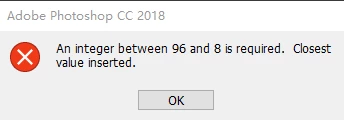
And it will show me General panel instead, and if I try to enter performance panel, will get the same error.
I've got 16GB memory installed, and I got 8.7GB of free memory available. Only 2MB is IMPOSSIBLE.
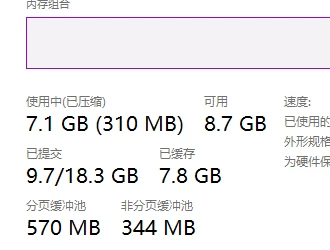
So will adobe fix the logic of how to fetch available memory? I think problem will be fixed by that way.
I googled for the solution and someone told me this problem happens after updating to FCU, I don't know if it's right.
https://www.reddit.com/r/photoshop/comments/7a569y/photoshop_issue_invalid_numeric_entry_an_integer/
ANY SOLUTION IS WELCOMED! Thanks in advance.
Adobe Photoshop Version: 19.0 20170929.r.165 2017/09/29: 1138933 x64
Number of Launches: 8
Operating System: Windows 10 64-bit
Version: 10 or greater 10.0.16299.15
System architecture: Intel CPU Family:6, Model:12, Stepping:3 with MMX, SSE Integer, SSE FP, SSE2, SSE3, SSE4.1, SSE4.2, AVX, AVX2, HyperThreading
Physical processor count: 4
Logical processor count: 8
Processor speed: 3592 MHz
Built-in memory: 16306 MB
Free memory: 2 MB
Memory available to Photoshop: 8 MB
Memory used by Photoshop: 100 %
Surface Dial: Enabled.
Alias Layers: Disabled.
Modifier Palette: Enabled.
Highbeam: Enabled.
Image tile size: 128K
Image cache levels: 4
Font Preview: Medium
TextComposer: East Asian
Display: 1
Display Bounds: top=0, left=0, bottom=1080, right=1920
Display: 2
Display Bounds: top=0, left=1920, bottom=1080, right=3840
Display: 3
Display Bounds: top=0, left=-1920, bottom=1200, right=0
Display: 4
Display Bounds: top=1088, left=0, bottom=2168, right=1920
OpenGL Drawing: Enabled.
OpenGL Allow Old GPUs: Not Detected.
OpenGL Drawing Mode: Advanced
OpenGL Allow Normal Mode: True.
OpenGL Allow Advanced Mode: True.
..............
 AdChoices