
tyler3394
Participant
December 20, 2018
Answered

Photoshop preset wont load D:

  • December 20, 2018
  • 4 replies
  • 2002 views

hello

I am trying to load .xmp presets into Photoshop, i am a windows user and i've copied my presets to C:\Users\user\AppData\Roaming\Adobe\CameraRaw\Settings but when i open Photoshop then camera raw and go to the preset section i see the default Photoshop presets not mine, Any ideas??

i am also running Photoshop version 20.0.1

also my camera raw general preferences for save image settings in is set to sidecar ".xmp" files.

[Moved from the defunct photography forum to a Photoshop support forum - moderator]
This topic has been closed for replies.
Correct answer Jeff Arola

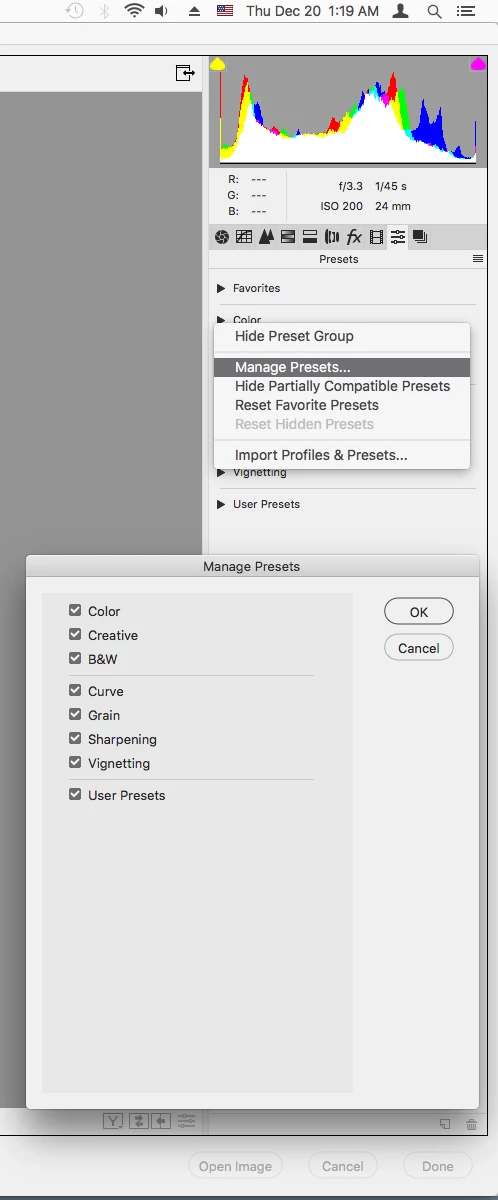
Also, right click somewhere in the Presets panel, click Manage Presets and verify User Presets is checked.

4 replies

tyler3394
tyler3394Author
Participant
December 21, 2018

i found the answer to my problem, i had to right click in camera raw in the preset section and select show partially compatible presets. then my presets appeared.

tyler3394
tyler3394Author
Participant
December 21, 2018

i dont have a user preset

Jeff Arola
Community Expert
Jeff ArolaCommunity ExpertCorrect answer
Community Expert
December 20, 2018

Also, right click somewhere in the Presets panel, click Manage Presets and verify User Presets is checked.

gener7
Community Expert
Community Expert
December 20, 2018

Good call Jeff. My loaded Presets appear there, and I can mouse over them just to see what each will do before selecting one.

I really havn't taken the time to learn it, but ACR is a powerhouse by itself.

gener7
Community Expert
Community Expert
December 20, 2018

Have you tried loading them via Camera Raw?

The open dialog would go to that directory. It's the MacOS equivalent, but just for illustration.

tyler3394
tyler3394Author
Participant
December 21, 2018

this is the error im getting when trying to load presets

gener7
Community Expert
Community Expert
December 21, 2018

You did give a clue what went wrong. Sidecar xmp files are different than Camera Raw setting xmp files.

Simply put, make some Camera Raw settings on an existing picture in Camera Raw. Then select "Save settings" in the above panel menu and give it a name. Save it to the Desktop so you can easily copy it to your other computer. Place it in the setting directory there and use the Load settings command if you still don't see it under Users Preset.