
JLewis24
Participating Frequently
September 26, 2018
Answered

Photoshop Print Settings (CC 2018)
  • September 26, 2018
  • 1 reply
  • 468 views

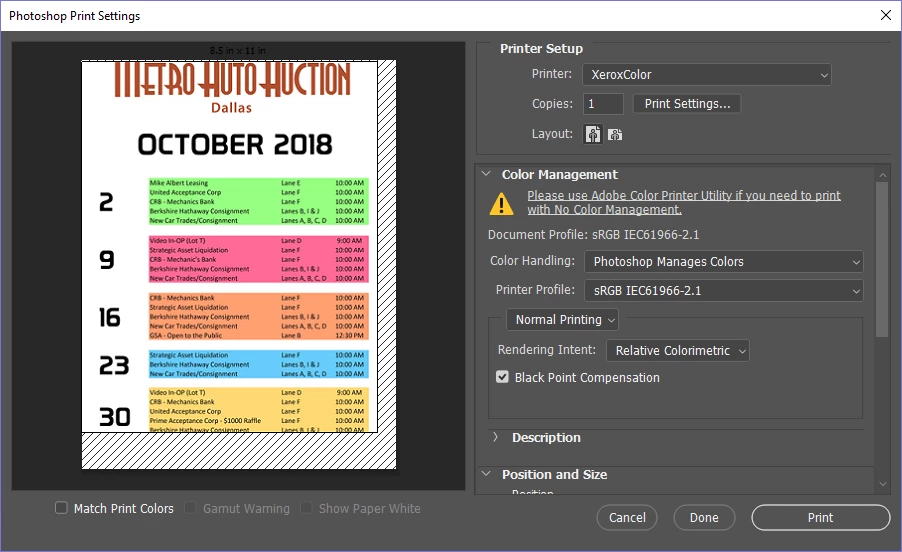
So I'm experiencing a glitch that causes the "printable area" to shift and trying to print causes the image to be small, in the top left corner. Nothing I've tried has caused this to go away and I can't move the "printable area". This has happened somewhat regularly and goes away without me making changes, restarting PS, etc. it just comes and goes as it pleases.

Help would be appreciated as this is work-related, not personal.

    This topic has been closed for replies.
    Correct answer Sahil.Chawla

    Hi JLewis,

    We're sorry to hear about the issue with the print settings, could you please try tapping the space key when you hit File > Print and see if it helps?

    Also, which exact version of Photoshop are you working on and which operating system are you using?

    Regards,
    Sahil

    1 reply

    Sahil.Chawla
    Adobe Employee
    Sahil.ChawlaCorrect answer
    Adobe Employee
    September 26, 2018

    Hi JLewis,

    We're sorry to hear about the issue with the print settings, could you please try tapping the space key when you hit File > Print and see if it helps?

    Also, which exact version of Photoshop are you working on and which operating system are you using?

    Regards,
    Sahil

    JLewis24
    JLewis24Author
    Participating Frequently
    September 26, 2018

    Using the spacebar worked, I'm assuming that it opens the print settings with default settings?

    I'm on Windows 10 Pro using Photoshop CC 19.1.5 Release

    Sahil.Chawla
    Adobe Employee
    Adobe Employee
    September 27, 2018

    Glad we got it working! Yes, tapping the spacebar resets the print settings to default. I would request you to update Photoshop to the latest version 19.1.6 via the Creative Cloud desktop app.