
Participant
July 11, 2019
Question

Photoshop "Text on selection" tool not present

  • July 11, 2019
  • 3 replies
  • 983 views

Hello,

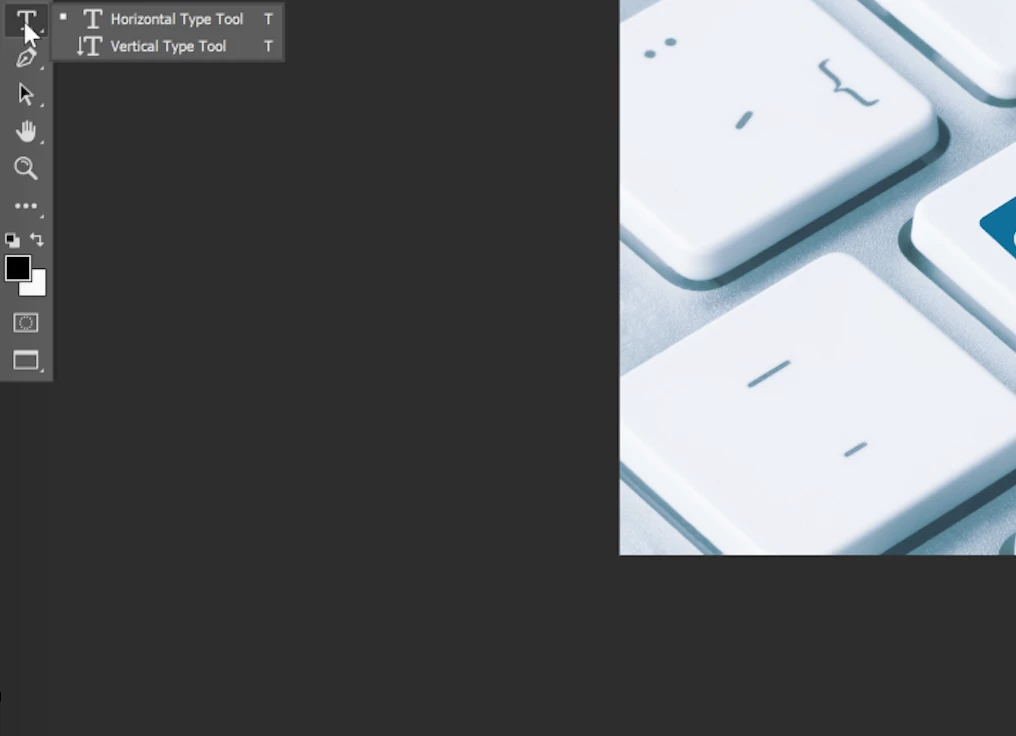
I am trying to use the "Text on selection" tool but its not present on my Photoshop or at least I cannot figure out how to add that toolbar option if that is the case. From the videos I watched it should be on the left side toolbar on the "T" or at the bottom when you are inserting text.

I am using Photoshop version 20.0.5. Any help much appreciated.
    This topic has been closed for replies.

    3 replies

    Participant
    July 12, 2019

    Thank you, All. I discovered to create the text in a shape or something you must first create the shape, then click the "T" in the toolbar and then put the cursor on the outside or inside of the shape until it changes symbols then click and you can add text on the curve or along the shape.

    Sahil.Chawla
    Adobe Employee
    Adobe Employee
    July 11, 2019

    Hi Zachary,


    That does not sound right, let's fix it!

    As the Text on Selection tool is not appearing in Photoshop, could you please try resetting the toolbar and let us know if it helps?

    Tools missing from the toolbar Photoshop CC 2015

    Regards,
    Sahil

    Participant
    July 11, 2019

    Hi Sahil,

    I just tried the steps of resetting toolbar and resetting workspace and then restarting Photoshop but I still don't have the "text on selection".

    Legend
    July 11, 2019

    There is no Text on selection tool. I assume you mean text on a path?

    If so you need to make a path first. When you then hover over the path the text tool will change so you can make the text follow the path.

    July 11, 2019

    Hi

    Not sure what you mean by "text on selection tool" have checked what Workspace you're using

    Also check Edit > Toolbar

    Participant
    July 11, 2019

    I was previously on workspace "photography". After your comment, I changed it to "Essentials (Default)" and I now have two additional items but not "text on selection". I also looked in the edit > toolbar settings and I don't see an option for "text on selection".