
Exit
  • Global community
    • Language:
      • Deutsch
      • English
      • Español
      • Français
      • Português
  • 日本語コミュニティ
  • 한국 커뮤니티
0

photoshop radial gradient tool quick change

Community Beginner ,
Feb 21, 2025 Feb 21, 2025

How can i quick change photoshop radial gradient tool 


I often switch between linear and radial gradients, and I would like to be able to quickly switch between them without having to click the mouse every time.
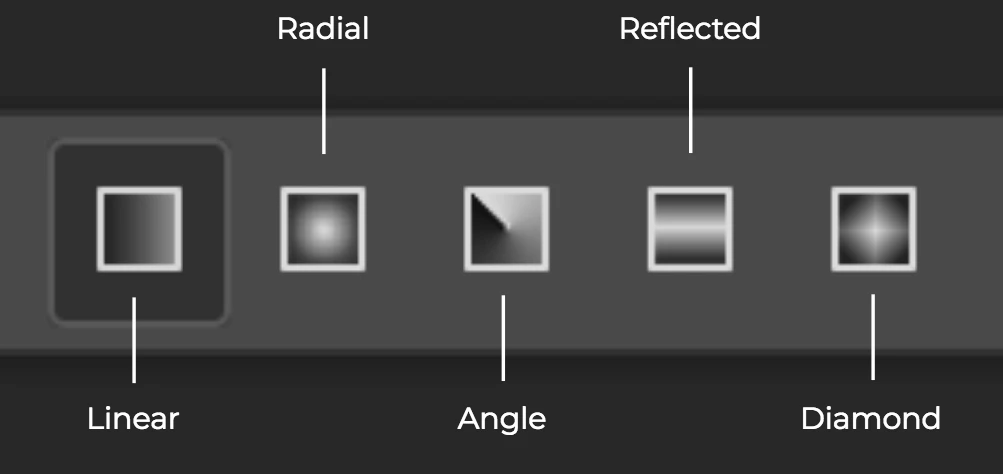
스크린샷 2025-02-21 19.11.45.png

have like this any shorcut? or can i make scripting for this?

TOPICS
Actions and scripting , macOS
373
Translate
Report
Community guidelines
Be kind and respectful, give credit to the original source of content, and search for duplicates before posting. Learn more
community guidelines
Adobe
Community Expert ,
Feb 21, 2025 Feb 21, 2025

It's not possible to record an action to change the gradient type, at least that's what I believe. I'll wait for the scripters to see this thread, but I'm suspicious that it is possible using a script either.

Translate
Report
Community guidelines
Be kind and respectful, give credit to the original source of content, and search for duplicates before posting. Learn more
community guidelines
Community Expert ,
Feb 21, 2025 Feb 21, 2025
quote

It's not possible to record an action to change the gradient type, at least that's what I believe. I'll wait for the scripters to see this thread, but I'm suspicious that it is possible using a script either.


By @Bojan Živković


If it can't be recorded in an action, scripting it would require a deeper knowledge of Action Manager code than I possess.


Usually with actions, you can record the selection of a tool preset, with the tool preset having the desired properties.

Translate
Report
Community guidelines
Be kind and respectful, give credit to the original source of content, and search for duplicates before posting. Learn more
community guidelines
Adobe Employee ,
Feb 21, 2025 Feb 21, 2025

The keyboard shortcut is simply the bracket keys (no modifiers): [ to go left, ] to go right 


Just for fun: the period (.) and comma (,) keys will cycle through the gradient presets

Translate
Report
Community guidelines
Be kind and respectful, give credit to the original source of content, and search for duplicates before posting. Learn more
community guidelines
Community Expert ,
Feb 21, 2025 Feb 21, 2025
LATEST
quote

The keyboard shortcut is simply the bracket keys (no modifiers): [ to go left, ] to go right 


Just for fun: the period (.) and comma (,) keys will cycle through the gradient presets


By @BrettN


Solid gold!  🙂

Translate
Report
Community guidelines
Be kind and respectful, give credit to the original source of content, and search for duplicates before posting. Learn more
community guidelines