pjscott51
Participating Frequently
June 18, 2022
Answered

Photoshop Save to the Cloud

  • June 18, 2022
  • 2 replies
  • 871 views

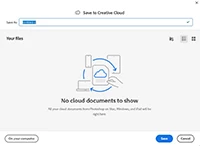
Hi, How can I get rid of this popup to save to the Adobe Cloud?

I always save to my PC so I have no need or interest to save to the Adobe Cloud. Thanks
Correct answer Derek Cross

Try: Edit > Preferences > File Handling > File Saving Options > Default File Location > Select "On Your Computer"

2 replies

Derek Cross
Community Expert
Derek CrossCommunity ExpertCorrect answer
Community Expert
June 18, 2022

Try: Edit > Preferences > File Handling > File Saving Options > Default File Location > Select "On Your Computer"

pjscott51
pjscott51Author
Participating Frequently
June 19, 2022

Thanks for the help.

Zesty_wanderlust15A7
Known Participant
June 18, 2022

If something is not your preference, first thing to go look is... Preferences 😉

(or the dozens of similar threads)

Trevor.Dennis
Community Expert
Community Expert
June 19, 2022

There is a bit of a clue in there being so many threads on the subject.  It took me a good few seconds to find the setting.  It's almost as if we are being encouraged to save to the cloud by default.   It's a useful feature if you need it.  Does anyone here have experience of using cloud storage in two locations when the file is still open in the other location?  You'd expect it to be locked unless you save with a different file name, but that would get very messy.  I'd be interested in how it is managed?  Anyone?

jane-e
Community Expert
Community Expert
June 19, 2022

@Trevor.Dennis wrote:

Does anyone here have experience of using cloud storage in two locations when the file is still open in the other location?  You'd expect it to be locked unless you save with a different file name, ...


I suspect this is a Windows-only question Trevor, as Macs don't have an issue with opening the same file in multiple applications. You can also move, rename, and delete a file while it's open. 😊


Jane
