Ncosgrove
Known Participant
July 20, 2018
Answered

Photoshop saves as a '3 File' format .3

  • July 20, 2018
  • 2 replies
  • 1755 views

This is a strange occurrence that does not happen often. I have also had this issue with InDesign when saving an .indd file and when I save as .pdf.

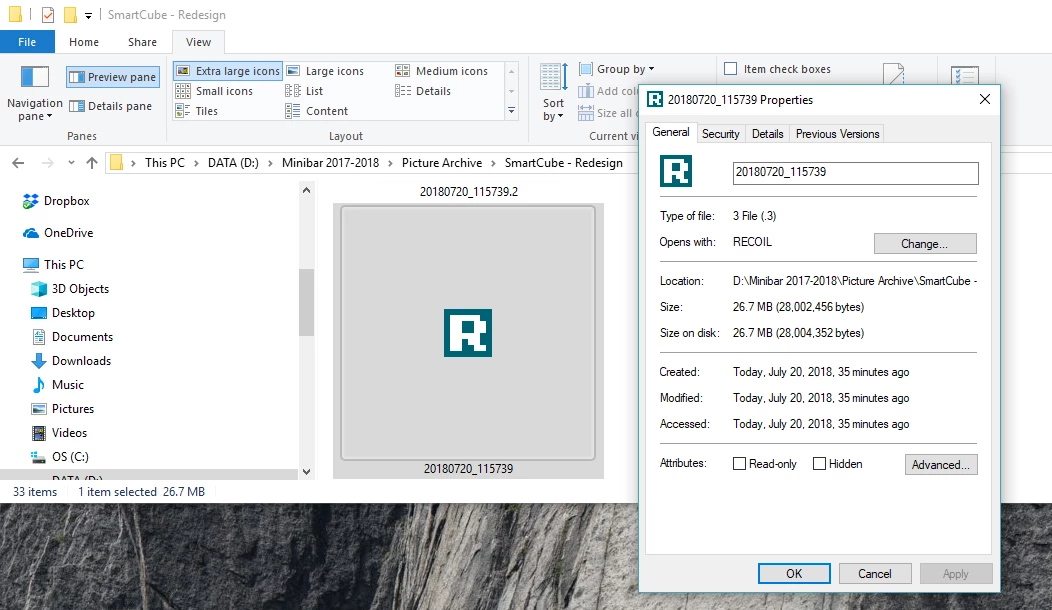
My issues is that after I save the file as .psd or .tiff and .jpg it is instead saved as a .3 or '3 File'. I have never heard of this format before (see screen capture). My thought is that when I make revisions to a document like rev.1 or rev.2, when it is saved as a rev.3 this is causing the issue. I never had this problem before until I upgraded my PC.

I have searched, and searched, to find a possibly answer and had hoped that with the recent update the problem might have fixed itself but I just ran into this bug again so am now reaching out.
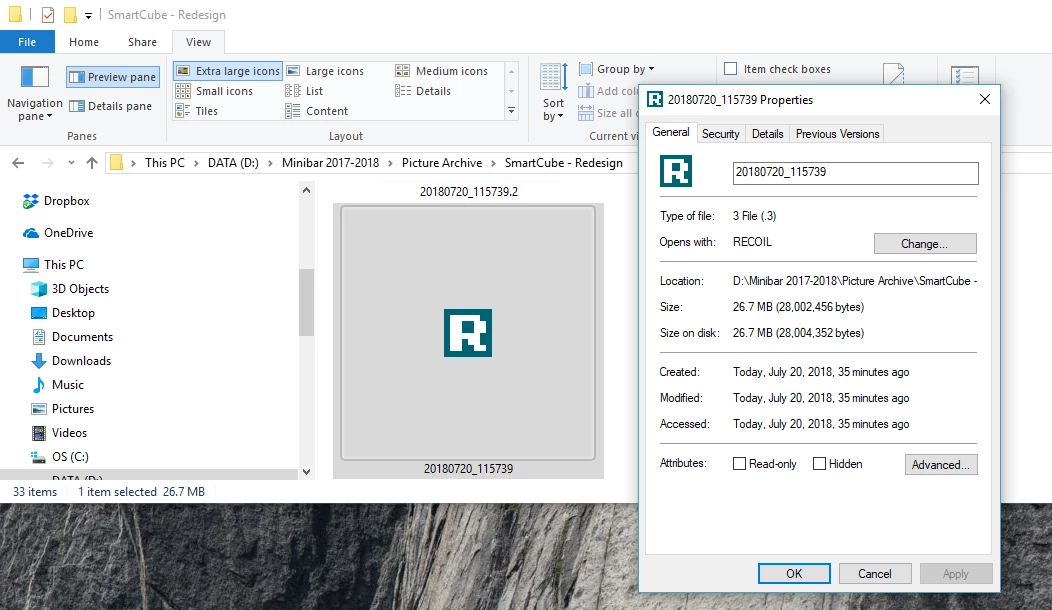
I have also noticed that the file saved is roughly 6.5 times larger than the original.

Thanks!

Best Regards,

Coz
This topic has been closed for replies.
Correct answer JJMack

File names may have many "." in the name and may also contain contain space character.   A file name "John J. McAssey Jr..jpg"  Is valid and  has a file extension ".jpg"  It a jpeg image.

"name_rev.3.psd"  is a valid name for a PSD file.

"name_rev.3.tiff" is a valid name for a Tiff image though "name_rev.3.tif" would be more normal on windows

"name_rev.3.jpg" is a valid name for a jpeg image though "name_rev.3.jpe"  may be more normal on a Mac

You stated you were seeing file with an ".3" extension.  That you should not see.    You may want to set you file explorer folder view options to display file extensions.

Here you show file type .3 not ,psd or  .tif, or .jpg ???

2 replies

Ncosgrove
NcosgroveAuthor
Known Participant
July 23, 2018

Ok,

So I just had this happen again to me when attempting to save a file as a .pdf. I was also able to repeat the glitch and it happened again, meaning that we are able to test this.

It did not matter which app I was using and the glitch happened in both Photoshop and Indesign. When I try and save as a PDF with a file name of "My_File_Name_Rev_2.3.pdf" it instead saves it as "My_File_Name_Rev_2.3".

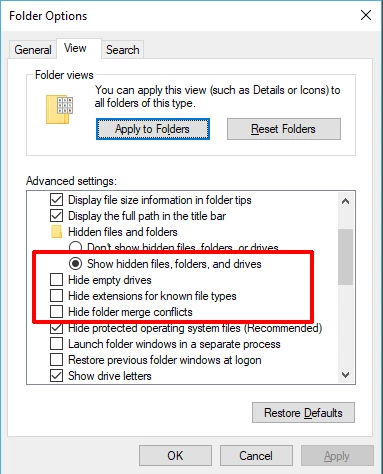
It seems to have an issue with ".3" even when the save as file type is set to PDF. Apparently the work around is you have to type the file extension instead of letting the save as dialog box automatically add the extension. Windows folder options has file extensions hidden by default so you need to uncheck this to ensure that the extension is there because otherwise Adobe thinks you are trying to save as file type ".3".

It is silly and I did not have to do this in the past but what are you going to do ¯\_(ツ)_/¯

JJMack
Community Expert
Community Expert
July 23, 2018

What add on are you using to add the _Rev_Code to the document name? The issue seems to be related to your Photoshop environment.

JJMack
JJMack
Community Expert
Community Expert
July 20, 2018

Ncosgrove  wrote

My issues is that after I save the file as .psd or .tiff and .jpg it is instead saved as a .3 or '3 File'.

That is your issue. That should not happen. All that should be save is Name.psd,  Name.tiff  and Name.jpg.   There should be no file Name.3  on your system.

What is causing Save to fail not save the file you set it to save? How are you saving files? Or what is renaming and changing the files you save.

JJMack
Ncosgrove
NcosgroveAuthor
Known Participant
July 20, 2018

@JJmack That is how I save the files: name.psd, name.tiff or name.jpg. The file name has revisions tied in with it like: name_rev.3.psd, name_rev.3.tiff, name_rev.3.jpg. This is a way of tracking changes made from previous versions and it has been working with photoshop for the past decade so I would not see this as the problem. It has worked with Adobe CC in the past and has only recently become an issue when I upgraded my PC.

I do not think that this is a naming issue because it would have had an impact on my prior work.

Oh and the saving does not fail but it is an unrecognized file format that no program or app can open. Which makes one think, how is that even possible?

JJMack
Community Expert
JJMackCommunity ExpertCorrect answer
Community Expert
July 21, 2018

File names may have many "." in the name and may also contain contain space character.   A file name "John J. McAssey Jr..jpg"  Is valid and  has a file extension ".jpg"  It a jpeg image.

"name_rev.3.psd"  is a valid name for a PSD file.

"name_rev.3.tiff" is a valid name for a Tiff image though "name_rev.3.tif" would be more normal on windows

"name_rev.3.jpg" is a valid name for a jpeg image though "name_rev.3.jpe"  may be more normal on a Mac

You stated you were seeing file with an ".3" extension.  That you should not see.    You may want to set you file explorer folder view options to display file extensions.

Here you show file type .3 not ,psd or  .tif, or .jpg ???

JJMack