
Participant
May 29, 2019
Question

Photoshop saves main file when saving smart objects

  • May 29, 2019
  • 4 replies
  • 1496 views

Hi all,

I'm working on several large photoshop files that contain high resolution .TIF files, and need to work on the smart objects within the files to change text values and then bulk render. The only issue is that there are hundreds of product images that need to be changed and Photoshop decides to save the main file every time I save a smart object - the main PSB file saves too. (In this case, it's "# HOME #.psb")
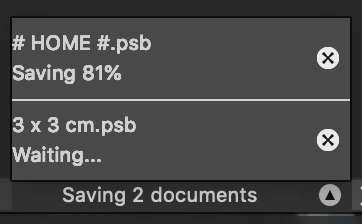
This happens almost every single time and prevents me from doing any work.

As the main PSBs need to be accessible by our graphics team, it's stored remotely on a server, which makes it even slower when it decides to save itself - the file is over 20GB.

Any help would be greatly appreciated!

Dan

    This topic has been closed for replies.

    4 replies

    Participant
    May 30, 2019

    c.pfaffenbichler
    Community Expert
    Community Expert
    May 30, 2019

    I’m getting royally annoyed by this tabbed view that prevents us from seeing pertinent elements of the other windows.

    But as it looks like the containing file is plainly not saving at the time you open the SOs there seems to be something very peculiar going on.

    What have you done for general trouble-shooting so far?

    Restoring Preferences after making sure all customized presets like Actions, Patterns, Brushes etc. have been saved might be a good starting point:

    https://helpx.adobe.com/photoshop/kb/basic-trouble-shooting-steps.html

    JJMack
    Community Expert
    Community Expert
    May 29, 2019

    In both of your screen captures you seem to show file " # Home #.psb" being saved and hung at 81% and 80%.  If this file is the master file the contains the smart  object layer that you are editing the object.  Did you X out the wrong document and you are saving your master that you are editing one of its smart object layer's object.

    Why is " # Home #.psb" being saved if you did not use save on the master opened document?

    Have you reset your Photoshop Preferences and Photoshop tools?

    JJMack
    Participant
    May 30, 2019

    Sorry for all the confusion:

    The steps are this,

    Master file contains all of the smart objects which are all different products that we sell.

    I double click one of the smart objects to edit it.

    In the smart object there is another smart object that contains the dimensions box.

    I double click on that smart object to edit it.

    I change the value of the dimensions box using the text tool.

    I attempt to save the dimensions box smart object by pressing X on the SO tab (it also happens when I Cmd+S)

    The tab doesn't close because it attempts to save the master file.

    It only closes once the master file fully saves and can then save itself.

    I then try to save its parent SO to update the master file, the same thing happens.

    I'll try and do screenshots when I return to this project this afternoon, thanks for all your help!

    JJMack
    Community Expert
    Community Expert
    May 29, 2019

    daniela91281617  wrote

    Hi all,

    I'm working on several large photoshop files that contain high resolution .TIF files, and need to work on the smart objects within the files to change text values and then bulk render.

    Dan

    I do not quite follow your work-flow.  Are these large Photoshop files mockup templates that contain Smart object layers that will have their Object Replaced or Updated by editing the Object.   If that is the case the Large Photoshop Template files should not be updated by overwriting it.  All that should be saved out us a output populated product mockup file like a jpeg file. The opened template document should be closed without saving any updated smart object layer. You do not want to change your master template file.  If the master template file is on a network file all user use.  If Photoshop lock that file for updated when a user opens the file it could well lock out other users.  Perhaps if you set that file attribute to Read only.  Photoshop will not lock the file for exclusive use.

    Adobe states that Adobe does not support network files.  It is not that  network file sharing does not work.  Its because networks can have problems and there can be contention for files.  Adobe does not supply any shared library system other than Adobe Cloud Libraries.  I do not use Adobe Cloud libraries and I when a users shares a library the library is synced to a local copy on the users machines. So all users in the case would have their own copy the the master template file in their shared cloud library.  The master files would be a synced copy on each users machine. A local file.

    JJMack
    Participant
    May 29, 2019

    Thanks JJ, I've now moved it to a separate SSD that is only able to accessed by me - the issue still happens annoyingly, so I'm now sure it's nothing to do with the server. The TIF files are all mockups by our parent company that were sent to us to rebrand to our company specs.

    I have just attempted to save another product image SO and the same thing happened again. I pressed the X on the smart object to close it and clicked "Save" on the popup in case it was the excessive use of Cmd+S, but the same thing has happened again.

    On the modified SO, bottom left, it's saving 2 documents again.

    I appreciate this is a very weird instance and I couldn't find anything about it online!

    c.pfaffenbichler
    Community Expert
    Community Expert
    May 29, 2019

    Could you please posts two screenshots that include both complete untabbed document windows

    • one before you invoke the close/save and

    •  one immediately after

    ?

    c.pfaffenbichler
    Community Expert
    Community Expert
    May 29, 2019
    Photoshop decides to save the main file every time I save a smart object

    That does not sound plausible, but then again if it’s a bug that would have to be expected …

    Might the main document simply still be saving from a previous invocation because of its enormous size?

    Do you have Scripts or Actions linked to events in File > Scripts > Script Events Manager?

    Might you accidentally be hitting cmd-S too often?

    What is your Photoshop > Preferences > File Handling > Automatically Save Recovery Information Every … setting?

    Participant
    May 29, 2019

    Thanks for your reply,

    It's a very strange occurrence. It's not saving whilst I'm working on the SO, and that's the weird bit, because it starts saving the large 20GB file before it saves the smart object that I've attempted to save.

    No scripts are enabled and the recovery settings are set to 10 minutes apart.

    I've transferred the PSB to a local SSD and set scratch disks to the same SSD to see if that improves it, otherwise I'll just assume that it's a bug or an auto-save.

    c.pfaffenbichler
    Community Expert
    Community Expert
    May 29, 2019

    I think the auto-save should not register anyway but I am not 100% sure.

    How long does the containing document roughly take to save?

    Could you post a screenshot (in non-tabbed View, so with both the containing doc and the SO visible as individual windows) before and after you start the save of the SO?