jordanh79084855
Participant
April 9, 2019
Question

Photoshop scratch disk full

  • April 9, 2019
  • 3 replies
  • 1174 views

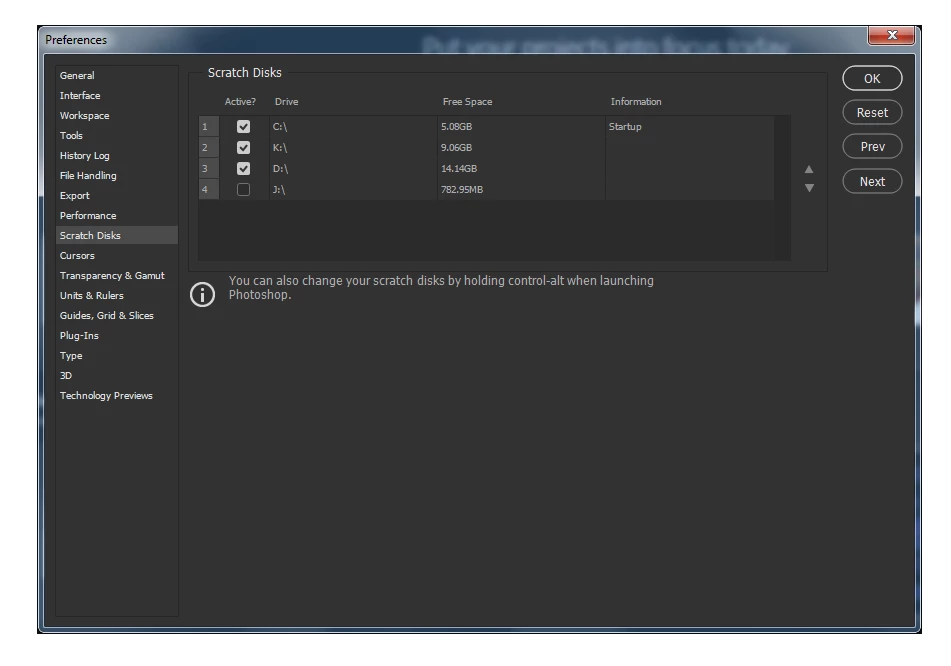
Hi, im currently having issues trying to open a file when previously I never had problems opening large files. The file is 500mb I've changed the scratch disks etc on which loads but still nothing, tried cleaning up space which I did still nothing and I deleted the temp files not needed and still not opening and getting the error message. Im getting very frustrated as all my disks apart from one (games drive) have atleast 5gb free and still I cannot open the file. I've come across this error before months ago but was sorted quickly and never had it again till now, I've run out of ideas if anyone can help.

All responses are greatly appreciated

Thanks

Update - I have just opened a 1gb file within 20 seconds but the file I cannot open is half the size? how does that make sense?

Message was edited by: Jordan Harte

This topic has been closed for replies.

3 replies

Participant
April 10, 2019

Hi everyone,

If you guys don't mind helping me out too.. Mac user, Scratch disks full, but I have 50.13 GB free space... Any advice? trying to open file of 114 MB but I keep getting that pop up message...

Unfortunately I don't have an extra Harddrive at this stage...should I try and get rid of the temp files / clear cache?

Please find attached some screenshots. Would appreciate your feedback.

Thanks in advance!

Legend
April 10, 2019

Try restarting your computer. And an external hard drive would be a good investment.

Participant
April 10, 2019

Thank you for your feedback, unfortunately a restart just never seems to do the trick...

D Fosse
Community Expert
Community Expert
April 9, 2019

Yes, you are alarmingly low on disk space. 5GB on the system drive is an emergency situation and you will soon have much bigger problems than Photoshop. Your whole system is about to choke. You really need to clean out ASAP.

jordanh79084855
Participant
April 9, 2019

Thankyou both for your replies, bit baffed as I have had the same drive space for over 4 or so months now and nothing alarming has happened. Will take into account free up space then update on here. Will be tomorrow, but thanks again for the quick replies and helpful info.

melissapiccone
Community Expert
Community Expert
April 9, 2019

Your disks are too full... you need to have way more free space to work. Your hard drive should always have 25% of free space for your computer to function properly. This trend to small hard drives is causing problems.

Melissa Piccone | Adobe Trainer | Online Courses Author | Fine Artist