MacPhobic
Inspiring
January 29, 2020
Question

Photoshop - Scratch Disks

  • January 29, 2020
  • 2 replies
  • 520 views

Hoping someone can help.

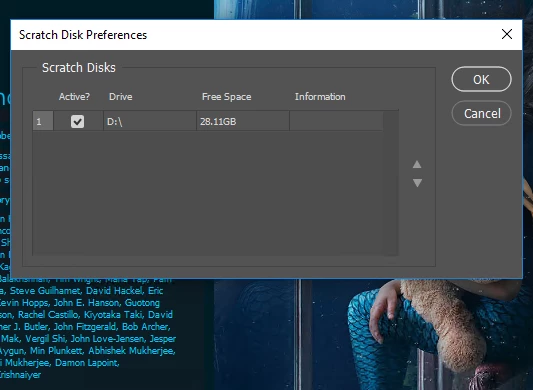
Is there a reason why the C: drive isn't showing up in the Scratch disks window?

How can we add it?
This topic has been closed for replies.

2 replies

Legend
January 30, 2020
Run photoshop as administrator or open access to the root of the C: drive for a regular user.
 
MacPhobic
MacPhobicAuthor
Inspiring
January 30, 2020

Thanks @r-bin!  Okay, but that's not the problem. But you're close with running as administrator does work. But WE are admins on the box and if we run it normally, we still get the error. We're wondering if there's somewhere on C: PS is trying to access that it doesn't have access to. But where?

MacPhobic
MacPhobicAuthor
Inspiring
January 30, 2020

Anyone? Why isn't Photosop seeing the C: drive? and how can we add it? We can't add C: when we launch PS with the key command. and we can't add it via Edit > Preferences. We need to be able to work and save files to the D drive. THOUGHTS?
