
Mohamed Hameed21513110
Inspiring
November 23, 2021
Answered

Photoshop script how to select multi layers by size ( CM or inch)

  • November 23, 2021
  • 3 replies
  • 9721 views

Hi every body how i need to know how to select all photoshop layers by size or diminsion ( CM or inch ) Please

This topic has been closed for replies.
Correct answer c.pfaffenbichler

- It is not necessary to carry out the required if this is difficult
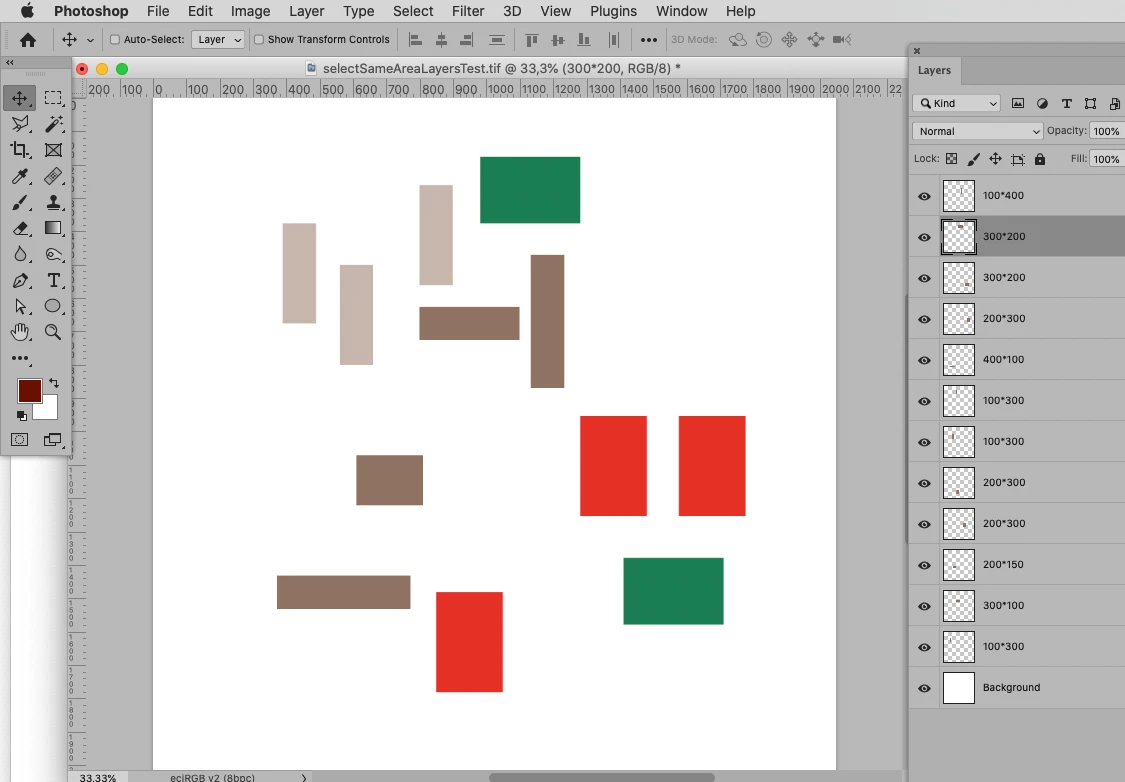
- Is there a problem with collecting all the layers of the same size and putting them in a group
I want to get to the nearest solution to the problem


How familiar are you with JavaScript and Photoshop Scripting? 

Are you capable of adapting a Script that contains the necessary basic operations to your needs? 


The below Script should group Layers that have the same bounds dimensions and align them horizontally in the group (see screenshots). 
 

// group layers of the same bounds dimensions;
// 2021, use it at your own risk;
if (app.documents.length > 0) {
    var theLayers = collectLayersBounds ();
    theLayers.sort(sortArrayByIndexedItem);
    var theIndex = 1;
    var theArray = [[theLayers[0]]];
    while (theIndex != theLayers.length) {
        if (theArray[theArray.length-1][0][3] == theLayers[theIndex][3]) {
            theArray[theArray.length-1].push(theLayers[theIndex])
        }
        else {theArray.push([theLayers[theIndex]])};
        theIndex++
    };
// group layers;
    for (var m = 0; m < theArray.length; m++) {
        selectLayerByID(theArray[m][0][2], false);
        for (var n = 1; n < theArray[m].length; n++) {
            selectLayerByID(theArray[m][n][2], true);
        };
        groupSelectedLayers (theArray[m][0][3])
    };
// move layers;
    for (var o = 0; o < theArray.length; o++) {
        var theW = Number(theArray[o][0][3].split("*")[0]);
        for (var n = 1; n < theArray[o].length; n++) {
            moveLayer (theArray[o][n][2], theArray[o][0][4]-theArray[o][n][4]+theW*n, theArray[o][0][5]-theArray[o][n][5]);
        };
    };
};
////////////////////////////////////
// based on code by mike hale, via paul riggott;
function selectLayerByID(id,add){ 
add = undefined ? add = false:add 
var ref = new ActionReference();
    ref.putIdentifier(charIDToTypeID("Lyr "), id);
    var desc = new ActionDescriptor();
    desc.putReference(charIDToTypeID("null"), ref );
       if(add) desc.putEnumerated( stringIDToTypeID( "selectionModifier" ), stringIDToTypeID( "selectionModifierType" ), stringIDToTypeID( "addToSelection" ) ); 
      desc.putBoolean( charIDToTypeID( "MkVs" ), false ); 
   try{
    executeAction(charIDToTypeID("slct"), desc, DialogModes.NO );
}catch(e){
alert(e.message); 
}
};
////// collect layers //////
function collectLayersBounds () {
    // the file;
    var myDocument = app.activeDocument;
    // get number of layers;
    var ref = new ActionReference();
    ref.putProperty(stringIDToTypeID('property'), stringIDToTypeID('numberOfLayers'));
    ref.putEnumerated( charIDToTypeID("Dcmn"), charIDToTypeID("Ordn"), charIDToTypeID("Trgt") ); 
    var applicationDesc = executeActionGet(ref);
    var theNumber = applicationDesc.getInteger(stringIDToTypeID("numberOfLayers"));
    // process the layers;
    var theLayers = new Array;
    for (var m = 0; m <= theNumber; m++) {
    try {
    var ref = new ActionReference();
    ref.putIndex( charIDToTypeID( "Lyr " ), m);
    var layerDesc = executeActionGet(ref);
    var layerSet = typeIDToStringID(layerDesc.getEnumerationValue(stringIDToTypeID("layerSection")));
    var isBackground = layerDesc.getBoolean(stringIDToTypeID("background"));
    // collect values;
    if (layerSet != "layerSectionEnd" && layerSet != "layerSectionStart" && isBackground != true) {
    var theName = layerDesc.getString(stringIDToTypeID('name'));
    var theID = layerDesc.getInteger(stringIDToTypeID('layerID'));
    var theIndex = layerDesc.getInteger(stringIDToTypeID('itemIndex'));
    var theColor = typeIDToStringID(layerDesc.getEnumerationValue(stringIDToTypeID("color")));
    var theBounds = layerDesc.getObjectValue(stringIDToTypeID("bounds"));
    var theX = theBounds.getUnitDoubleValue(stringIDToTypeID("left"));
    var theY = theBounds.getUnitDoubleValue(stringIDToTypeID("top"));
    var theW = theBounds.getUnitDoubleValue(stringIDToTypeID("right")) - theBounds.getUnitDoubleValue(stringIDToTypeID("left"));
    var theH = theBounds.getUnitDoubleValue(stringIDToTypeID("bottom")) - theBounds.getUnitDoubleValue(stringIDToTypeID("top"));
    theLayers.push([theName, theIndex, theID, theW+"*"+theH, theX, theY])
    };
    }
    catch (e) {};
    };
    return theLayers
    };
////// group //////
function groupSelectedLayers (theName) {
    var desc159 = new ActionDescriptor(); 
    var ref114 = new ActionReference(); 
    var idlayer = stringIDToTypeID( "layer" );
    var idordinal = stringIDToTypeID( "ordinal" );
    var idtargetEnum = stringIDToTypeID( "targetEnum" );
    var idnull = stringIDToTypeID( "null" );
    var idname = stringIDToTypeID( "name" );
    ref114.putEnumerated(idlayer, idordinal, idtargetEnum); 
    desc159.putReference(idnull, ref114 );
    desc159.putString(idname, "aaa" );
    executeAction( stringIDToTypeID( "groupLayersEvent" ), desc159, DialogModes.NO );
    var desc63 = new ActionDescriptor();
    var ref37 = new ActionReference();
    ref37.putEnumerated( idlayer, idordinal, idtargetEnum );
    desc63.putReference( idnull, ref37 );
    var desc64 = new ActionDescriptor();
    desc64.putString(idname, theName);
    desc63.putObject(stringIDToTypeID( "to" ), idlayer, desc64);
    executeAction(stringIDToTypeID( "set" ), desc63, DialogModes.NO)
};
////// sort a double array, thanks to sam, http://www.rhinocerus.net/forum/lang-javascript/ //////
function sortArrayByIndexedItem(a,b) {
    var theIndex = 3;
    if (a[theIndex]<b[theIndex]) return -1;
    if (a[theIndex]>b[theIndex]) return 1;
    return 0;
    };
////// move layer //////
function moveLayer (theID, hor, ver) {
selectLayerByID(theID, false);
    var desc77 = new ActionDescriptor();
    var ref38 = new ActionReference();
    var idlayer = stringIDToTypeID( "layer" );
    ref38.putEnumerated( idlayer, stringIDToTypeID( "ordinal" ), stringIDToTypeID( "targetEnum" ));
desc77.putReference( stringIDToTypeID( "null" ), ref38 );
var idto = stringIDToTypeID( "to" );
    var desc78 = new ActionDescriptor();
    var idpixelsUnit = stringIDToTypeID( "pixelsUnit" );
    desc78.putUnitDouble( stringIDToTypeID( "horizontal" ), idpixelsUnit, hor );
    desc78.putUnitDouble( stringIDToTypeID( "vertical" ), idpixelsUnit, ver );
desc77.putObject( idto, stringIDToTypeID( "offset" ), desc78 );
executeAction( stringIDToTypeID( "move" ), desc77, DialogModes.NO );
};


3 replies

JJMack
Community Expert
Community Expert
November 24, 2021

Why did you accept that script as a solution for you problem?  It does group same size layers like you want.  It does not distribute the layers optimality over the canvas, You can move the groups over the canvas  if the grouped layers will fit within the canvas width, and if when you distribute the groups layer they fit within the document height.  If all the layer are then over the canvas I would not think the tiling would be optimal.   That is the hard part of your problem. Here I have a document like the one you posted as far as the image layers distribution goes.  I ran the script. The layer were grouped and moved many layers off canvas and many over lapping other.  I then move the  layer groups  on canvas and distributed them so the was no overlapping layers.  I would not call that layout optimal.

JJMack
c.pfaffenbichler
Community Expert
Community Expert
November 24, 2021

One could process the groups further, but getting at a truly efficient usage of canvas space would seem quite difficult to me. 

// groups wider than canvas could be a problem;
// distribute groups on canvas;
// 2021, use it at your own risk;
if (app.documents.length > 0) {
	var savedRuler = app.preferences.rulerUnits;
	app.preferences.rulerUnits = Units.PIXELS;
	var myDocument = activeDocument;
	var docW = myDocument.width;
	var docH = myDocument.height;
	var theGroups = collectGroupsBounds ();
	theGroups.sort(sortArrayByIndexedItems);
	var theRefX = 0;
	var theRefY = 0;
	var lineH = 0;
	for (var m =0; m < theGroups.length; m++) {
		var theX = theGroups[m][3];
		var theY = theGroups[m][4];
		var theW = theGroups[m][5];
		var theH = theGroups[m][6];
// check if line exceeds doc width;
		if (theRefX + theW >= docW) {
			theRefX = 0;
			theRefY = theRefY + lineH;
			lineH = 0;
		};
		if (theH > lineH) {lineH = theH};
// move group;		
		moveLayer (theGroups[m][2], theRefX-theX, theRefY-theY);
		theRefX = theRefX+theW;
		};
	app.preferences.rulerUnits = savedRuler;
	};
////////////////////////////////////
////// based on code by mike hale and paul riggott //////
function selectLayerByID(index,add){ 
add = undefined ? add = false:add 
var ref = new ActionReference();
    ref.putIdentifier(charIDToTypeID("Lyr "), index);
    var desc = new ActionDescriptor();
    desc.putReference(charIDToTypeID("null"), ref );
       if(add) desc.putEnumerated( stringIDToTypeID( "selectionModifier" ), stringIDToTypeID( "selectionModifierType" ), stringIDToTypeID( "addToSelection" ) ); 
      desc.putBoolean( charIDToTypeID( "MkVs" ), false ); 
   try{
    executeAction(charIDToTypeID("slct"), desc, DialogModes.NO );
}catch(e){
alert(e.message); 
}
};
////// sort a double array, thanks to sam, http://www.rhinocerus.net/forum/lang-javascript/ //////
function sortArrayByIndexedItems(a,b) {
var theIndex1 = 5;
var theIndex2 = 6;
if (a[theIndex1]*a[theIndex2]<b[theIndex1]*b[theIndex2]) return 1;
if (a[theIndex1]*a[theIndex2]>b[theIndex1]*b[theIndex2]) return -1;
return 0;
};
////// move layer //////
function moveLayer (theID, hor, ver) {
	selectLayerByID(theID, false);
		var desc77 = new ActionDescriptor();
		var ref38 = new ActionReference();
		var idlayer = stringIDToTypeID( "layer" );
		ref38.putEnumerated( idlayer, stringIDToTypeID( "ordinal" ), stringIDToTypeID( "targetEnum" ));
	desc77.putReference( stringIDToTypeID( "null" ), ref38 );
	var idto = stringIDToTypeID( "to" );
		var desc78 = new ActionDescriptor();
		var idpixelsUnit = stringIDToTypeID( "pixelsUnit" );
		desc78.putUnitDouble( stringIDToTypeID( "horizontal" ), idpixelsUnit, hor );
		desc78.putUnitDouble( stringIDToTypeID( "vertical" ), idpixelsUnit, ver );
	desc77.putObject( idto, stringIDToTypeID( "offset" ), desc78 );
	executeAction( stringIDToTypeID( "move" ), desc77, DialogModes.NO );
	};
////// collect groups //////
function collectGroupsBounds () {
// the file;
    var myDocument = app.activeDocument;
// get number of layers;
    var ref = new ActionReference();
    ref.putProperty(stringIDToTypeID('property'), stringIDToTypeID('numberOfLayers'));
    ref.putEnumerated( charIDToTypeID("Dcmn"), charIDToTypeID("Ordn"), charIDToTypeID("Trgt") ); 
    var applicationDesc = executeActionGet(ref);
    var theNumber = applicationDesc.getInteger(stringIDToTypeID("numberOfLayers"));
// process the layers;
    var theLayers = new Array;
    for (var m = 0; m <= theNumber; m++) {
    try {
    var ref = new ActionReference();
    ref.putIndex( charIDToTypeID( "Lyr " ), m);
    var layerDesc = executeActionGet(ref);
    var layerSet = typeIDToStringID(layerDesc.getEnumerationValue(stringIDToTypeID("layerSection")));
    var isBackground = layerDesc.getBoolean(stringIDToTypeID("background"));
// collect values;
    if (/*layerSet != "layerSectionEnd" &&*/ layerSet == "layerSectionStart" && isBackground != true) {
	var theName = layerDesc.getString(stringIDToTypeID('name'));
    var theID = layerDesc.getInteger(stringIDToTypeID('layerID'));
    var theIndex = layerDesc.getInteger(stringIDToTypeID('itemIndex'));
    var theColor = typeIDToStringID(layerDesc.getEnumerationValue(stringIDToTypeID("color")));
// boundsNoEffects works better on groups;
    var theBounds = layerDesc.getObjectValue(stringIDToTypeID("boundsNoEffects"));
    var theX = theBounds.getUnitDoubleValue(stringIDToTypeID("left"));
    var theY = theBounds.getUnitDoubleValue(stringIDToTypeID("top"));
    var theW = theBounds.getUnitDoubleValue(stringIDToTypeID("right")) - theBounds.getUnitDoubleValue(stringIDToTypeID("left"));
    var theH = theBounds.getUnitDoubleValue(stringIDToTypeID("bottom")) - theBounds.getUnitDoubleValue(stringIDToTypeID("top"));
    theLayers.push([theName, theIndex, theID, theX, theY, theW, theH, theW * theH])
    };
    }
    catch (e) {};
    };
    return theLayers
    };


Mohamed Hameed21513110
Inspiring
November 24, 2021

Really, thank you c.pfaffenbichler
The first code works very well for me
But I ask you for a code that checks all groups
And it converts it from px to cm
Really nice and amazing work
Thank you again

c.pfaffenbichler
Community Expert
Community Expert
November 23, 2021

If the areas are rectangular this might help: 

// 2021, use it at your own risk;
if (app.documents.length > 0) {
    var theLayers = collectLayersBounds ();
    var theBounds = activeDocument.activeLayer.bounds;
    var thisArea = (theBounds[2] - theBounds[0]) * (theBounds[3] - theBounds[1]);
    for (var m = 0; m < theLayers.length; m++) {
        if (theLayers[m][4] == thisArea) {selectLayerByID(theLayers[m][2], true)}
    }
};
////////////////////////////////////
// based on code by mike hale, via paul riggott;
function selectLayerByID(id,add){ 
add = undefined ? add = false:add 
var ref = new ActionReference();
    ref.putIdentifier(charIDToTypeID("Lyr "), id);
    var desc = new ActionDescriptor();
    desc.putReference(charIDToTypeID("null"), ref );
       if(add) desc.putEnumerated( stringIDToTypeID( "selectionModifier" ), stringIDToTypeID( "selectionModifierType" ), stringIDToTypeID( "addToSelection" ) ); 
      desc.putBoolean( charIDToTypeID( "MkVs" ), false ); 
   try{
    executeAction(charIDToTypeID("slct"), desc, DialogModes.NO );
}catch(e){
alert(e.message); 
}
};
////// collect layers //////
function collectLayersBounds () {
    // the file;
    var myDocument = app.activeDocument;
    // get number of layers;
    var ref = new ActionReference();
    ref.putProperty(stringIDToTypeID('property'), stringIDToTypeID('numberOfLayers'));
    ref.putEnumerated( charIDToTypeID("Dcmn"), charIDToTypeID("Ordn"), charIDToTypeID("Trgt") ); 
    var applicationDesc = executeActionGet(ref);
    var theNumber = applicationDesc.getInteger(stringIDToTypeID("numberOfLayers"));
    // process the layers;
    var theLayers = new Array;
    for (var m = 0; m <= theNumber; m++) {
    try {
    var ref = new ActionReference();
    ref.putIndex( charIDToTypeID( "Lyr " ), m);
    var layerDesc = executeActionGet(ref);
    var layerSet = typeIDToStringID(layerDesc.getEnumerationValue(stringIDToTypeID("layerSection")));
    var isBackground = layerDesc.getBoolean(stringIDToTypeID("background"));
    // if group collect values;
    if (layerSet != "layerSectionEnd" /*&& layerSet != "layerSectionStart" && isBackground != true*/) {
    var theName = layerDesc.getString(stringIDToTypeID('name'));
    var theID = layerDesc.getInteger(stringIDToTypeID('layerID'));
    var theIndex = layerDesc.getInteger(stringIDToTypeID('itemIndex'));
    var theColor = typeIDToStringID(layerDesc.getEnumerationValue(stringIDToTypeID("color")));
    var theBounds = layerDesc.getObjectValue(stringIDToTypeID("bounds"));
    var theseBounds = [theBounds.getUnitDoubleValue(stringIDToTypeID("left")), theBounds.getUnitDoubleValue(stringIDToTypeID("top")), theBounds.getUnitDoubleValue(stringIDToTypeID("right")), theBounds.getUnitDoubleValue(stringIDToTypeID("bottom"))];
    var theArea = (theBounds.getUnitDoubleValue(stringIDToTypeID("right")) - theBounds.getUnitDoubleValue(stringIDToTypeID("left"))) * (theBounds.getUnitDoubleValue(stringIDToTypeID("bottom")) - theBounds.getUnitDoubleValue(stringIDToTypeID("top")));
    theLayers.push([theName, theIndex, theID, theColor, theArea])
    };
    }
    catch (e) {};
    };
    return theLayers
    };

Mohamed Hameed21513110
Inspiring
November 23, 2021

Thanks
But this is not what I want
I have attached an explanation of what I want
I want when selecting an element all the elements are selected based on the dimensions knowing that the layers have no name..
Layers may have different names, but they are defined by dimensions


c.pfaffenbichler
Community Expert
c.pfaffenbichlerCommunity ExpertCorrect answer
Community Expert
November 24, 2021

- It is not necessary to carry out the required if this is difficult
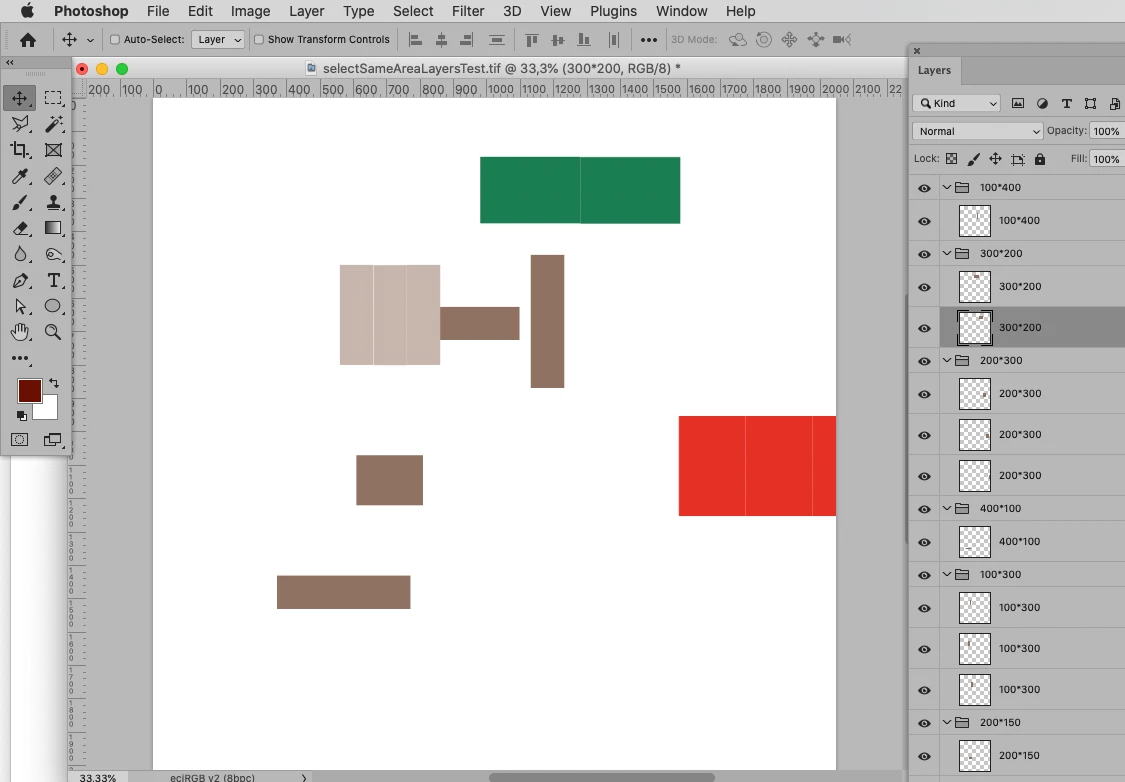
- Is there a problem with collecting all the layers of the same size and putting them in a group
I want to get to the nearest solution to the problem


How familiar are you with JavaScript and Photoshop Scripting? 

Are you capable of adapting a Script that contains the necessary basic operations to your needs? 


The below Script should group Layers that have the same bounds dimensions and align them horizontally in the group (see screenshots). 
 

// group layers of the same bounds dimensions;
// 2021, use it at your own risk;
if (app.documents.length > 0) {
    var theLayers = collectLayersBounds ();
    theLayers.sort(sortArrayByIndexedItem);
    var theIndex = 1;
    var theArray = [[theLayers[0]]];
    while (theIndex != theLayers.length) {
        if (theArray[theArray.length-1][0][3] == theLayers[theIndex][3]) {
            theArray[theArray.length-1].push(theLayers[theIndex])
        }
        else {theArray.push([theLayers[theIndex]])};
        theIndex++
    };
// group layers;
    for (var m = 0; m < theArray.length; m++) {
        selectLayerByID(theArray[m][0][2], false);
        for (var n = 1; n < theArray[m].length; n++) {
            selectLayerByID(theArray[m][n][2], true);
        };
        groupSelectedLayers (theArray[m][0][3])
    };
// move layers;
    for (var o = 0; o < theArray.length; o++) {
        var theW = Number(theArray[o][0][3].split("*")[0]);
        for (var n = 1; n < theArray[o].length; n++) {
            moveLayer (theArray[o][n][2], theArray[o][0][4]-theArray[o][n][4]+theW*n, theArray[o][0][5]-theArray[o][n][5]);
        };
    };
};
////////////////////////////////////
// based on code by mike hale, via paul riggott;
function selectLayerByID(id,add){ 
add = undefined ? add = false:add 
var ref = new ActionReference();
    ref.putIdentifier(charIDToTypeID("Lyr "), id);
    var desc = new ActionDescriptor();
    desc.putReference(charIDToTypeID("null"), ref );
       if(add) desc.putEnumerated( stringIDToTypeID( "selectionModifier" ), stringIDToTypeID( "selectionModifierType" ), stringIDToTypeID( "addToSelection" ) ); 
      desc.putBoolean( charIDToTypeID( "MkVs" ), false ); 
   try{
    executeAction(charIDToTypeID("slct"), desc, DialogModes.NO );
}catch(e){
alert(e.message); 
}
};
////// collect layers //////
function collectLayersBounds () {
    // the file;
    var myDocument = app.activeDocument;
    // get number of layers;
    var ref = new ActionReference();
    ref.putProperty(stringIDToTypeID('property'), stringIDToTypeID('numberOfLayers'));
    ref.putEnumerated( charIDToTypeID("Dcmn"), charIDToTypeID("Ordn"), charIDToTypeID("Trgt") ); 
    var applicationDesc = executeActionGet(ref);
    var theNumber = applicationDesc.getInteger(stringIDToTypeID("numberOfLayers"));
    // process the layers;
    var theLayers = new Array;
    for (var m = 0; m <= theNumber; m++) {
    try {
    var ref = new ActionReference();
    ref.putIndex( charIDToTypeID( "Lyr " ), m);
    var layerDesc = executeActionGet(ref);
    var layerSet = typeIDToStringID(layerDesc.getEnumerationValue(stringIDToTypeID("layerSection")));
    var isBackground = layerDesc.getBoolean(stringIDToTypeID("background"));
    // collect values;
    if (layerSet != "layerSectionEnd" && layerSet != "layerSectionStart" && isBackground != true) {
    var theName = layerDesc.getString(stringIDToTypeID('name'));
    var theID = layerDesc.getInteger(stringIDToTypeID('layerID'));
    var theIndex = layerDesc.getInteger(stringIDToTypeID('itemIndex'));
    var theColor = typeIDToStringID(layerDesc.getEnumerationValue(stringIDToTypeID("color")));
    var theBounds = layerDesc.getObjectValue(stringIDToTypeID("bounds"));
    var theX = theBounds.getUnitDoubleValue(stringIDToTypeID("left"));
    var theY = theBounds.getUnitDoubleValue(stringIDToTypeID("top"));
    var theW = theBounds.getUnitDoubleValue(stringIDToTypeID("right")) - theBounds.getUnitDoubleValue(stringIDToTypeID("left"));
    var theH = theBounds.getUnitDoubleValue(stringIDToTypeID("bottom")) - theBounds.getUnitDoubleValue(stringIDToTypeID("top"));
    theLayers.push([theName, theIndex, theID, theW+"*"+theH, theX, theY])
    };
    }
    catch (e) {};
    };
    return theLayers
    };
////// group //////
function groupSelectedLayers (theName) {
    var desc159 = new ActionDescriptor(); 
    var ref114 = new ActionReference(); 
    var idlayer = stringIDToTypeID( "layer" );
    var idordinal = stringIDToTypeID( "ordinal" );
    var idtargetEnum = stringIDToTypeID( "targetEnum" );
    var idnull = stringIDToTypeID( "null" );
    var idname = stringIDToTypeID( "name" );
    ref114.putEnumerated(idlayer, idordinal, idtargetEnum); 
    desc159.putReference(idnull, ref114 );
    desc159.putString(idname, "aaa" );
    executeAction( stringIDToTypeID( "groupLayersEvent" ), desc159, DialogModes.NO );
    var desc63 = new ActionDescriptor();
    var ref37 = new ActionReference();
    ref37.putEnumerated( idlayer, idordinal, idtargetEnum );
    desc63.putReference( idnull, ref37 );
    var desc64 = new ActionDescriptor();
    desc64.putString(idname, theName);
    desc63.putObject(stringIDToTypeID( "to" ), idlayer, desc64);
    executeAction(stringIDToTypeID( "set" ), desc63, DialogModes.NO)
};
////// sort a double array, thanks to sam, http://www.rhinocerus.net/forum/lang-javascript/ //////
function sortArrayByIndexedItem(a,b) {
    var theIndex = 3;
    if (a[theIndex]<b[theIndex]) return -1;
    if (a[theIndex]>b[theIndex]) return 1;
    return 0;
    };
////// move layer //////
function moveLayer (theID, hor, ver) {
selectLayerByID(theID, false);
    var desc77 = new ActionDescriptor();
    var ref38 = new ActionReference();
    var idlayer = stringIDToTypeID( "layer" );
    ref38.putEnumerated( idlayer, stringIDToTypeID( "ordinal" ), stringIDToTypeID( "targetEnum" ));
desc77.putReference( stringIDToTypeID( "null" ), ref38 );
var idto = stringIDToTypeID( "to" );
    var desc78 = new ActionDescriptor();
    var idpixelsUnit = stringIDToTypeID( "pixelsUnit" );
    desc78.putUnitDouble( stringIDToTypeID( "horizontal" ), idpixelsUnit, hor );
    desc78.putUnitDouble( stringIDToTypeID( "vertical" ), idpixelsUnit, ver );
desc77.putObject( idto, stringIDToTypeID( "offset" ), desc78 );
executeAction( stringIDToTypeID( "move" ), desc77, DialogModes.NO );
};


c.pfaffenbichler
Community Expert
Community Expert
November 23, 2021

Please elaborate. 

Screenshots might help clarify. 

Mohamed Hameed21513110
Inspiring
November 23, 2021

I have File with multi layers with different Size layer ...

I need when select layer in photo 001 and run script  collect all layer with same size in photo 002

c.pfaffenbichler
Community Expert
Community Expert
November 23, 2021

Sorry, I am not sure I understand. 


There are two files involved?

If so how can the second image be identified? 

Will there only ever be two images open at the same time when the Script is invoked?