
Known Participant
March 20, 2023
Question

Photoshop script to generate the report with the content and its Font name

  • March 20, 2023
  • 1 reply
  • 2204 views

Hi,


In Photoshop document, there are many layers with different fonts. My task is to generate the report with content and its font name.

I am unable to find the respective content with font name, if suppose that text layer contain 2 or more fonts (see below screenshot).
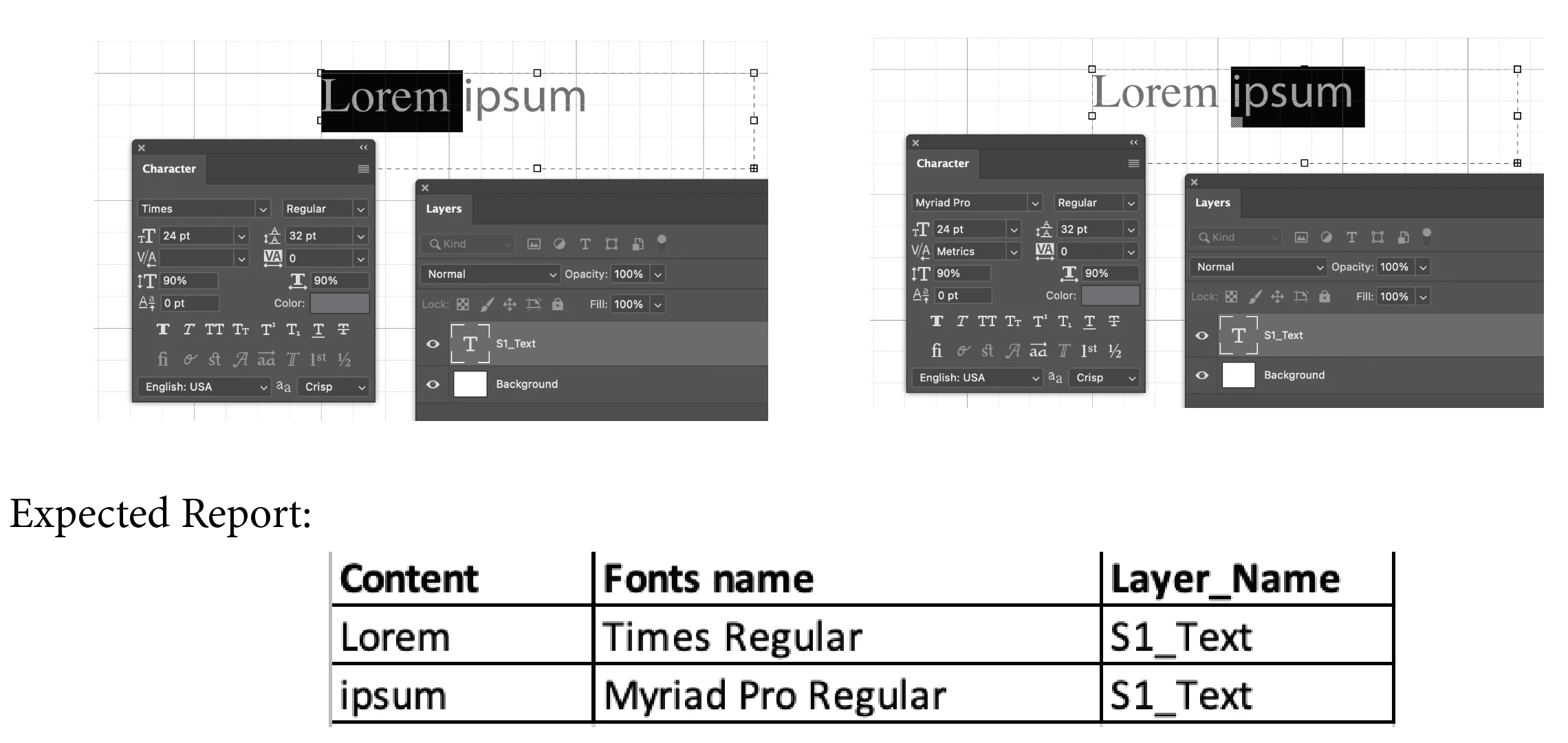
I explore many places in our forum community (link), but on that I can able to get the font name which is applied for first charter/word if suppose that text layer contain more than 2 fonts. I am unable to find next font applied in the same text layer.

Can any one help to generate the report as shown above screenshot?

Thanks
Asuvath


This topic has been closed for replies.

1 reply

c.pfaffenbichler
Community Expert
Community Expert
March 20, 2023

What is the point of the task? 


This collects the fonts in a document: 

// 2015, use it at your own risk;
#target photoshop
if (app.documents.length > 0) {
var myDocument = app.activeDocument;
//
main ();
};
////////////////////////////////////
function main () {
var theFonts = new Array;
var ref = new ActionReference();
ref.putEnumerated( charIDToTypeID("Dcmn"), charIDToTypeID("Ordn"), charIDToTypeID("Trgt") ); 
var applicationDesc = executeActionGet(ref);
var theNumber = applicationDesc.getInteger(stringIDToTypeID("numberOfLayers"));
//////
for (var m = theNumber; m >= 0; m--) {
try {
var ref = new ActionReference();
ref.putIndex( charIDToTypeID( "Lyr " ), m);
var layerDesc = executeActionGet(ref);
var layerSet = typeIDToStringID(layerDesc.getEnumerationValue(stringIDToTypeID("layerSection")));
var isBackground = layerDesc.getBoolean(stringIDToTypeID("background"));
var theName = layerDesc.getString(stringIDToTypeID('name'));
// if not layer group collect values;
if (layerSet != "layerSectionEnd" && layerSet != "layerSectionStart" && isBackground != true) {
var hasText = layerDesc.hasKey(stringIDToTypeID("textKey"));
if (hasText == true) {
var textDesc = layerDesc.getObjectValue(stringIDToTypeID('textKey'));
var paragraphRangeList = textDesc.getList(stringIDToTypeID('paragraphStyleRange'));
var kernRange = textDesc.getList(stringIDToTypeID('kerningRange'));
var rangeList = textDesc.getList(stringIDToTypeID('textStyleRange'));
for (var o = 0; o < rangeList.count; o++) {
var styleDesc = rangeList.getObjectValue(o).getObjectValue(stringIDToTypeID('textStyle'));
// check for default font;
if (styleDesc.hasKey(stringIDToTypeID('fontPostScriptName')) == true) {var aFont = styleDesc.getString(stringIDToTypeID('fontPostScriptName'))}
else {
	var theDefault = styleDesc.getObjectValue(stringIDToTypeID('baseParentStyle'));
	var aFont = theDefault.getString(stringIDToTypeID('fontPostScriptName'));
	};
// add to array;
var theCheck = true;
for (var n = 0; n < theFonts.length; n++) {
if (theFonts[n] == aFont) {theCheck = false}
};
if (theCheck  == true) {theFonts.push(aFont)}
}
}
}
}
catch (e) {};
}
alert ("the result:"+"\n"+theFonts.join("\n"))
};


AsuvathAuthor
Known Participant
March 20, 2023

Hi @c.pfaffenbichler ,


Thanks, I need the content with respective font names for the same layer (See below screenshot). Sorry, I am not need to collect all the fonts.

My problem is unable to get the 2nd font name and content from the same layer. Please do the needful.


Thanks
Asuvath


c.pfaffenbichler
Community Expert
Community Expert
March 24, 2023

Thanks @c.pfaffenbichler ,


Yes, you are correct. I am new to the action manager code, so I am not sure which code (syntex) is used to get that particular string from the content even if we have the start and end position.


var theFrom = thisOne.getInteger(stringIDToTypeID('from'));
var theTo = thisOne.getInteger(stringIDToTypeID('to'));
 
So I go through action manager related articles from forum, but still I am not get it. I am trying.


Thanks
Asuvath


You get the Text, then you can use the from/to-numbers to determine which letters are addressed. 

    var theText = textDesc.getString(stringIDToTypeID("textKey"));