
Participant
January 6, 2021
Answered

Photoshop Spanish Support

  • January 6, 2021
  • 2 replies
  • 703 views

How do you set photoshop language to Spanish.

I did the whole reinstall thing suggested by your support site.

Cloud is set to Spanish

Native language on the computer is Spanish.

The only choice in options is English.

Searches are useless.
This topic has been closed for replies.
Correct answer davescm

Uninstall Photoshop using the CC Desktop application.

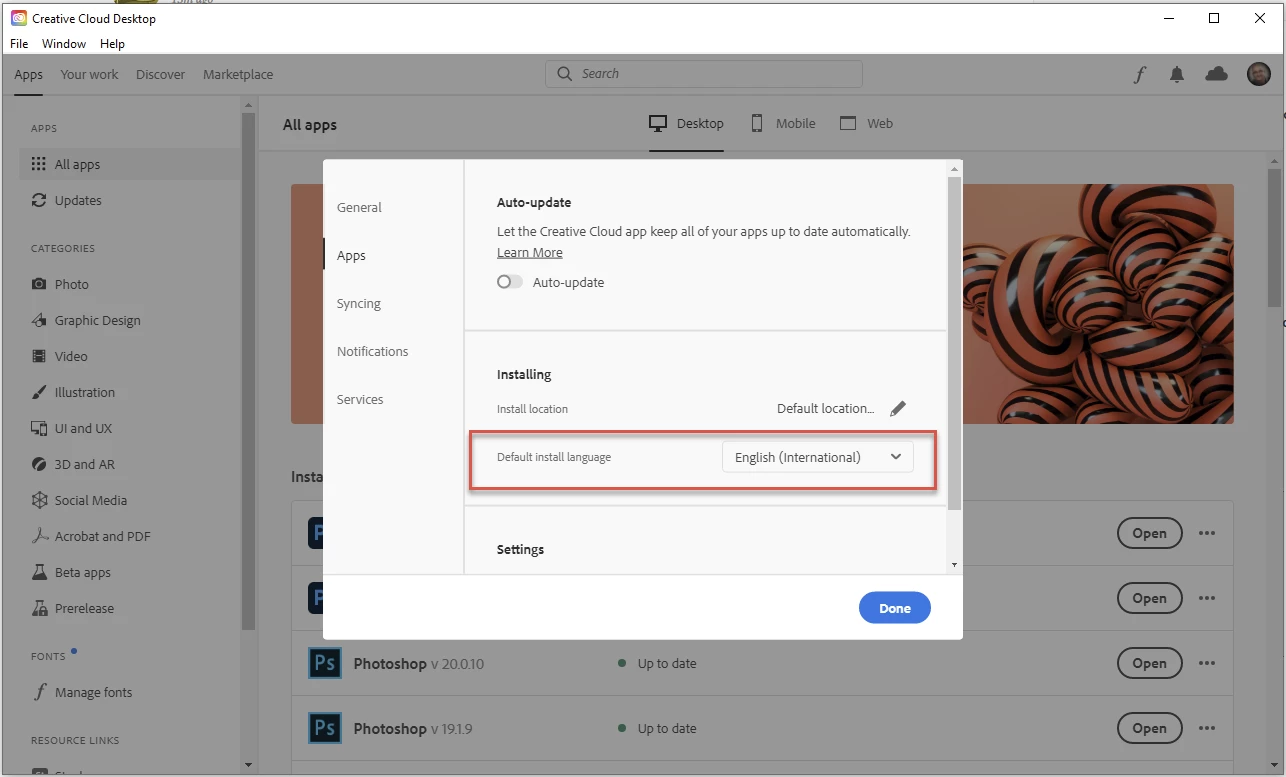
In the CC Desktop application go to Preferences (File >Preferences) and set the Default Install Language to your choice

Install Photoshop from the CC desktop application


Dave

2 replies

Participant
January 6, 2021

Thank you,  it worked.  It does seem a bit more cumbersome than it needed to be.  Wouldn't it be more convenient to put language support right in the app?

jane-e
Community Expert
Community Expert
January 6, 2021

It would. This is a user-to-user forum and we are volunteers. You can make feature requests to the developers here:

https://feedback.photoshop.com/

~ Jane

davescm
Community Expert
davescmCommunity ExpertCorrect answer
Community Expert
January 6, 2021

Uninstall Photoshop using the CC Desktop application.

In the CC Desktop application go to Preferences (File >Preferences) and set the Default Install Language to your choice

Install Photoshop from the CC desktop application


Dave