
January 8, 2020
Answered

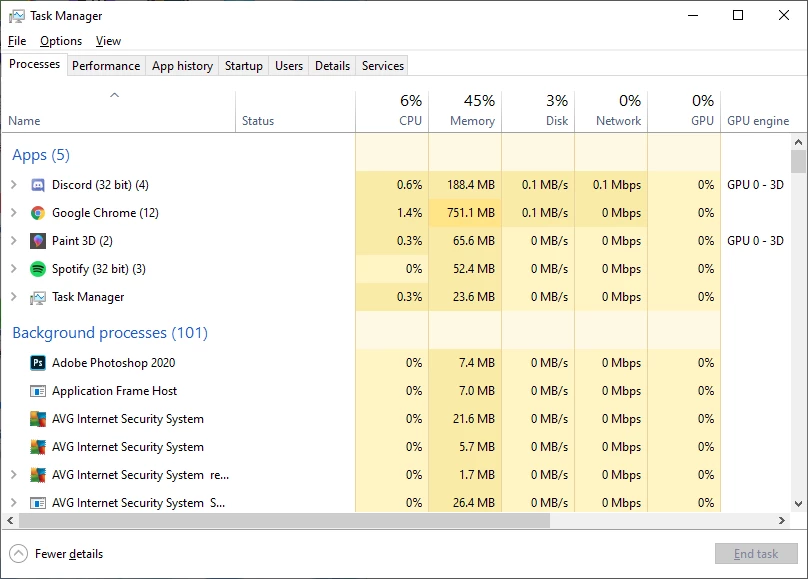
Photoshop stuck as background process

  • January 8, 2020
  • 3 replies
  • 3932 views

I have looked up solutions and similar problems to this for a few hours now and I'm just going to throw in the towel and ask.

Before you ask, a few things

 - My PC is able to run it for I have been running it fine

 - I always run as administrator so it's not as simple as that (I have tried running it normally too)

 - I've uninstalled and reinstalled the program multiple times

 - Updated to the latest version

 - All my drivers have been updated to the latest version as well

 - Restarted My PC several times after different attempts to fix

 - Updated windows to the latest version

I had this problem back in Photoshop 2019 as well and I have no idea how it fixed, but then it just stopped working again.  Help much appreciated.
This topic has been closed for replies.
Correct answer Akash Sharma

Hi there,


Sorry that process for Photoshop 2020 and Photoshop 2019 keeps running in the the background even when it's not open. 


As you've covered many basic troubleshooting, would you mind creating a new administrative user account(Windows) and see if the issue still persists in it? Refer the below article to know how to create a new user account/root account: https://support.microsoft.com/en-in/help/4026923/windows-10-create-a-local-user-or-administrator-account 


Thanks,

Akash

3 replies

Ussnorway7605025
Legend
July 24, 2020

the link is correct but Adobe redirrect server is buggering it up

try this one

https://support.microsoft.com/en-us/help/4026923/windows-10-create-a-local-user-or-administrator-account

Participant
July 23, 2020

That link is no longer valid

Akash Sharma
Akash SharmaCorrect answer
Legend
January 8, 2020

Hi there,


Sorry that process for Photoshop 2020 and Photoshop 2019 keeps running in the the background even when it's not open. 


As you've covered many basic troubleshooting, would you mind creating a new administrative user account(Windows) and see if the issue still persists in it? Refer the below article to know how to create a new user account/root account: https://support.microsoft.com/en-in/help/4026923/windows-10-create-a-local-user-or-administrator-account 


Thanks,

Akash

January 8, 2020

Sorry for the late response as for I had classes in the morning and other things to do, but this worked first try, thank you for the help.